TradingView Alternatives 2026: 7 Platforms Traders Pick
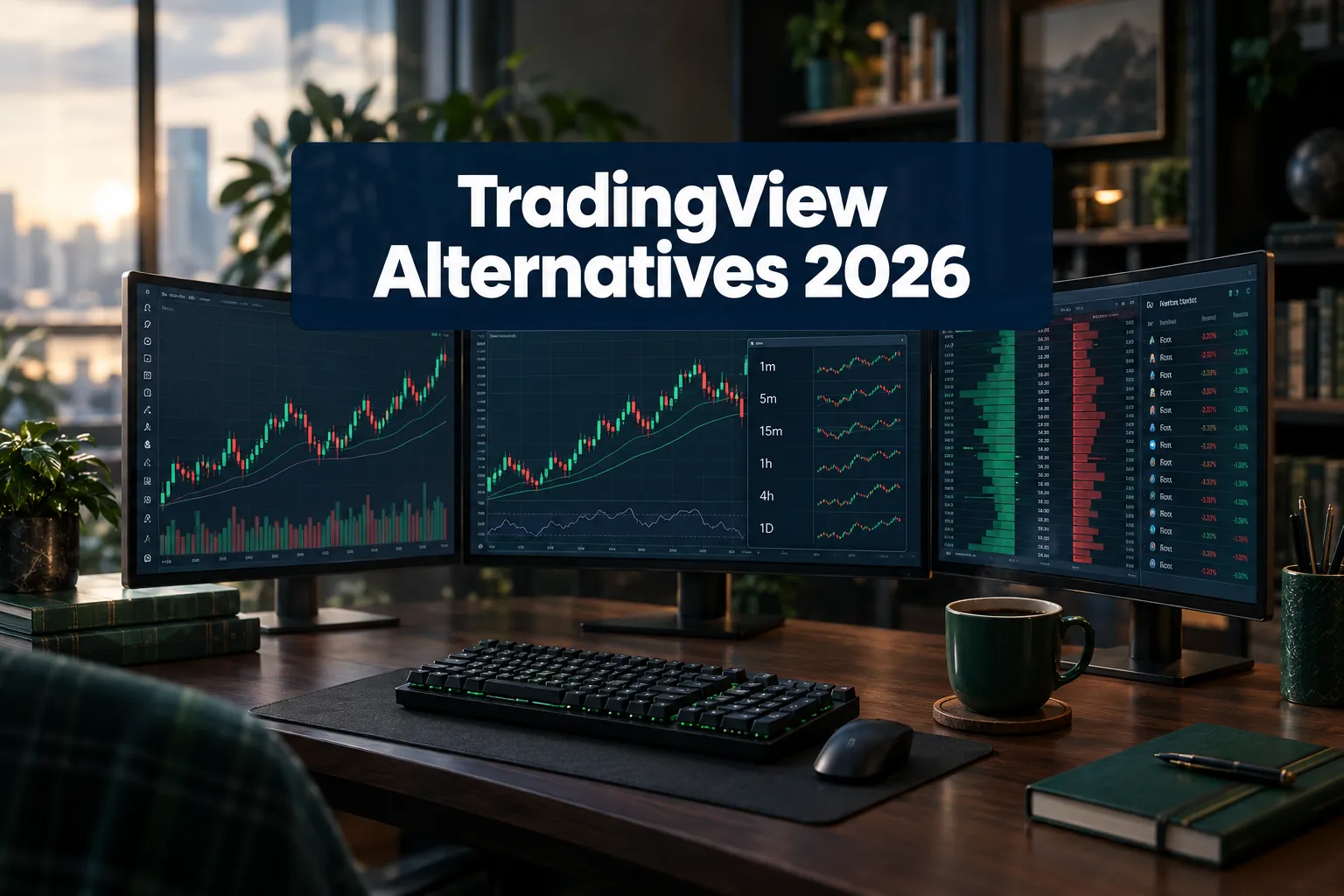
The best TradingView alternatives in 2026 are TrendSpider for automated technical analysis and TakeProfit if you want a free plan that doesn't feel like a punishment.
Quick answer
TrendSpider (Alpha Score 92/100) is the strongest overall TradingView alternative because it automates trendlines, pattern detection and no-code backtesting, which is the work most traders do badly by hand. TakeProfit is the best free option, with multiple watchlists on its Freeroll plan and an All-In tier at $20 a month. Koyfin wins for fundamentals and macro research, TC2000 for fast U.S. stock scanning at $24.99, Quantower for futures and order execution, LuxAlgo for indicator-heavy traders, and GoCharting for cheap browser-based order flow. Prices checked.
Key Takeaways
- TrendSpider scores 92/100 on the FullStack Alpha Score, the highest of the seven platforms reviewed here, with plans from about $59 to $349 a month.
- TakeProfit's free Freeroll plan allows multiple watchlists, while TradingView's free plan dropped to a single watchlist. Its All-In plan is $20 a month or $120 a year.
- Koyfin's Plus plan at $39 a month gives you fundamentals, estimates and valuation data that TradingView simply does not carry. Reddit users have called its dashboards a poor man's Bloomberg.
- TC2000 starts at $24.99 a month and scans U.S. stocks and options fast, but it scored 12/20 on Usability in our framework. The interface shows its age.
- Quantower's free version is real, not a demo, and its All-in-One tier is $70 a month. Reddit futures traders describe it as the closest match to TradingView-style charts with a serious order panel bolted on.
- GoCharting is the cheapest route to footprint charts and depth-of-market in a browser (U.S. CME data $30/mo, Level 2 $35/mo), and it has the thinnest public user feedback of the group at 10/20 on Community Verdict.
- LuxAlgo offers 800+ indicators and a free plan with 500 credits, and it scored 13/20 on Transparency. Test the signals before you trust them.
What are the best TradingView alternatives in 2026?
The best TradingView alternatives in 2026 are TrendSpider, Koyfin, TC2000, Quantower, TakeProfit, LuxAlgo and GoCharting. Each one beats TradingView at a specific job rather than beating it at everything, which is the entire point: TradingView is a generalist, and generalists lose to specialists on narrow tasks.
Here's how we ranked them, by FullStack Alpha Score out of 100:
- TrendSpider (92) for automated technical analysis and backtesting
- Koyfin (85) for fundamentals, estimates and macro research
- TC2000 (76) for U.S. stock and options scanning
- Quantower (75) for futures, DOM and order execution
- TakeProfit (74) for a genuinely usable free plan
- LuxAlgo (72) for indicator toolkits and AI-assisted testing
- GoCharting (67) for low-cost order flow in a browser
None of these is a drop-in TradingView clone with identical social features, script library and global symbol coverage. If what you want is TradingView with a lower bill, you'll be disappointed. If what you want is better tooling for the one thing you actually do every day, keep reading.
Why are traders looking for TradingView alternatives?
Traders leave TradingView for four reasons: the free plan got tighter, the paid tiers stack up when you add data and seats, manual chart work doesn't scale, and the research side is thin if your process starts with financials instead of candles. Price creep and the 1-watchlist free plan are the two biggest reasons TradingView alternatives are trending in 2026.
The free plan is a trial now, not a tool. One watchlist, a hard cap on indicators per chart, ads, and alert limits. That's fine for someone learning what a moving average is. It's not fine for a trader running a sector watchlist, an earnings watchlist and a short list of actives.
Data fees are the quiet line item. The sticker price of any charting platform is rarely the real price. Real-time U.S. exchange data, Level 2 depth and futures feeds are billed separately on almost every platform here. Budget for the data, not just the software.
Manual work is the real cost. If you're drawing the same trendlines across 40 charts every weekend, you're paying with hours instead of dollars. Automation is the one feature where a more expensive platform can be cheaper.
Practical takeaway: write down the three tasks you spend the most screen time on this week. Pick the platform that automates the most expensive one. Everything else is a nice-to-have.
Quick picks: the best TradingView alternative for each type of trader
- Swing trader who draws a lot of lines: TrendSpider. Automated trendlines, multi-timeframe charts and no-code backtesting.
- Fundamentals-first investor: Koyfin. Statements, estimates, valuation multiples and macro dashboards, with a free tier.
- U.S. stock scanner junkie: TC2000. EasyScan is fast, and the formula language is readable.
- Futures and order-flow trader: Quantower. DOM, footprint charts and direct broker execution in one window.
- Cost-conscious chartist: TakeProfit. Multiple watchlists free, $20 a month for the full build.
- Indicator collector: LuxAlgo. 800+ indicators, AI backtesting assistants, free trade journal.
- Order flow on a budget: GoCharting. Footprint and depth tools in a browser for the price of a streaming service.
Decision rule: if your edge comes from reading the tape in real time, go Quantower or GoCharting. If your edge comes from finding setups before the open, go TrendSpider or TC2000. If your edge comes from understanding the business, go Koyfin.
TrendSpider: best TradingView alternative for automated technical analysis
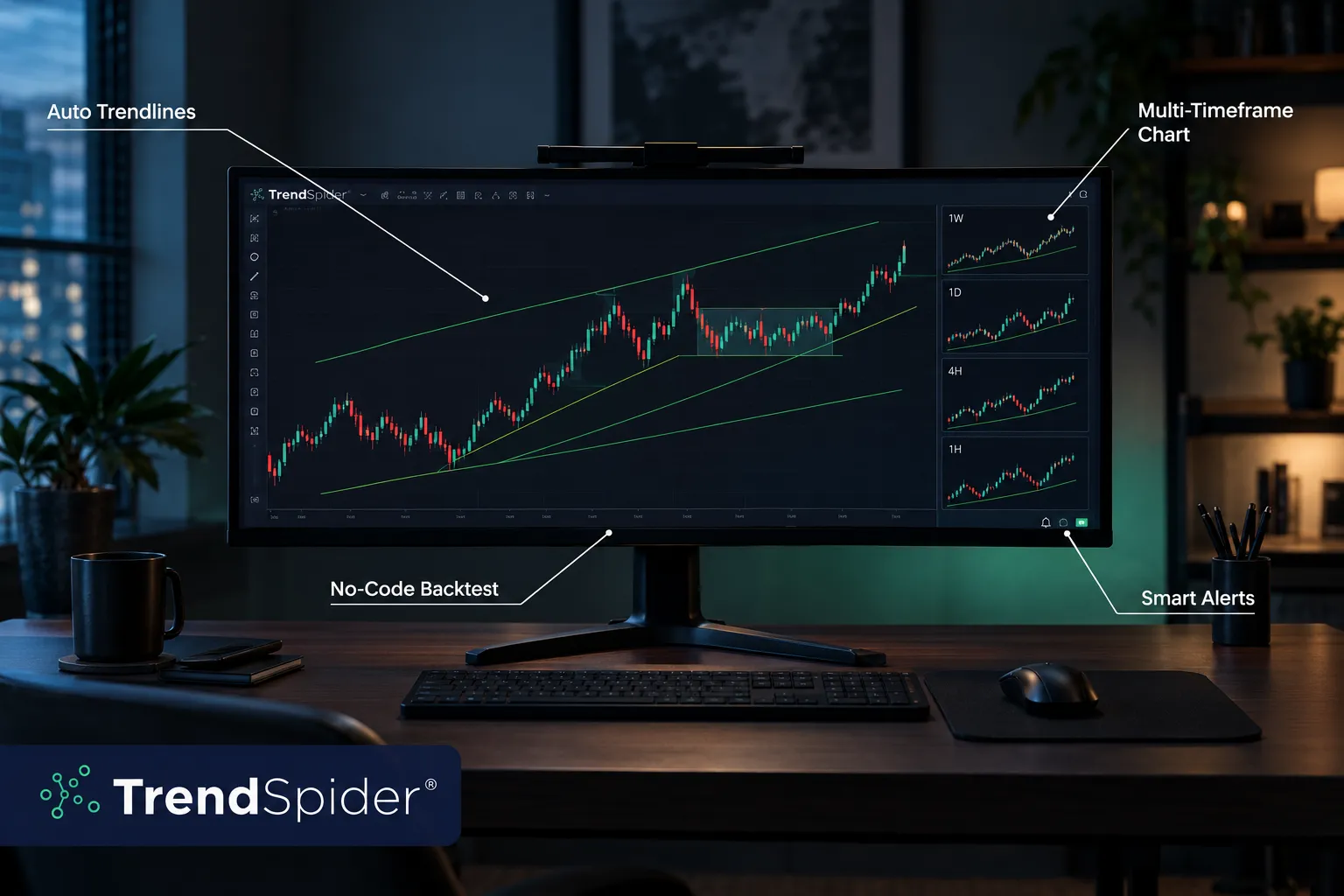
TrendSpider is the best overall TradingView alternative for swing and active traders who want their technical analysis done for them instead of drawn by hand. It scored 92/100, the highest here, on the strength of automated trendline and pattern detection, multi-timeframe charting, no-code strategy backtesting, scanners and smart alerts.
The pitch is simple. TradingView gives you a canvas and expects you to be the artist. TrendSpider gives you a machine that draws the support and resistance lines, flags the pattern, scans the universe for more of them, and then lets you backtest the rule set without writing a line of Pine Script. Add Sidekick and ML Quant Lab, its AI layer, and you get a research assistant instead of a sketchpad.
No-code backtesting is the feature that earns the price. Most traders have a strategy they've never tested, which means they have a belief, not a system. Being able to define an entry, a stop loss and an exit, then see how that rule performed across years of price action, changes what you argue about with yourself at 9:28 a.m.
Key features
- Automated trendline and chart pattern detection across timeframes
- Multi-timeframe analysis on one chart, no tab juggling
- No-code strategy tester for entries, exits and position sizing rules
- Dynamic price alerts that ride a trendline instead of sitting at a fixed price
- Market scanners with technical, fundamental and seasonality filters
- Sidekick AI and ML Quant Lab for pattern and signal research
Pros
- Automated trendlines and pattern recognition cut hours of weekend chart work
- No-code backtesting lets you test a strategy before you risk money on it
- Multi-timeframe analysis on a single chart
- AI tools (Sidekick, ML Quant Lab) are built in, not bolted on as an upsell
- Scanners and smart alerts are genuinely strong for swing traders
Cons
- Expensive next to TradingView, and Reddit users have flatly called it overpriced
- One Reddit user who switched away cited no live CBOE index data
- No free plan, so you pay before you can test it properly
Price: paid plans from about $59 to $349 a month depending on tier and billing.
Best for: swing traders and active traders who want TradingView-grade charts plus automated analysis and backtesting, and who value their time at more than $2 an hour.
Not for: index options traders who need live CBOE data, or anyone who wants to kick the tires for free first.
Related reading: what TrendSpider does that a screener cannot.
Koyfin: best TradingView alternative for fundamentals and research
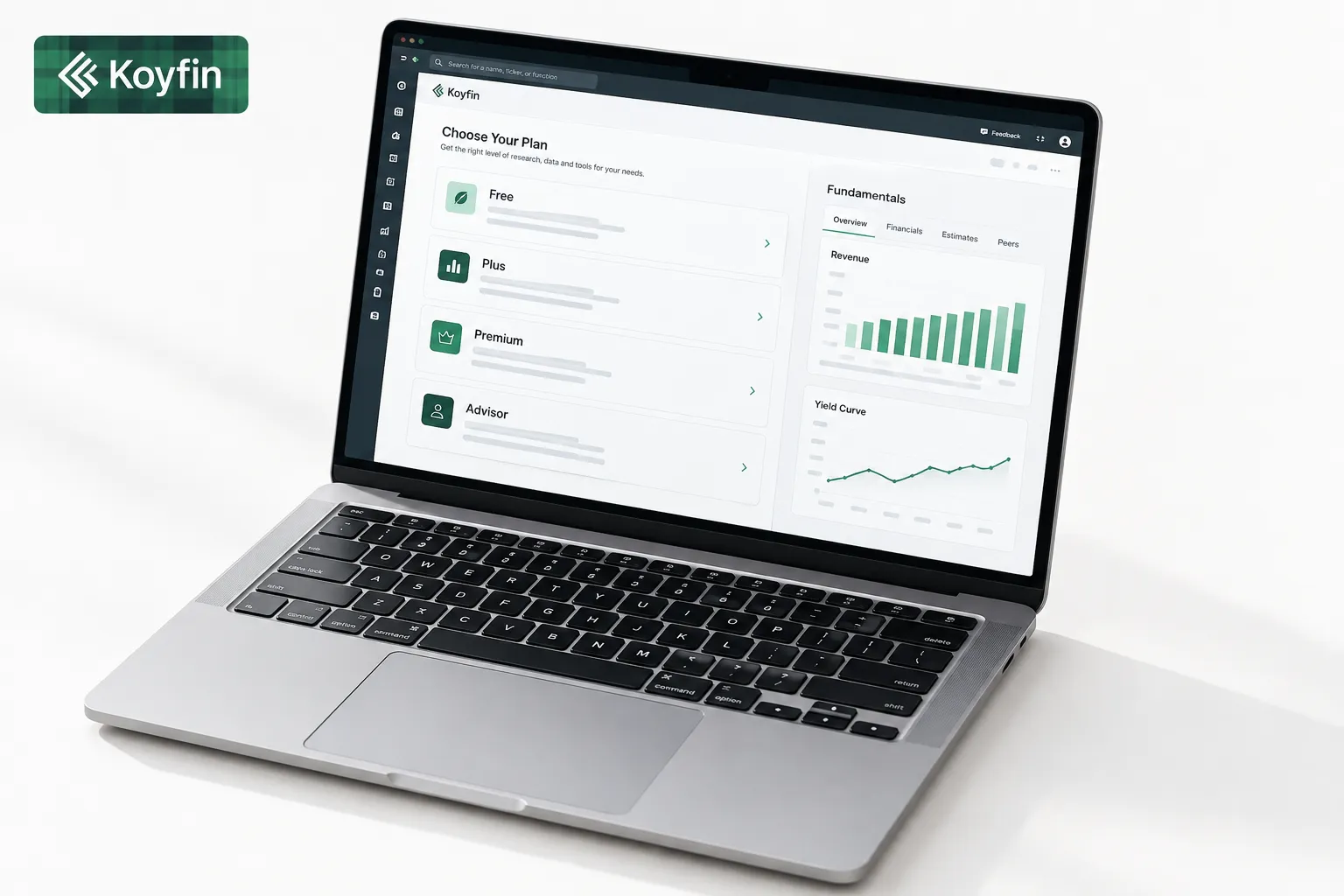
Koyfin is the best TradingView alternative for investors whose decisions start with the business rather than the chart. It scored 85/100, with its highest marks in Price-to-Value (19/20) and Transparency (18/20), because the free tier is real and the pricing ladder is published without games.
What you get is a web-based research terminal: financial statements, analyst estimates, valuation multiples, custom dashboards, and coverage across global equities, ETFs, funds, fixed income, currencies and commodities. Reddit users keep describing it as a poor man's Bloomberg, which is both a compliment and an accurate scoping of expectations.
Where it separates from TradingView is depth of data on the company and the macro picture. Yields, currencies, commodity curves and ten-year financial histories live in one place. TradingView will show you the ticker's chart. Koyfin will show you whether the business under the ticker is compounding or quietly deteriorating.
One honest caveat on community signal: Koyfin scored 13/20 on Community Verdict. Public discussion is enthusiastic among research-minded investors but thin compared to the volume around TradingView, which makes it harder to corroborate experiences at scale.
Key features
- Full financial statements, estimates and valuation multiples
- Customizable dashboards and watchlists built around fundamentals
- Macro coverage: yield curves, FX, commodities, economic series
- Screeners for equities, ETFs and funds
- Charting of fundamental data series, not just price
Pros
- Free plan lets you build dashboards before paying anything
- Transparent pricing, with Plus at $39 a month
- Fundamentals, estimates and valuation data TradingView does not match
- Custom dashboards users compare to a Bloomberg-lite setup
- Strong macro coverage across yields, currencies and commodities
Cons
- Charting is lighter than TradingView for active day traders
- Advisor tiers at $209 and $299 a month get expensive quickly
- No Pine-style scripting, so no custom indicator building
- Public discussion is thinner than the big-name platforms
Price: Free; Plus $39/mo; Premium $79/mo; Advisor Core $209/mo; Advisor Pro $299/mo.
Best for: long-horizon investors, swing traders who want earnings context, and anyone building a thesis before a position.
Not for: scalpers. If you need a one-minute chart with order flow, this is the wrong aisle.
TC2000: best TradingView alternative for U.S. stock scanning
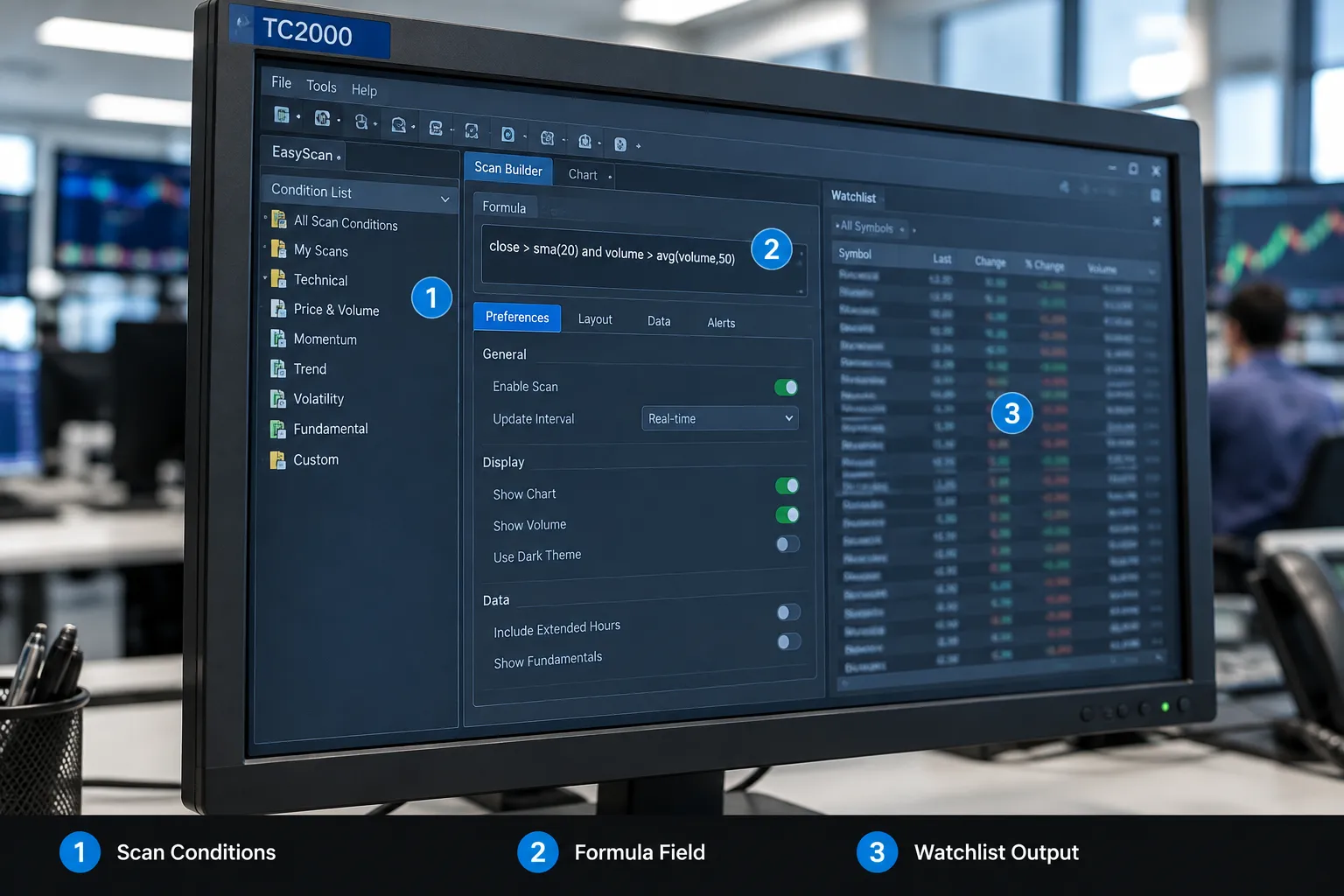
TC2000 is the best TradingView alternative for U.S. stock and options traders who scan a wide universe every single day. It scored 76/100, carried by Signal Quality (17/20) and dragged down hard by Usability (12/20).
EasyScan is the reason people put up with everything else. You can filter thousands of U.S. stocks on price action, volume, indicator conditions and your own formulas, and it returns results quickly enough to act on before the open. The formula language is readable English-ish logic rather than a full programming language, so a trader can write a custom condition in an afternoon instead of a semester.
Now the part the marketing page won't say. The interface feels like software from a different decade, and the learning curve is real. That 12/20 on Usability isn't a rounding error, it's the honest cost of entry. Expect a week of frustration before your first useful scan, and expect to lean on community-shared scan setups to get there faster. Coverage is also U.S.-centric, with little for global equities or crypto.
Key features
- EasyScan real-time scanning across U.S. stocks and options
- Personal Criteria Formula language for custom conditions
- Charting with indicator overlays and condition-based coloring
- Alerts and sortable watchlists tied to scan results
- Broker-connected trading from the charts
Pros
- Fast, deep scanning across U.S. stocks and options
- Scan formulas are easy to read and write without learning a full scripting language
- Charting and heavy scanning in one platform, no second subscription
- Active trading communities share scan setups you can copy
- Public, simple pricing tiers with no quote-us-for-a-demo nonsense
Cons
- Some users find it expensive for the subset of features they actually use
- The interface feels dated next to TradingView, and the learning curve is steep (12/20 Usability)
- U.S.-focused, with little for global or crypto traders
Price: $24.99, $49.99 and $99.99 a month. Real-time data and Level 2 are add-ons.
Best for: U.S. equity and options traders who build their day around a pre-market scan.
Not for: anyone who wants a modern interface out of the box, or traders focused on non-U.S. markets.
If scanning is your bottleneck, compare this against our list of swing trade scanners that find setups before they break out.
Quantower: best TradingView alternative for futures and order execution
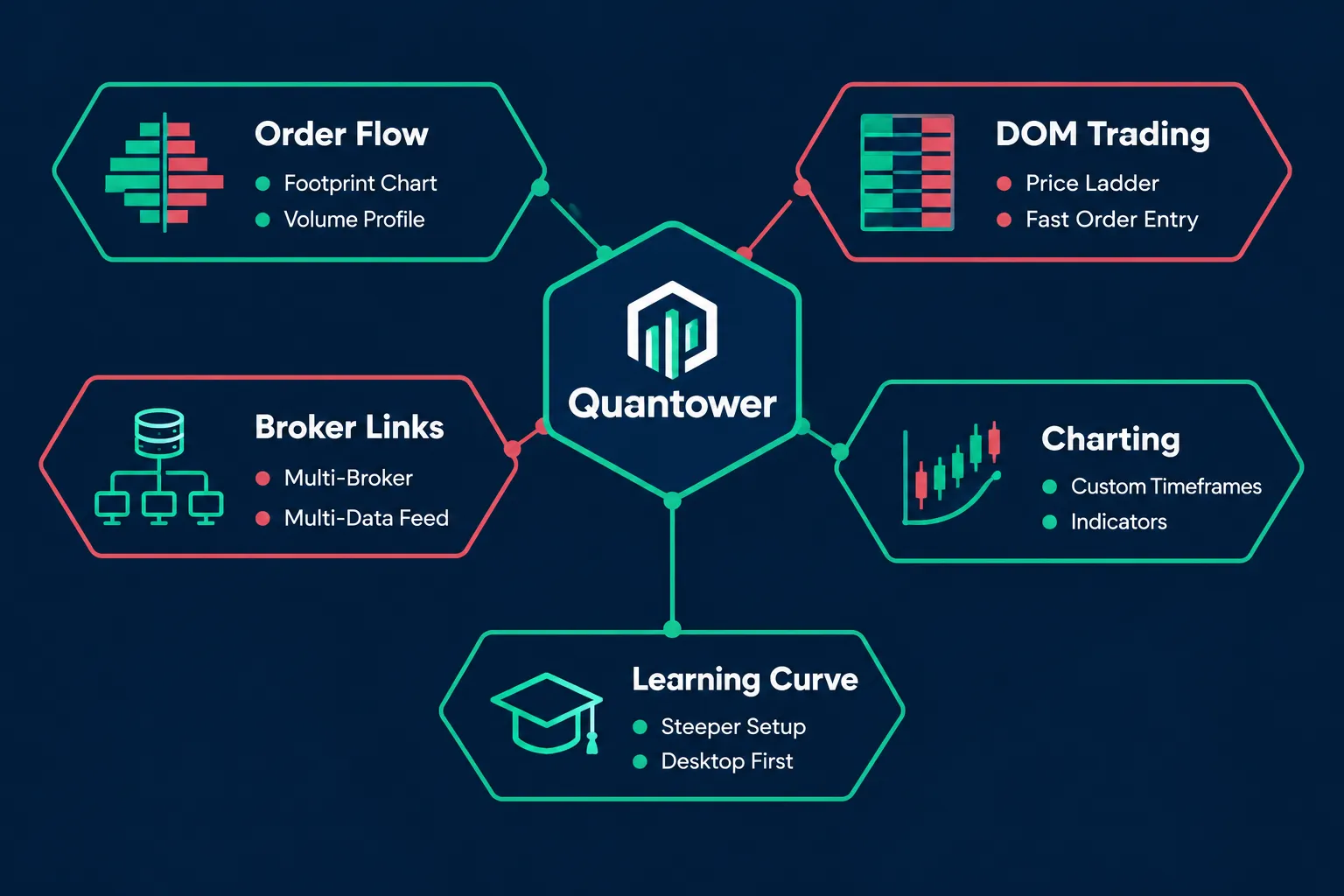
Quantower is the best TradingView alternative for futures traders who need real order entry attached to their charts. It scored 75/100, with Usability at 13/20, which tells you exactly where the pain is: the tools are serious, and so is the setup.
This is a multi-asset, multi-broker desktop platform with charting plus the order panel TradingView never really built. You get a DOM (depth of market, the ladder showing resting bids and offers at each price), footprint charts, volume profile and volume analysis. For context on what those tools actually measure, Investopedia's explainer on depth of market is a clean starting point.
Reddit futures traders describe Quantower as the closest fit to TradingView-style charts with a more serious order panel, and that's the right frame. The free version is a genuine working tier, not a seven-day tease, which matters because the order flow learning curve takes longer than a trial.
Two honest drawbacks. The DOM and footprint tools will confuse newer traders for weeks, and All-in-One at $70 a month is more than TradingView's mid tiers. On the plus side, support reportedly replies in chat inside 15 minutes, which is not normal in this category.
Key features
- DOM ladder trading with one-click order entry and bracket orders
- Footprint charts, volume profile and order flow analytics
- Multi-broker and multi-data-feed connections
- Custom timeframe and chart types (renko, range, tick)
- Free version plus a 7-day trial of the paid build
Pros
- Free version with a strong, usable feature set
- Closest match to TradingView charts with a professional order panel attached
- Order flow, DOM and footprint tools built for futures
- Connects to many brokers and data feeds
- Fast support, with chat replies often inside 15 minutes
Cons
- DOM and order flow tools carry a real learning curve (13/20 Usability)
- All-in-One at $70 a month costs more than TradingView's mid tiers
- Much smaller community than TradingView, so fewer tutorials and shared setups
Price: Free version; All-in-One $70/mo; 7-day trial.
Best for: futures and active intraday traders who want charts and execution in one window.
Not for: casual investors, or anyone who wants to be productive on day one.
Pair it with the right venue: see our take on the best futures trading broker.
TakeProfit: best free TradingView alternative
TakeProfit is the best free TradingView alternative in 2026 because its Freeroll plan allows multiple watchlists while TradingView's free plan dropped to one. It scored 74/100, with Price-to-Value at 17/20 and Community Verdict at 11/20.
The platform is browser-based, fast and modern, with multi-chart layouts, alerts and Indie, its own Python-like language for custom indicators. If you've ever wanted to write an indicator without learning Pine Script's quirks, Indie is friendlier to anyone who has touched Python.
The paid tier is where the value argument gets loud. All-In runs $20 a month or $120 a year. One hundred twenty dollars for a year of multi-chart layouts and custom scripting is less than most traders spend on Discord subscriptions they forgot about.
The 11/20 Community Verdict is the honest knock. Public discussion is sparse. Reddit traders who use it praise the multi-chart layouts, but there's no library of thousands of shared scripts, no flood of YouTube tutorials, and no large base of users to sanity-check a bug against. A Trustpilot reviewer flagged the missing bar replay feature, which matters if you practice setups on historical data. There's also no mobile app yet.
Key features
- Multi-chart layouts with synced symbols and timeframes
- Multiple watchlists, including on the free plan
- Indie, a Python-like scripting language for custom indicators
- Price and condition alerts
- 30-day trial of the paid tier
Pros
- Free plan with multiple watchlists, while free TradingView allows 1
- All-In at $20/mo or $120/yr is cheap for the feature set
- Indie makes custom indicators fast to build if you know any Python
- Fast, responsive, modern interface
- Multi-chart layouts get specific praise from Reddit users
Cons
- No bar replay yet, per a Trustpilot reviewer, so no historical practice mode
- No mobile app
- Small community (11/20), meaning fewer shared scripts, tutorials and second opinions
Price: Freeroll free; All-In $20/mo or $120/yr; 30-day trial.
Best for: cost-conscious chartists who run several watchlists and want a clean multi-chart workspace.
Not for: traders who rely on bar replay practice or need charts on a phone.
LuxAlgo: best TradingView alternative for indicator-driven traders
LuxAlgo is the best fit for traders who want a large indicator toolkit and AI-assisted testing in one subscription. It scored 72/100, with Transparency the weak pillar at 13/20.
LuxAlgo made its name selling indicator toolkits that run on TradingView, and now runs its own platform, Quant Charts, with 800+ indicators, AI backtesting assistants and a free open-source trade journal. A YouTube commenter called Quant Charts the first serious competitor to TradingView, which is a high bar and a reasonable thing for a commenter to feel on day one.
That 13/20 Transparency score deserves a plain explanation. Indicator marketing in this category tends toward signal arrows on a chart with limited disclosure about what's under them. Confluence scoring, smart-money concepts, AI-labeled overlays: these can be useful, and they can also be a black box with a subscription button. The fix isn't to avoid the product, it's to test every signal on your own instruments and timeframes before you let it size a position.
Two other issues worth naming. A YouTube commenter reported missing higher timeframes such as 3, 6 and 12 months, which matters for long-term structure. A Trustpilot reviewer reported trouble getting a refund after re-subscribing. Support otherwise gets strong Trustpilot praise, which is the kind of split you should read as a billing-process problem rather than a service-quality one.
Key features
- 800+ indicators across trend, momentum, volume and structure
- AI backtesting assistants for rule testing
- Quant Charts, its own charting platform outside TradingView
- Free open-source trade journal
- Free plan with 500 credits
Pros
- Very large toolkit at 800+ indicators
- Free plan with 500 credits to test before paying
- Free open-source trade journal, which most competitors charge for
- Quant Charts is a credible standalone platform, not a plugin
- Support gets strong praise on Trustpilot
Cons
- Indicator marketing can read like a black box (13/20 Transparency). Validate signals yourself
- Missing higher timeframes such as 3, 6 and 12 months, per a YouTube commenter
- A Trustpilot reviewer reported refund trouble after re-subscribing
Price: Free plan with 500 credits; paid plans at $24.99, $39.99, $59.99 and $119.99 a month.
Best for: indicator-driven traders curious about a platform outside TradingView who will do the testing work.
Not for: traders who want a transparent, fully documented model behind every signal.
For a reality check on signal accuracy claims generally, read how accurate AI trading signals really are.
GoCharting: best budget TradingView alternative for order flow
GoCharting is the cheapest practical way to get footprint charts, DOM and volume profile in a browser. It scored 67/100, the lowest of the seven, with Community Verdict at 10/20.
The tooling is legitimately interesting for the price. Footprint charts (which show buy and sell volume at each individual price level inside a candle), market depth, volume profile and DOM, all running in a browser tab with no install. U.S. CME data is a $30/mo add-on and Level 2 is $35/mo, which undercuts most desktop order flow platforms.
Now the critical part, because a 10/20 on Community Verdict means we don't get to be vague. Public sentiment is thin and mixed. A Reddit user described the free version as pretty disappointing. Multiple users say charting isn't as smooth as TradingView and ask for more performance work. Users who like the core order flow tools are asking for additions like heatmaps, which is a signal of an unfinished product rather than a broken one. With little community discussion, you'll be troubleshooting mostly alone.
The pattern that works: traders use GoCharting for order flow analysis alongside a separate execution platform. As a supplement at $30 a month, that's defensible. As your only platform, it's a stretch.
Key features
- Footprint charts and order flow analytics in-browser
- DOM and market depth visualization
- Volume profile and auction market tools
- Free tier plus low-cost U.S. data add-ons
Pros
- Order flow, footprint and DOM tools in a browser with no install
- Free tier to get started
- Low-cost U.S. data add-ons at $30 and $35 a month
- Works well as an order flow companion to a separate execution platform
Cons
- A Reddit user called the free version pretty disappointing
- Charting is less smooth than TradingView, and users want more performance work
- Thin public sentiment (10/20), so there's little community help when something breaks
Price: Free tier; U.S. CME data $30/mo; Level 2 $35/mo.
Best for: order flow curious traders who want footprint and depth tools cheaply as a second screen.
Not for: anyone who needs one platform to do everything reliably.
Comparison table: TradingView alternatives side by side
| Platform | Price (Oct 2026) | Free plan | Standout strength | Alpha Score | Best for |
|---|---|---|---|---|---|
| TrendSpider | $59 to $349/mo | No | Automated trendlines, no-code backtesting | 92/100 | Swing and active traders |
| Koyfin | Free; $39 to $299/mo | Yes | Fundamentals, estimates, macro dashboards | 85/100 | Research-first investors |
| TC2000 | $24.99 to $99.99/mo | No | Fast EasyScan on U.S. stocks and options | 76/100 | Daily scanners |
| Quantower | Free; $70/mo | Yes | DOM, footprint, broker execution | 75/100 | Futures traders |
| TakeProfit | Free; $20/mo or $120/yr | Yes | Multi-watchlist free plan, Indie scripting | 74/100 | Budget chartists |
| LuxAlgo | Free; $24.99 to $119.99/mo | Yes (500 credits) | 800+ indicators, AI backtesting | 72/100 | Indicator-driven traders |
| GoCharting | Free; data from $30/mo | Yes | Browser-based order flow | 67/100 | Cheap order flow add-on |
Real-time exchange data and Level 2 are usually billed separately. Confirm current pricing on each vendor's site before subscribing.
Top 5 favorite features across these TradingView alternatives
These are the five features that actually changed how we work, ranked by how much time or money they save.
- Automated trendline detection (TrendSpider). Drawing support and resistance by hand across 40 charts is unpaid labor. Having it drawn consistently, by the same rules every time, removes the thing you were going to fudge anyway.
- No-code backtesting (TrendSpider, LuxAlgo). A strategy you haven't tested is a hunch wearing a lab coat. Being able to test entry, stop and exit rules without coding is the fastest upgrade available to most retail traders.
- Multiple watchlists on a free plan (TakeProfit). Mundane, and the single biggest daily annoyance TradingView's free tier created. Sector list, earnings list, actives list. Three lists, zero dollars.
- Custom dashboards (Koyfin). One screen with the income statement trend, estimate revisions and the yield curve. It turns research from a tab-hunting exercise into a glance.
- Footprint charts and DOM in a browser (GoCharting, Quantower). Order flow used to mean a desktop install and a four-figure annual bill. Thirty dollars a month for CME data is a different conversation.
What we like about these TradingView alternatives
They pick a lane. TrendSpider automates analysis. Koyfin does research. Quantower does execution. Specialists beat generalists at specific tasks, and every one of these platforms is better than TradingView at the one thing it chose.
Four of seven have real free tiers. Koyfin, Quantower, TakeProfit and LuxAlgo all let you work before you pay. That's not generosity, it's confidence.
Pricing is mostly public. TC2000, Koyfin, TakeProfit and LuxAlgo publish tiers on the page. In a category full of "book a demo" screens, published pricing is a transparency signal, and it's why Koyfin scored 18/20 and TC2000 16/20 on that pillar.
Support is better than you'd expect at this size. Quantower's chat replies inside 15 minutes. LuxAlgo's support earns Trustpilot praise. Smaller companies competing on service is one of the few reliable advantages of not being the market leader.
What we don't like about these TradingView alternatives
Communities are thin. TakeProfit scored 11/20 and GoCharting 10/20 on Community Verdict. TradingView's script library and forums are a genuine moat. When your indicator breaks at 9:45 a.m., a big community is a feature.
Several are more expensive than TradingView, not less. TrendSpider starts around $59 and runs to $349. Quantower's All-in-One is $70. Koyfin's Advisor tiers hit $299. If your goal was purely a smaller bill, only TakeProfit, TC2000's entry tier and GoCharting clear that bar.
Usability is the common weak spot. TC2000 at 12/20 and Quantower at 13/20 both demand a real investment of time before they repay you. Power without onboarding is just a longer path to quitting.
Data fees hide the true cost. Real-time U.S. equity data, Level 2 and CME feeds are extra almost everywhere. A $24.99 plan can land north of $60 once you add what you actually need.
Gaps you'll hit: no live CBOE index data on TrendSpider per one Reddit user, no bar replay on TakeProfit, missing 3/6/12-month timeframes on LuxAlgo. Check your specific must-have before you move.
What does Reddit say about TradingView alternatives?
Reddit's consensus is that no single platform replaces TradingView outright, and most traders end up running two tools instead of one. Reading those threads against vendor marketing is the whole exercise, since Reddit skews negative (people post when they're annoyed) and review sites skew positive (vendors solicit).
What comes up repeatedly:
- TrendSpider: praised for automation, called overpriced by multiple users. One user who switched away cited the absence of live CBOE index data.
- Quantower: described as the closest fit to TradingView-style charts with a more serious order panel, which is why futures traders keep landing there.
- Koyfin: compared to a poor man's Bloomberg for its dashboards. Research crowd likes it, day traders find the charting light.
- TakeProfit: praised specifically for multi-chart layouts and the free plan's multiple watchlists.
- GoCharting: at least one user called the free version pretty disappointing, and performance complaints recur.
The useful pattern inside the noise: traders who are happy pair a research or scanning tool with an execution platform and stop looking for one app to do everything. That's not a compromise, it's how professional desks have always been set up.
Is there a free TradingView alternative that is actually good?
Yes. TakeProfit's Freeroll plan is the best free TradingView alternative because it allows multiple watchlists, which TradingView's free tier no longer does. Quantower's free version is the best free option for futures charting and DOM practice, and Koyfin's free tier is the best free fundamentals research. The cheapest serious TradingView alternatives start at $0, led by TakeProfit's Freeroll plan and Koyfin's free tier.
What free gets you, honestly:
- TakeProfit Freeroll: multiple watchlists, charting, decent speed. No bar replay, no mobile app.
- Quantower free: charting plus order panel. The deeper order flow tools sit behind All-in-One.
- Koyfin free: dashboards and core fundamentals, with the heavier data behind Plus.
- LuxAlgo free: 500 credits, enough to test a handful of indicators, not enough to run a workflow.
- GoCharting free: limited enough that at least one Reddit user found it disappointing.
Common mistake: stacking three free plans to avoid one $20 subscription, then spending 45 minutes a day copying tickers between them. Your time has a price. Twenty dollars a month is roughly one lunch. One avoidable mistake from a messy workflow costs more than a year of the subscription.
Deepvue vs TradingView and other alternatives worth a look
Deepvue is a market research and screening platform aimed at momentum and relative-strength traders, built around multi-timeframe screening, relative strength ranking and market breadth. Compared to TradingView, it's narrower: less social, less scripting, more focused on surfacing leading stocks. Compared to TrendSpider, it leans screening-first rather than automation-first. It's worth a trial if your process is built on relative strength and sector rotation.
Others that belong on your short list depending on the job:
- Thinkorswim (Schwab): free with a funded account, strong options analytics, heavy desktop software.
- Sierra Chart: cheap, extremely fast, and visually about as inviting as a tax form. Serious futures traders love it anyway.
- StockCharts: clean technical charting plus solid breadth and intermarket tools for swing investors.
- Finviz: the fastest free stock screener for a quick idea pass, with a paid Elite tier for real-time data.
- NinjaTrader: futures-focused execution plus strategy development.
If AI-assisted analysis is the part you care about, our roundup of AI trading platforms covers that field in more depth than a single section here can.
How to choose the right TradingView alternative (buying guide)
Start with the task, not the tool. Most traders pick a platform by feature count, then use 8% of it. Here's the order of operations that works. Match TradingView alternatives to your trading style first, and the price question usually answers itself.
1. Name the one job. Scanning, charting, research, or execution. Write it down in five words. If you can't, you have a process problem, and no subscription fixes that.
2. Price the data, not the software. Ask what real-time U.S. equity data costs, what Level 2 costs, and what futures feeds cost. Add it to the plan price. That's your real number.
3. Check your three must-haves before you subscribe. Index options data, bar replay, a mobile app, your broker's integration, your specific timeframe. The gaps listed in these reviews are exactly the kind that send people back to TradingView after two months.
4. Weight usability heavily if you trade part time. A platform that takes three weeks to configure is fine if you trade full time and brutal if you get 40 minutes a night. TC2000 at 12/20 and Quantower at 13/20 on Usability are the two that demand the most patience.
5. Use the free tier or trial, and use it on a real week. Not a Sunday afternoon. Run your actual pre-market routine through it on a Tuesday. Trials: Quantower 7 days, TakeProfit 30 days, free tiers on Koyfin, LuxAlgo and GoCharting.
6. Paper trade it first before you move live orders. Especially for DOM and footprint tools, where a misclick is an actual position. New platform plus real money plus unfamiliar hotkeys is how people donate to the market by accident.
7. Budget against your account size. A $349 monthly subscription on a $5,000 account needs an 84% annual return just to cover the tool. That math should determine your tier, not the feature grid. The SEC's Investor.gov has plain-English material on costs and fees that's worth ten minutes before any recurring charge.
Common mistakes to avoid
- Buying the top tier before you've used the entry tier for a month
- Migrating during earnings season, when your attention is already spent
- Paying for 800 indicators when you trade three
- Treating a backtest as a forecast. It tells you what a rule did, not what it will do
- Cancelling TradingView before the new platform survives a full week of your routine
How the Alpha Score ranks these TradingView alternatives
The FullStack Alpha Score is 100 points built from five pillars worth 20 each: Signal Quality, Transparency, Price-to-Value, Usability and Community Verdict. No stars, because a star rating hides why a tool is good. A platform can have excellent output and terrible onboarding, and one number buries that. Our ranking of TradingView alternatives follows the Alpha Score, never commission. The score comes from FullStack Alpha desk research plus public user sentiment, and the pillar split is provisional.
| Platform | Signal | Transparency | Price-to-Value | Usability | Community | Total |
|---|---|---|---|---|---|---|
| TrendSpider | 19 | 18 | 17 | 19 | 19 | 92 |
| Koyfin | 17 | 18 | 19 | 18 | 13 | 85 |
| TC2000 | 17 | 16 | 16 | 12 | 15 | 76 |
| Quantower | 16 | 15 | 16 | 13 | 15 | 75 |
| TakeProfit | 15 | 15 | 17 | 16 | 11 | 74 |
| LuxAlgo | 15 | 13 | 14 | 16 | 14 | 72 |
| GoCharting | 14 | 14 | 15 | 14 | 10 | 67 |
Read the columns, not just the totals. Koyfin's 19 on Price-to-Value is the best value number on the board, and its 13 on Community Verdict says the public conversation is thin. TrendSpider leads everywhere and still carries legitimate criticism on price. TakeProfit's 17 on value next to an 11 on community is the exact trade you're making: good product, small crowd.
Community Verdict reads Reddit, G2, Capterra, Trustpilot, Google and app stores against each other. The gap between solicited and unsolicited reviews is the finding, not an inconvenience. LuxAlgo praised on Trustpilot for support while one reviewer reports refund trouble is a billing-process problem, and we say so instead of averaging it into mush.
Scores come from hands-on use, corroborated by those six public sources. Every one was tested by the FullStack Alpha desk, and FullStack Alpha sells no charting platform of its own, so there's no house product at the top of this list.
FullStack Alpha scorecards
Every tool in this article has a full scorecard: pricing, pros and cons, verified user quotes and the Alpha Score breakdown.
FAQ
What is the best free alternative to TradingView?
TakeProfit's Freeroll plan is the best free TradingView alternative in 2026, mainly because it allows multiple watchlists while TradingView's free tier allows one. Quantower's free version is better for futures charting and DOM practice, and Koyfin's free tier is better for fundamentals research.
Is there anything better than TradingView?
Yes, at specific jobs. TrendSpider is better at automated technical analysis and no-code backtesting. Koyfin is better at fundamentals, estimates and macro data. Quantower is better at order flow and execution. No single platform here beats TradingView across charting, global symbol coverage, scripting library and community combined.
What do professional traders use instead of TradingView?
Professional and semi-professional traders typically run an execution-grade platform with a DOM and order flow (Quantower, Sierra Chart, NinjaTrader) alongside a separate research or scanning tool (Koyfin, TC2000, TrendSpider). Institutional desks use Bloomberg or FactSet, which sit far outside retail price ranges.
Is TrendSpider better than TradingView?
TrendSpider is better than TradingView for automated trendline detection, multi-timeframe analysis on one chart and no-code strategy backtesting. TradingView is better for price (its mid tiers cost less), global symbol coverage, Pine Script's library and community size. TrendSpider scored 92/100 on the FullStack Alpha Score largely on automation and usability.
Can I use Pine Script outside TradingView?
No. Pine Script is proprietary to TradingView and doesn't run on other platforms. If you want custom indicators elsewhere, TakeProfit uses Indie (a Python-like language), Quantower supports C# via its API, and TC2000 uses its own Personal Criteria Formula syntax. Plan to rewrite, not port.
Is the TradingView free plan still worth it?
It's worth it as a learning tool and a second chart window, not as a primary workspace. With one watchlist, limited indicators per chart, ads and alert caps, most active traders outgrow it within a few months. TakeProfit's free plan covers the watchlist gap at zero cost.
Which TradingView alternative is best for day trading?
Quantower for futures day trading, because the DOM, footprint charts and direct broker execution sit in the same window as the charts. For U.S. stock day trading, TC2000 ($24.99 to $99.99/mo) is the stronger pick for pre-market and intraday scanning. For a broader look at intraday tools, see our guide to the best stock apps for day trading .
Final verdict: which TradingView alternative should you pick?
Overall winner: TrendSpider (92/100). If you're a swing or active trader with a funded account and you spend real hours on chart analysis, the automation and no-code backtesting pay for themselves in time saved and tested rules. It's the most expensive pick here and Reddit's "overpriced" complaint is fair at the lower end of a small account. Verify index options data coverage first if you trade CBOE products.
Best free: TakeProfit (74/100). Multiple watchlists free, $120 a year for the full build, modern and fast. Accept the thin community, no bar replay and no mobile app.
Best for research: Koyfin (85/100). If your decisions start with the financials, Plus at $39 does more for you than any charting upgrade will.
Best for scanning: TC2000 (76/100). Fastest route from 5,000 tickers to a five-name watchlist. Budget a week for the interface.
Best for futures: Quantower (75/100). Charts plus a real order panel, free version to learn on, $70 for the full toolkit.
Indicator collectors: LuxAlgo (72/100). Big toolkit, free credits, and a transparency score that says test everything yourself.
Order flow on a budget: GoCharting (67/100). Good as a $30 companion to your execution platform. Not good as your only platform, and the thin public feedback means you're mostly on your own.
The honest summary: most traders who leave TradingView end up with two tools, not one. A scanner or research terminal plus an execution platform. Pick the pair that matches your process, and stop auditioning software every six weeks. Discipline beats prediction, and a settled workflow beats a shiny one.
Start with a free plan or trial before you switch
Don't cancel anything yet. Pick one platform from this list, run your actual routine through its free tier or trial for five trading days, and keep a two-column note: minutes saved, and friction added. If the first column wins, switch. If it doesn't, you just saved yourself a subscription.
Free tiers to start with today: TakeProfit, Koyfin, Quantower. Paid but worth the test if you're funded and active: TrendSpider.
Fewer tabs, fewer alerts, one process you actually follow. Cut the noise, keep the alpha.
Seven platforms examined in depth here. 200+ AI stock tools, scanners and trading platforms are catalogued in the FullStack Alpha directory, filterable by category, price and what they actually do.
Compare the full field → aistockpickerapps.com
This is education, not financial advice.
Your market edge starts with the right tool. Stay alpha.
Some links in this article are affiliate links, which may earn FullStack Alpha a commission at no extra cost to you. Rankings are set by Alpha Score, never by payment.
We test the tools. You get the verdict.
One email a week. What we tested, what scored, and what we'd skip. Written for traders, not for clicks.
More from FullStack Alpha