FullStack Alpha
Review
Quantower logo

Quantower Review: Pro Order Flow on a Free Platform?

A serious multi-broker trading desk with a free entry point, built for people who live in the order book.

Visit Quantower
Listen to this review
Audio in production

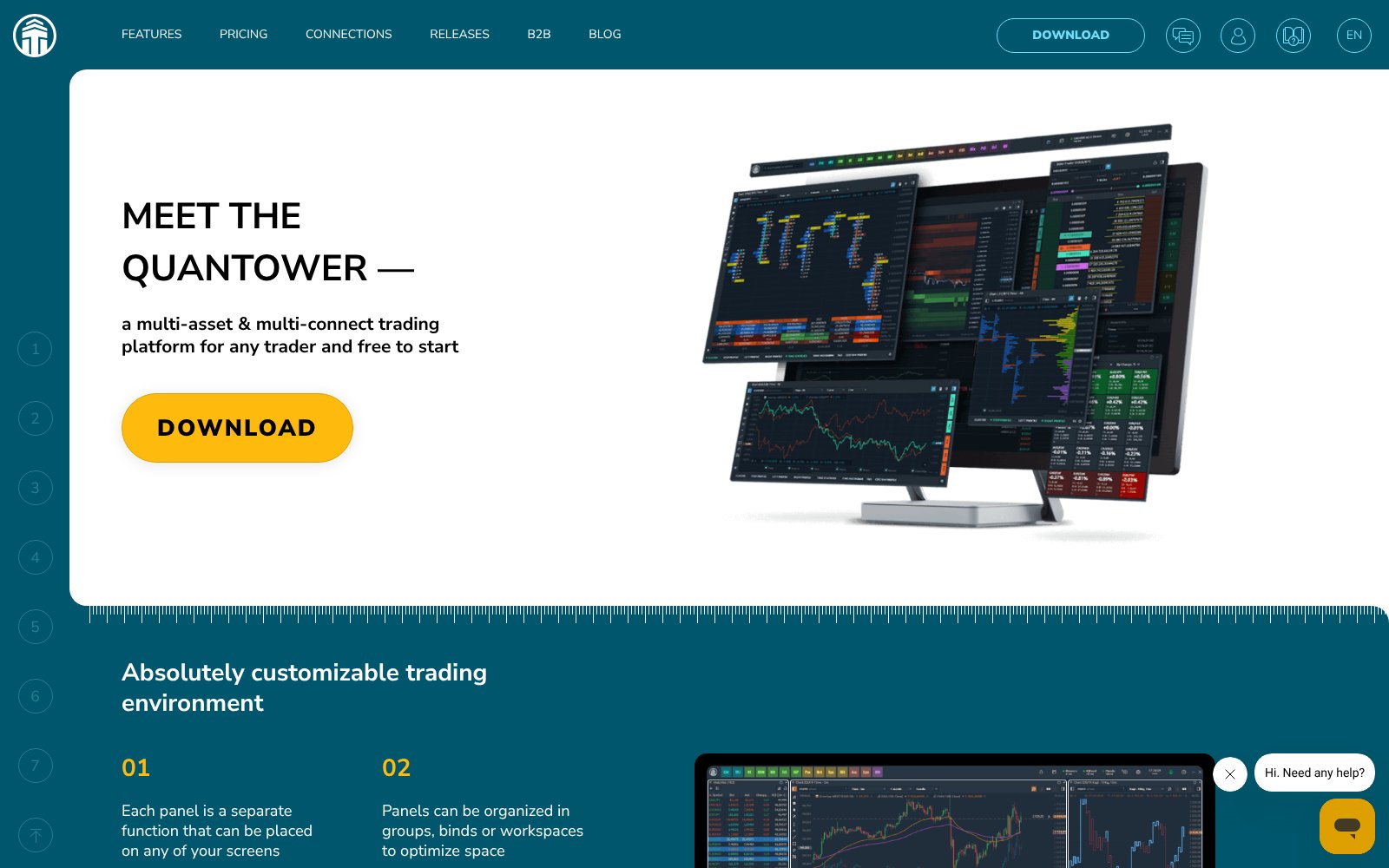
What Quantower Actually Looks Like

Screenshot of the Quantower homepage
The Quantower homepage

The Alpha Score Breakdown

Quantower scores 75 out of 100 across five pillars, 20 points each.

  • Signal Quality16 / 20
  • Transparency15 / 20
  • Price-to-Value16 / 20
  • Usability13 / 20
  • Community Verdict15 / 20
How we score →

The Verdict

Quantower scores 75, and the user base explains most of it. It holds a 4.7 on Trustpilot from 364 reviews, and the praise is specific: fast execution, deep customization, and a support team that users say answers chat in minutes and will connect to your screen to fix a setup. The platform connects to many brokers and data feeds in one desktop app, with DOM Surface, volume analysis, TPO profiles and a C# toolset for automated strategies. A Reddit trader calls it the closest fit to TradingView-style charts with a more serious order panel, which is why signal quality earns 16. The score comes from FullStack Alpha desk research plus public user sentiment, and the pillar split is provisional.


The Watch-Out

Usability is the weak pillar at 13. This is a professional desk, and a three-star reviewer puts it plainly: built for experienced traders, not a good fit for them. The full feature set costs $70 a month, individual extensions are sold separately, lifetime licenses are non-refundable, and third-party market data fees come on top. It is a Windows desktop application, so Mac users need a workaround.

Who It's For

Hover, tap, or focus a card to see who we'd point at this tool — and who should walk away.

Who this is for

The traders who get the most out of Quantower.

Flip to see the list

Who this is for

  • Futures and order-flow day traders who read the DOM
  • Traders using more than one broker or prop firm account
  • Developers who want to build C# strategies and plugins
  • Anyone who wants to test a pro desk on a free version first

Who this isn't for

Where Quantower is the wrong spend.

Flip to see the list

Who this isn't for

  • Beginners still learning chart basics
  • Mac-only traders who do not want to run Windows
  • Long-term investors; there is no fundamental research here
  • Anyone who wants one simple price with market data included

The Pain It Solves

A real complaint from the trading forums, and what this tool actually does about it.

—
Trustpilot
“Would prefer to have a lower tier lifetime license just for the advance order placing strategy”

Source: Trustpilot

Quantower logo

Quantower

Quantower's answer is unbundling. Instead of forcing the full $70 license, it sells single extensions and packages, so you can pay for the order-flow piece you use. Do the math before you buy: if you need three or more extensions, the All-in-One license on annual billing usually wins.

What Users Say

Sentiment pulled from two independent sources, kept separate so you can weigh each one yourself.

Trustpilot logo4.7 from 364 reviews
“I use Quantower for both manual futures trading and automated trading systems, and I’m very happy with the platform. It is modern, fast, user-friendly, and easy to customize visually.”
Read the original on Trustpilot →
Trustpilot logo4.7 from 364 reviews
“I must say for a Free Program... This is top Notch. You have so many options to change the looks or even small Details.”
Read the original on Trustpilot →
Trustpilot logo4.7 from 364 reviews
“I go in through their chat and they usually respond within 15 minutes.”
Read the original on Trustpilot →
Trustpilot logo4.7 from 364 reviews
“Technical support went out of its way to help me create a custom script for the charting/DOM.”
Read the original on Trustpilot →
Trustpilot logo4.7 from 364 reviews
“For a more experienced trader, this would be good, with its many features. But I was not a good fit.”
Read the original on Trustpilot →

Every quote is real and traceable. How we source them →

Pricing

Free version

Free

Limited version of the platform with no registration required.

Full-feature trial

Free for 7 days

Every feature for 7 days with a Quantower account.

Our pick

All-in-One

$70 / month

All available features, connections and updates. Discounts of 10% for 3 months, 20% for 6 months and 30% billed annually. Purchases do not auto-renew.

Lifetime and extensions

Quoted on pricing page

A lifetime license and single extensions such as DOM Surface, Volume Analysis and TPO Profile Chart. Lifetime licenses are non-refundable.

Prices change. Check the vendor’s page before you buy.

Pros and Cons

What works

  • 4.7 Trustpilot rating from 364 reviews, with consistent praise for support
  • Multi-broker and multi-feed connections in one platform
  • DOM Surface, volume analysis, TPO and cluster charts for order-flow work
  • Free version with no registration, plus a 7-day full-feature trial
  • No auto-renewal on purchases and a 10-day money-back window

What doesn’t

  • Steep learning curve that newer traders say is not for them
  • All-in-One license is $70 a month, and market data is extra
  • Lifetime licenses cannot be refunded
  • Windows desktop software; no native Mac build

Quantower FAQ

The Alpha Report

We test the tools. You get the verdict.

One email a week. What we tested, what scored, and what we'd skip. Written for traders, not for clicks.

No spam. Unsubscribe anytime.

Related Reading

75/ 100

Our verdict on Quantower

Quantower scores 75, and the user base explains most of it.

Visit Quantower

This is an affiliate link. It never affects our score. Why →