Quantower Pricing 2026: What AMP and Mac Traders Pay
Reviewed by Jay Rocco, Chief Editor
Quantower Pricing: Two Prices, One Free Path and a Mac Problem
Read the transcript
Search Quantower pricing and you'll find two different numbers. Most traders assume one of them is a typo. Neither is. And if you're on a Mac, there's a third number nobody prints on a pricing page. This is FullStack Alpha, and here's what Quantower really costs, in about two and a half minutes.
Quick answer. The cheapest legitimate way to run the full platform is through a broker that covers the license. AMP Futures gives its customers the complete version with no monthly platform fee, all advanced features included, as long as you connect through the AMP CQG gateway. Buy direct instead, and the All-in-One license is seventy dollars a month, or roughly forty-nine a month equivalent if you pay for a full year upfront.
The most important things you need to know.
One. The platform fee and the data fee are separate. Quantower's license doesn't include market data. CME futures data and equities data are billed by the exchange or your broker.
Two. There's a permanently limited free version. It's not a trial that expires. There's also a seven-day full-featured trial if you want to test everything.
Three. Prepaid discounts. Ten percent off for three months, twenty percent off for six, and thirty percent off for twelve.
Four. Two terms soften the risk. Purchases don't renew automatically, and first orders carry a ten-day money-back window. Lifetime licenses are excluded from refunds.
Five. Features come in modules, like DOM Surface, volume analysis and TPO profile charts, so check which bundle actually covers how you trade.
What to watch out for. The Mac problem. There's still no native macOS build, so Mac traders need a Windows virtual machine, and that cost belongs in your budget. The annual discount is real, but it's a bet on your own consistency. Three months into learning a platform is a bold time to commit a full year. And the pricing page lists lifetime and extension options without public prices, so confirm at checkout.
The verdict. If you trade futures and AMP fits your needs, the free broker route is the obvious move. If you need a different broker, go monthly at seventy dollars until the platform earns a permanent spot, then switch to annual.
Your next step. Check whether your broker includes Quantower. If it doesn't, start the free version, add the seven-day trial when you're ready, and add up platform plus data plus any Mac virtual machine before you buy anything.
The full pricing breakdown is right below this player. Prices change, so check the table for current numbers. Your market edge starts with the right tool. Stay alpha.
Last updated: October 28, 2026
Most traders researching quantower pricing find two different numbers and assume one of them is a typo. 

Quick answer: the cheapest real way to run Quantower and what it costs
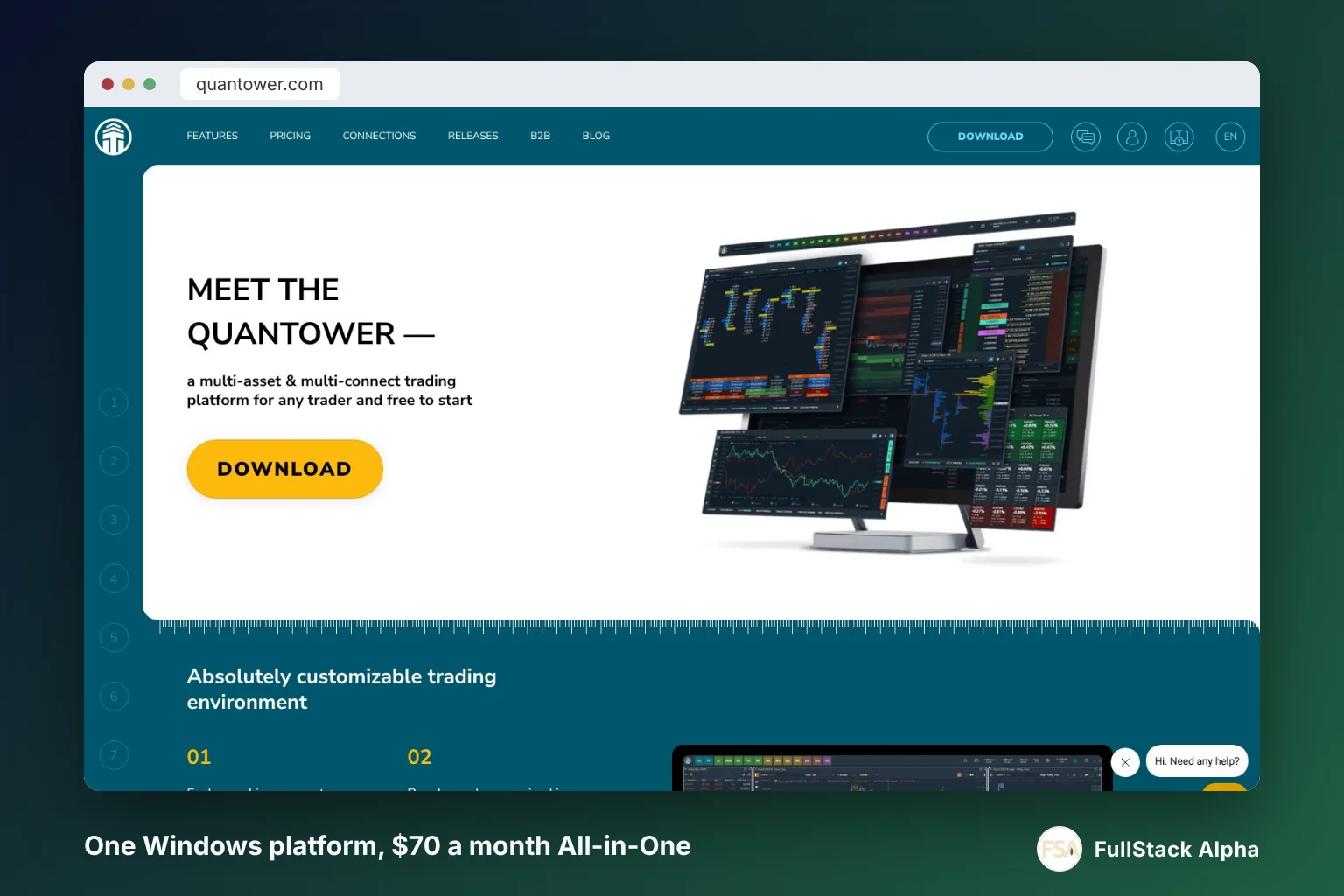
The cheapest legitimate way to run the full platform in 2026 is through a broker that covers the license. AMP Futures gives its customers the complete version at no monthly platform fee, with all advanced features unlocked, on the condition that you connect through the AMP/CQG gateway. If you'd rather buy direct, the quantower pricing for the All-in-One license is $70 per month, dropping to roughly $49 per month equivalent if you commit to a full year at the advertised 30% annual discount.
Three things to hold onto before you price anything out.
One, the platform fee and the data fee are separate charges. Quantower's direct license explicitly excludes third-party market data. CME futures data, equities data, whatever you need, comes from the exchange or your broker, and it's billed on top. A trader who reads quantower pricing as $70 and nothing else will be short.
Two, "free" always has a leash. AMP's free Quantower is tied to the 
Three, Mac users are paying a hidden tax. As of October 2026, Quantower remains a Windows terminal. A macOS build is described as planned, not shipped, with no announced release date. Running it on Apple hardware means a virtualization layer, a cloud Windows box or a second computer, and that cost never shows up on any quantower pricing page.
The decision rule is blunt: if you're trading futures and your broker offers the platform free, take the broker route and spend the saved money on data and a better internet connection. If you're not a futures trader or your broker doesn't participate, price the direct license honestly, including the annual lock-in.
How much does Quantower cost in 2026?
Quantower costs $70 per month for the direct All-in-One license as listed on quantower.com, and $0 per month for AMP Futures clients trading through the AMP/CQG connection. Everything else in quantower pricing is a variation on those two anchors.
Here's how the pieces actually fit together.
The direct license
The All-in-One license bundles every feature, every broker connection, and all updates. It's the only license that includes TPO charts and DOM Surface, per Quantower's license comparison.
There is a cheaper middle path. Quantower sells single pro features as extensions on top of the free version (DOM Surface, Power Trades, Volume Analysis, TPO Profile Chart, Advanced features, Option trading), plus a discounted Multi-asset package of Volume Analysis and Advanced features with unlimited connections. The pricing page lists 1 month, 3 month, 6 month, 1 year and lifetime terms for each, but it did not display the extension prices when we checked, so confirm in the checkout before you budget. A lifetime All-in-One option is also listed, again with no public price shown.
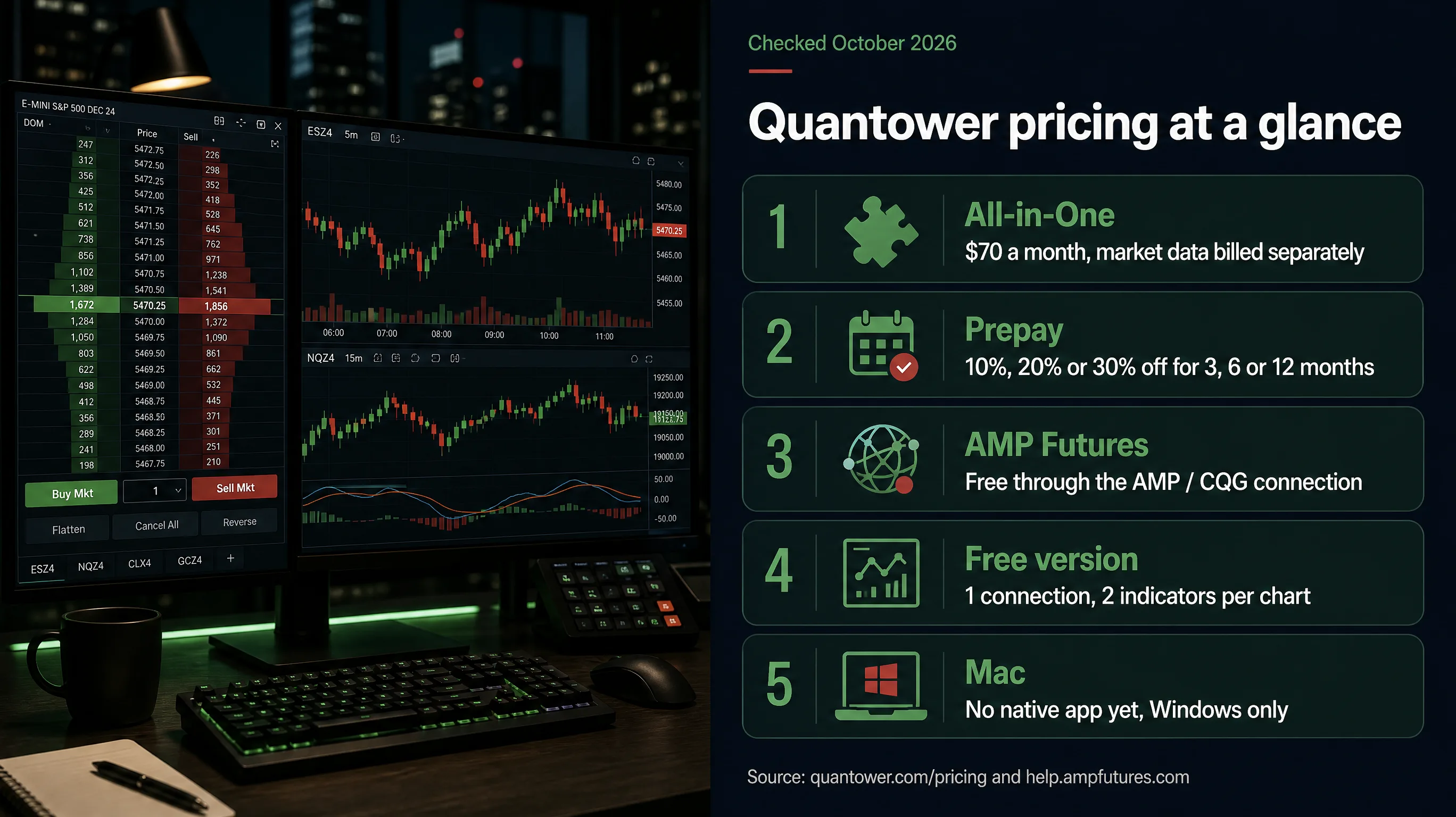
Quantower advertises prepaid discounts: 10% off for three months, 20% off for six, and 30% off for twelve. Run the math on the annual option and you land around $49 a month in effective cost, with the catch that you've committed the whole year upfront. For a trader three months into learning the platform, that's a bet on your own consistency. Two terms soften the risk: purchases don't renew automatically, and first orders carry a 10-day money-back window (lifetime licenses are excluded from refunds).
The free version
The free tier isn't a trial that expires. It's a permanently limited build. (Quantower separately offers a 7-day full-featured trial once you register an account.) You get one active broker or data connection at a time, basic charting with a two-indicator-per-chart cap and one overlay, the DOM Trader ladder, Time & Sales, chart trading, alerts, and the free API. That's enough to place orders and read price action. It is not enough to do the order-flow work the platform is known for.
What's missing matters: advanced volume analysis, footprint-style tools, TPO (Market Profile) charts, and DOM Surface all require the paid license unless a broker hands it to you.
The data feed, which is the part everyone forgets
Quantower's license covers the software only. Market data is explicitly excluded. AMP publishes its own platform and data fee schedule separately, and that's where the real monthly number gets decided for most futures traders.
Rough shape of it for a US futures trader: the exchange charges a non-professional fee for each exchange group you subscribe to, and AMP bills it monthly as an itemized line on your statement. Multiply by the number of exchange groups you watch. Check AMP's current schedule rather than trusting a number in any article, including this one, because exchange fees get revised.
A $70 platform with $0 budgeted for data is a $70 platform you can't see through.
A worked example
Say you trade NQ and ES through AMP, on Windows, and you want the full order-flow toolkit.
- Platform license: $0, covered by AMP's promotion on the CQG connection
- CME data: billed per AMP's current schedule
- Everything else: your internet bill
Same trader, same setup, but buying direct from Quantower instead:
- Platform license: $70 per month, or about $49 effective on annual
- CME data: same as above
- Total: roughly $50 to $70 more per month for the identical software
That gap is the entire quantower price conversation for futures traders, and the core of quantower pricing for anyone with a broker that participates. The software is the same. The invoice isn't.
Quantower pricing table: every plan and license
Every Quantower license and route in one place. This quantower pricing table was checked against quantower.com and AMP's published offer pages in October 2026.
| Route | What you get | Who it suits | Catch | Price (USD) |
|---|---|---|---|---|
| Free version | One connection, basic charts, 2 indicators per chart, DOM Trader, Time & Sales, chart trading, alerts, free API | Testing the platform, simple execution | No advanced volume analysis, no TPO, no DOM Surface, single connection | $0 / month |
| All-in-One, monthly | Every feature, every connection, all updates. Data not included | Traders who want month-to-month flexibility | Highest per-month cost; data billed separately | $70 / month |
| All-in-One, 3 months prepaid | Same as monthly, 10% discount | Traders testing a quarter-long commitment | Prepaid, non-monthly billing | ~$63 / month equivalent |
| All-in-One, 6 months prepaid | Same, 20% discount | Traders past the learning curve | Six-month lock-in | ~$56 / month equivalent |
| All-in-One, 12 months prepaid | Same, 30% discount | Committed daily users | Full-year commitment upfront | ~$49 / month equivalent |
| AMP Futures promotion |
Full version, all advanced trading features, no monthly platform fee | AMP futures clients on the CQG gateway | Restricted to the AMP/CQG connection; exchange data still billed | $0 / month |
| Exchange market data | CME, CBOT, NYMEX, COMEX and others, per exchange group | Required for anything live | Not included in any Quantower license; see AMP's fee schedule | Varies, check broker |
Hunting for a lower price? Check our AI stock tool deals page.
Two notes on the table that matter more than the numbers.
AMP quotes the regular price as "Normally $100 per month" on its promotional material, while Quantower's own page shows $70. The likeliest explanation is different promotional or historical reference pricing. Treat whatever your broker's account agreement says as the binding number, and treat the vendor page as the retail benchmark for quantower pricing.
The prepaid "per month equivalent" figures are arithmetic, not a billing option. You can't pay $49 monthly. You pay the annual amount and divide. If you quit in month four, you've spent the full year.
What do AMP Futures traders get with Quantower?
AMP Futures clients get the complete Quantower terminal with no monthly platform fee, provided they connect through the AMP/CQG gateway, according to AMP's Quantower help page. That's the entire offer, and it's unusually clean for a broker platform promotion.
What's actually included
AMP's help documentation states the full version with "all advanced trading features" is free to its customers. AMP's Quantower Free page lists the tools the free tier locks away: DOM Surface, TPO profile charts, cluster (footprint) charts, the Power Trades scanner, time statistics, OCO orders from the chart, spread trading and Excel RTD. For amp quantower users, that is the whole paid toolkit at a $0 platform fee.
The CQG condition, explained
The promotion is tied to the AMP/CQG connection. CQG is a market data and order-routing infrastructure provider, which means your orders and your price data travel through CQG's network to the exchange. If you'd prefer to route through 
This matters more in 2026 than it used to. Quantower's October 4 beta added a batch of Rithmic gateways including BoxcarTrading, ElevateFutures, GoatFundedFutures, HOLAPRIME, and TRADEFUNDED. Prop-firm traders now have far more Rithmic-side options inside the platform. None of that changes AMP's CQG-only terms for the free license.
What AMP does not cover
Market data. AMP publishes its platform subscription and data fee schedule separately, and exchange fees are the trader's responsibility. A free terminal with no data feed is a very expensive paperweight.
Common mistake: signing up for the AMP promotion, connecting to a demo feed, loving it, then being surprised by the exchange data invoice in month one. Read AMP's fee article before you fund. It confirms Quantower is free for AMP clients and that data fees depend on the exchange.
The decision rule
Choose the AMP route if: you trade US futures, you're comfortable routing through CQG, and you want the full order-flow toolkit without a software line item.
Skip it if: you need Rithmic routing for a prop-firm account, you trade mostly equities through other connections, or you want multiple simultaneous broker connections that fall outside the promotion's terms.
For traders comparing execution venues more broadly, the FullStack Alpha broker and tool directory catalogues day-trading platforms by category and cost.
Can you run Quantower on a Mac?
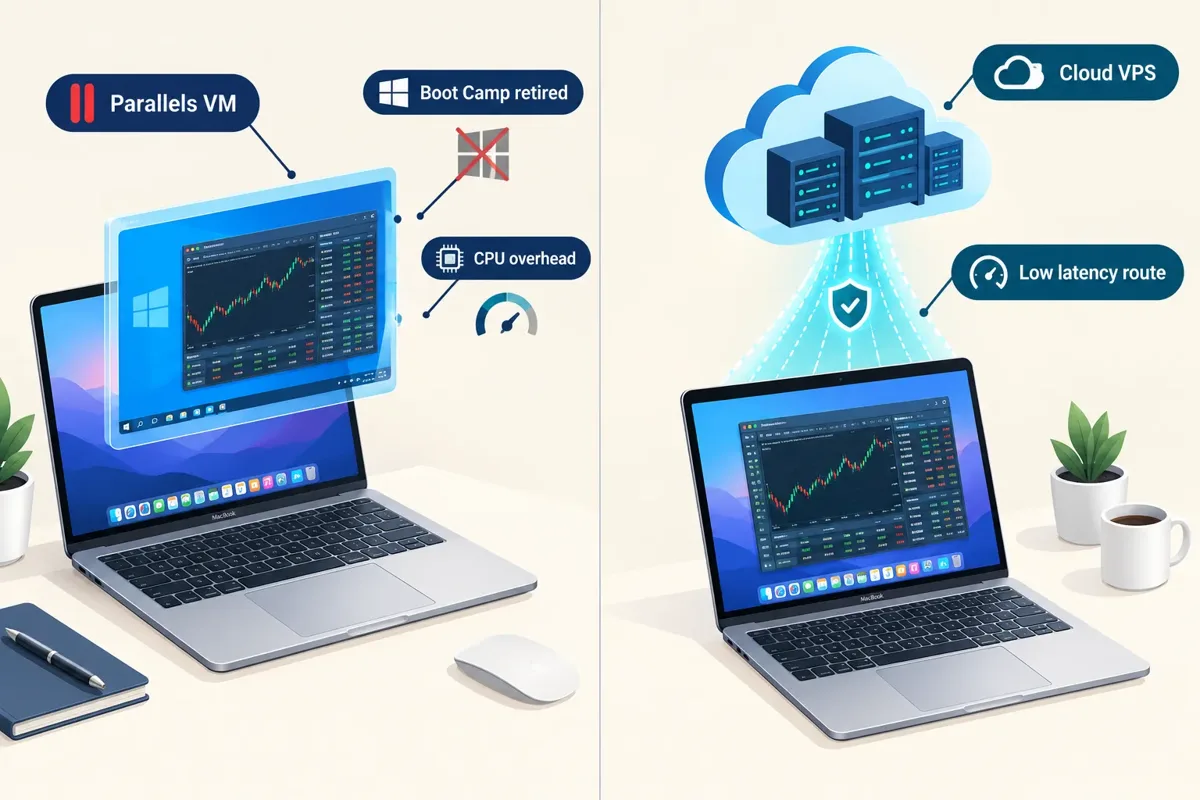
Not natively. As of October 2026, Quantower's FAQ states the terminal is only available for Windows, and the download page offers a single Windows 10/11 64-bit build. The developers say they are planning a Mac version, with no announced ship date. The FAQ names Parallels, VirtualBox and VMware Fusion as workarounds and says it cannot guarantee stability on them. If you want quantower for mac, you're running Windows underneath it.
That's the honest answer, and it's been the honest answer for years. Here's what the workarounds actually cost and where each one breaks.
Option 1: Parallels Desktop
Run Windows 11 inside macOS. Works on both Intel and Apple Silicon Macs (Apple Silicon runs the ARM build of Windows). Parallels is paid software, and you'll also need a Windows license. Add both to your quantower pricing math.
Where it breaks: memory. Order-flow charts with multiple footprint panels are hungry, and a VM with 8GB allocated on a 16GB Mac will stutter during the open. Budget 16GB minimum on the Mac, 8GB to the VM.
Option 2: A cloud Windows VPS
Rent a Windows server, ideally one co-located near the exchange, and remote into it. Trading-focused VPS plans bill monthly, and the price climbs with RAM, CPU and proximity to Chicago.
Where it works best: latency. A VPS near Chicago sits closer to the CME matching engine than your apartment does, and it keeps running if your home internet drops mid-trade.
Where it breaks: you're now managing a second computer. Updates, security, and a monthly bill that quietly doubles your quantower price.
Option 3: A cheap dedicated Windows machine
A refurbished Windows mini-PC, sitting next to your Mac, running the terminal full-time.
Where it works: one-time cost, no virtualization overhead, no monthly fee. For a trader who'll use the platform daily for years, this is usually the cheapest total cost.
Where it breaks: desk space and an extra monitor input.
Boot Camp is dead on Apple Silicon
If you're on an M-series Mac, Boot Camp is not an option. Apple removed it with the silicon transition. Any guide telling a 2026 MacBook owner to partition for Windows is years out of date.
The honest take on quantower mac support
The platform's development pace is not the problem. Per the release notes, the team shipped stable version 1.147.9 on October 25, 2026, 1.147.8 five days before that, and moved the application to .NET 10 back in March. They're building. They're just building Windows features.
Decision rule: if you're a Mac-only trader who refuses to run Windows in any form, pick a different platform. Don't fight a hardware requirement for a year. A mini-PC or a VPS is the whole fix, and it costs less than most traders' first bad trade.
Is there a Quantower mobile app?
Quantower is a desktop terminal, and there is no full-featured quantower mobile app that replicates the Windows platform on a phone. Mobile access for most traders means using the broker's own app for position monitoring while the desktop terminal does the work.
That's the practical reality, and it's worth sitting with rather than treating as a flaw.
Why the desktop-only approach isn't accidental
The platform's identity is order-flow analysis. Footprint charts, DOM Surface, cumulative delta, volume profiles, TPO. These are dense, multi-panel, pixel-hungry tools. Squeezing a footprint chart onto a 6-inch screen produces something unreadable, and reading a bad chart is worse than reading no chart.
The September 2026 beta cycle leaned further into this: a Risk Management panel, 
What to do instead
A workable mobile setup for a futures trader:
- Desktop terminal runs the trade. Entries, exits, stops, all set before you walk away.
- Broker mobile app for monitoring. AMP and most futures brokers offer one. You can see positions and flatten in an emergency.
- Server-side stops, always. If your stop lives only in the desktop platform and your machine sleeps, you have no stop. Send working orders to the exchange.
- Price alerts on the phone. The free tier includes alerts; use them so you're not refreshing a chart on a train.
Edge case worth naming: if you're running the platform on a cloud VPS, you can remote into that Windows box from an iPad or phone using a remote desktop app. It's clumsy on a small screen, and it works in a pinch. Don't build a strategy around it.
Mobile monitoring is fine. Mobile decision-making is how traders talk themselves into revenge trading at a bus stop.
So when someone asks about the quantower mobile app, the honest quantower pricing answer is $0, because it doesn't exist. If mobile-first execution is non-negotiable for you, that's a legitimate reason to look elsewhere. The best AI stock tools for 2026 roundup covers several platforms built phone-first.
Which Quantower plan is worth paying for?
For most futures traders, the broker-supplied license is the only one worth paying for, because you don't pay for it. For everyone else, the annual All-in-One at roughly $49 per month equivalent beats monthly, but only after you've proven you'll actually use the platform for a year.
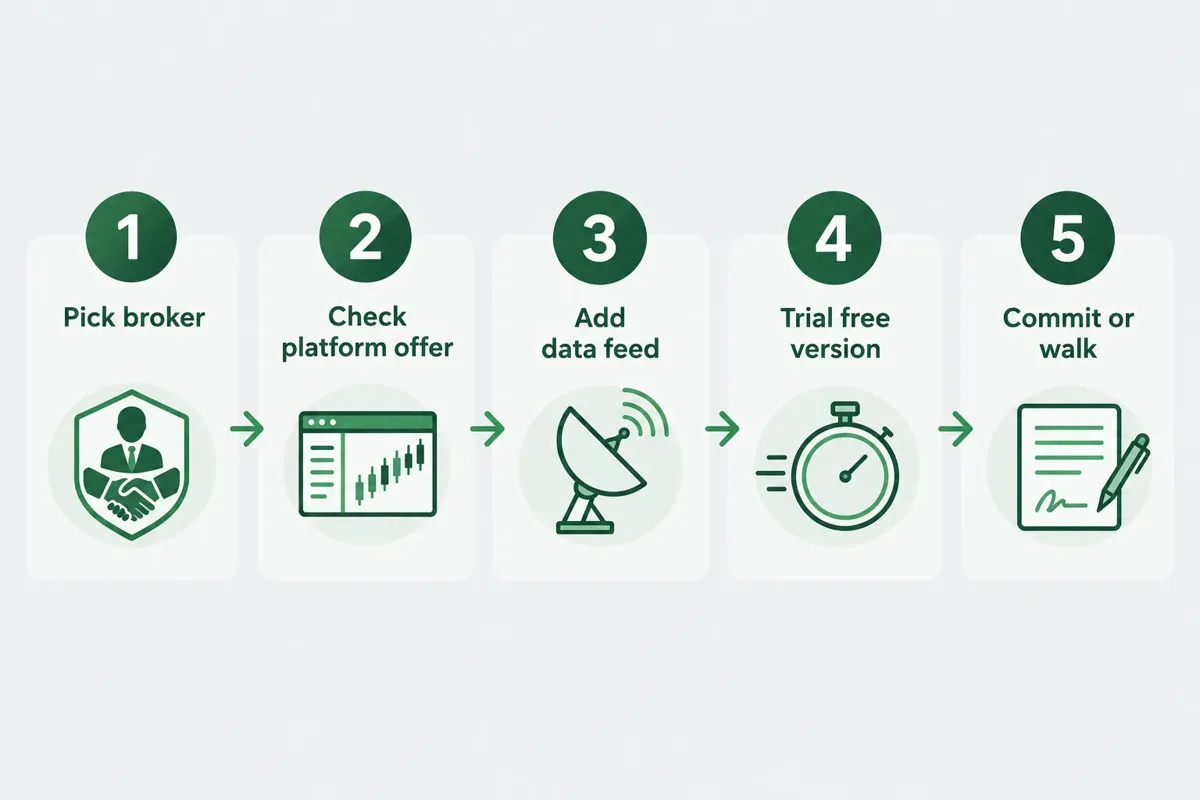
Here's the decision sequence for quantower pricing, in order.
Step 1: Start on the free version for 30 days
One connection, basic charts, DOM Trader, chart trading. When you're close to deciding, burn the 7-day full-featured trial to see the paid tools before paying. That's enough to answer the only question that matters in month one: does this interface fit how you actually read price action? Paper trade it first. If the ladder feels wrong in your hands, no feature list fixes that.
Step 2: Check whether your broker covers it
AMP covers it on the CQG connection. Other brokers run their own arrangements. One email saves you $840 a year. Ask before you buy.
Step 3: If you're buying direct, pick by usage frequency, not by discount size
- Trading daily, three-plus months of screen time already logged? Annual. The 30% discount is real money and you'll use every month of it.
- Trading a few days a week, still refining the setup? Six months at 20% off is the sensible middle.
- Still deciding, or seasonal? Monthly at $70. Paying the premium for the option to walk away is a legitimate trade.
Who shouldn't pay for this at all
Beginners with a $2,000 account. Spending $70 a month on a terminal while trading a two-grand account means the software is costing you 3.5% of capital a month before a single commission. That's a brutal hurdle. Use the free tier, or trade through a broker that covers the license, until the account supports the overhead.
Equity-only swing traders. The order-flow depth that justifies the price is built for intraday futures. If you're holding positions for days and reading daily charts, a free charting service plus a solid screener covers you. Our breakdown of what AI trading platforms do that screeners cannot is a better starting point for that style.
Anyone who hasn't written their risk rules down. The platform added a Risk Management panel in beta version 1.147.1 with rules for allowed trading time, open profit and loss limits, data latency thresholds, account equity floors, and maximum or minimum balance. That's a genuinely useful feature set for funded-account traders. It also can't invent rules you haven't decided on. Software enforces discipline; it doesn't supply it.
Why it feels expensive
Traders compare the $70 to a free broker platform and conclude they're being gouged. The comparison is off. The free broker platform doesn't do footprint, TPO, DOM Surface, or multi-connection routing. The right comparison is to other professional order-flow terminals, and against that field, $70 monthly with every feature included is mid-market. Expensive and overpriced aren't the same word.
Systems over hacks. The license is a tool cost. The thing that decides your year is whether you follow your own stop loss.
Quantower vs the alternatives on price
Quantower sits in the mid-tier of professional futures platforms: cheaper than a full Bloomberg-adjacent setup, pricier than a retail charting subscription, and free-to-cheap if your broker participates. Against 
Against thinkorswim
Schwab's thinkorswim costs nothing to use with a funded Schwab account, which makes any price comparison lopsided on the surface. Where it diverges:
Choose thinkorswim if: you trade options and equities alongside futures, you're on a Mac, or you want a single free platform from a single broker.
Choose Quantower if: you trade futures intraday, you read order flow, and you want to keep your platform when you switch brokers.
Against the broader field
| Alternative | Rough position on price | Best fit |
|---|---|---|
| thinkorswim |
Free with a Schwab account | Multi-asset traders, Mac users |
 NinjaTrader NinjaTrader |
Free plan, $99 monthly plan, or $1,499 lifetime license | Futures traders wanting automation |
 Sierra Chart Sierra Chart |
Low monthly, charged in tiers | Latency-focused, data-heavy users |
 TradingView TradingView |
Free tier plus paid plans | Charting, social ideas, multi-asset |
| Quantower |
$70/mo direct, free via AMP | Futures order flow, multi-broker routing |
Non-futures use
The platform also connects to equities and options brokers, not just futures. It isn't futures-only. What it is, is futures-optimized. The volume and order-flow tooling that justifies the license is built around centralized exchange data, and that's where it earns its keep. If stocks are your main market, you're paying for depth you'll partly use.
For traders weighing automation instead of manual order flow, our roundup of futures trading bots covers the hands-off side, and the honest read on what actually works is in our guide to algorithmic trading with AI and what retail traders get wrong, and there's a broader scorecard-style review of 
Prop firm traders
Quantower's recent gateway additions include multiple prop-firm Rithmic connections, and its September blog post on risk management for funded accounts shows who it's courting. There's no publicly posted blanket prop-firm discount on the vendor pricing page. Many funded-account programs bundle platform access into their own fee structure, so check your firm's platform list before buying a license you already have.
Sources
- Quantower. help.ampfutures.com.
- Pricing. quantower.com.
- What are the costs for platform subscriptions or data fees. faq.ampfutures.com.
- Quantower Free. ampfutures.com.
- Quantower Demo. demo.ampfutures.com.
- Release Notes. quantower.com.
- Blog. quantower.com.
Stop pricing the software and start pricing the whole stack. Open AMP's data fee page, write down the real monthly number including exchange fees and whatever Windows box you need, then run the free version for 30 days before a dollar leaves your account. If the ladder doesn't fit your hands, the quantower pricing was never the issue. For the full feature-by-feature verdict, read our Quantower deep dive.
Still deciding which futures platform deserves your money? The FullStack Alpha directory catalogs 200+ AI and trading tools, filterable by category, price, and what they actually do. Compare AI day trading tools →
This is education, not financial advice.
Your market edge starts with the right tool. Stay alpha.
Some links on this page may be affiliate links. Scores and verdicts are never influenced by them.
Prices are subject to change as fast as AI technology.
We test the tools. You get the verdict.
One email a week. What we tested, what scored, and what we'd skip. Written for traders, not for clicks.
Frequently asked
More from FullStack Alpha