FullStack Alpha
Review
GoCharting logo

GoCharting Review: Order Flow Charts in Your Browser?

Order flow, footprint and market profile that run in a browser, including on a Mac, with rough edges around billing and data.

Visit GoCharting
Listen to this review
Audio in production

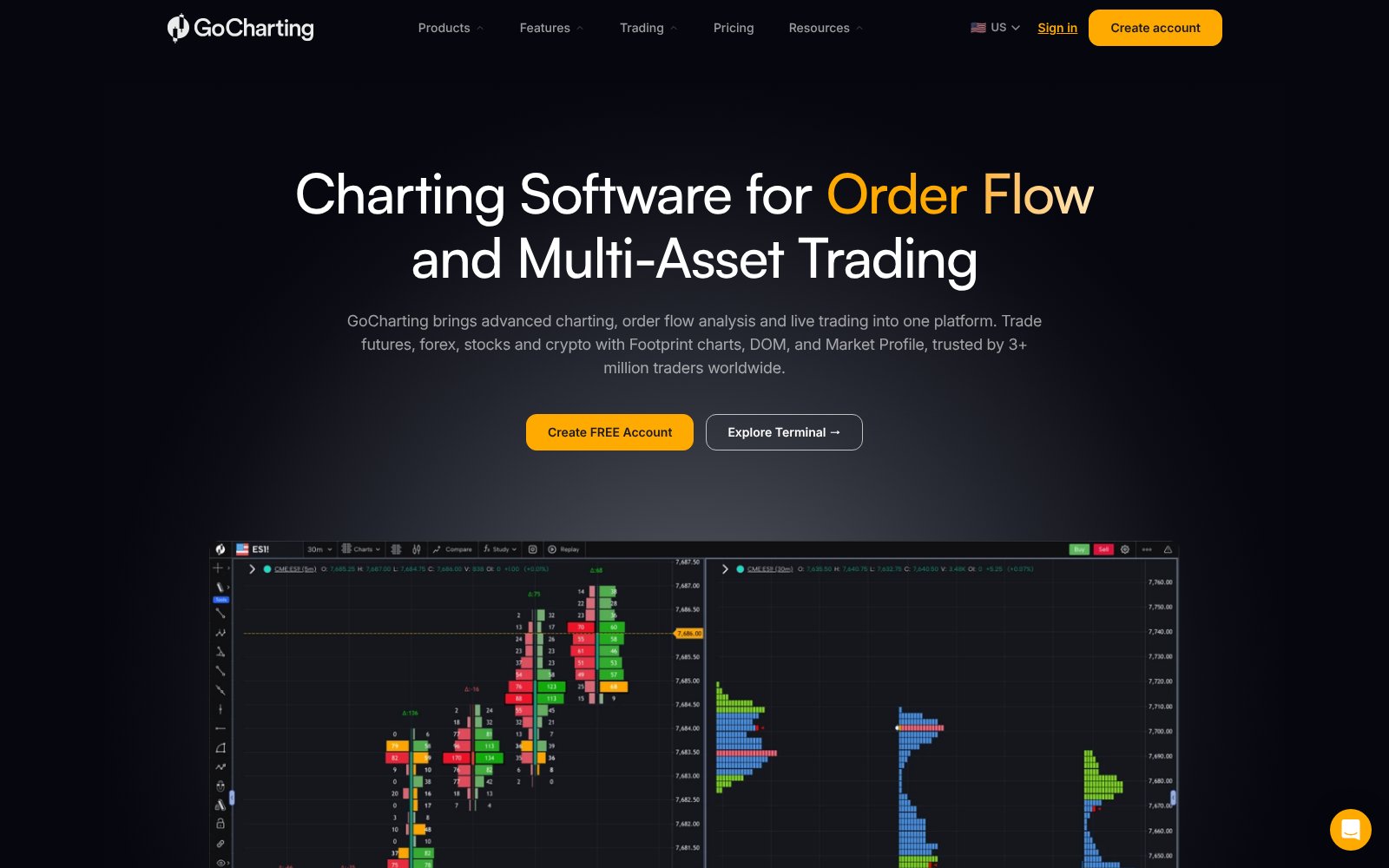
What GoCharting Actually Looks Like

Screenshot of the GoCharting homepage
The GoCharting homepage

The Alpha Score Breakdown

GoCharting scores 67 out of 100 across five pillars, 20 points each.

  • Signal Quality14 / 20
  • Transparency14 / 20
  • Price-to-Value15 / 20
  • Usability14 / 20
  • Community Verdict10 / 20
How we score →

The Verdict

GoCharting scores 67, and price-to-value leads at 15. It puts footprint and imbalance charts, delta bars, tick-based volume and market profile, and a DOM-style view into a browser, which means Mac traders get order-flow tools that several big desktop platforms only offer on Windows. A free account with no card gets real-time charts on several exchanges, an options chain with a strategy builder, and multi-broker one-click trading, and the US CME Futures bundle is listed at $30 to $35 a month. The score comes from FullStack Alpha desk research plus public user sentiment, and the pillar split is provisional.


The Watch-Out

Community verdict is the weak pillar at 10. GoCharting rates 3.0 on Trustpilot from 27 reviews and 3.3 on the App Store from 26 ratings. Complaints include missing history on multi-timeframe charts, account and data deletion requests, and a dispute over whether the advertised 7-day free trial allows a refund. The free plan uses end-of-day data for stocks, and a Reddit user calls it pretty disappointing. Prices on the page are labeled indicative.

Who It's For

Hover, tap, or focus a card to see who we'd point at this tool — and who should walk away.

Who this is for

The traders who get the most out of GoCharting.

Flip to see the list

Who this is for

  • Mac traders who want footprint and order-flow charts
  • Futures traders who analyze on GoCharting and execute elsewhere
  • Options traders who want a free chain and strategy builder
  • Traders in India, where GoCharting runs its own regional plans

Who this isn't for

Where GoCharting is the wrong spend.

Flip to see the list

Who this isn't for

  • Anyone who expects the free plan to include real-time US order flow
  • Traders who need polished multi-timeframe history
  • Anyone counting on a no-questions refund after a trial purchase
  • Long-term investors who need fundamentals, not order flow

The Pain It Solves

A real complaint from the trading forums, and what this tool actually does about it.

—
Trustpilot
“I am a trader from Europe and was looking for order flow software that I could use on my Mac, since several of the major programs in this field only run on Windows.”

Source: Trustpilot

GoCharting logo

GoCharting

GoCharting runs in the browser, so footprint charts, delta and market profile work on a Mac with nothing to install. Start on the free account to learn the layout, then pay for one month of the data bundle you need before committing to annual, and read the trial terms closely before you pay.

What Users Say

Sentiment pulled from two independent sources, kept separate so you can weigh each one yourself.

Trustpilot logo3.0 from 27 reviews
“I am a trader from Europe and was looking for order flow software that I could use on my Mac, since several of the major programs in this field only run on Windows. As I now use only Mac, I needed an equivalent alternative, and GoCharting has surprised me in an extremely positive way.”
Read the original on Trustpilot →
Trustpilot logo3.0 from 27 reviews
“I use it for orderflow analysis only, execution on other platform. So I can't give feedback on execution but everything else works as intended.”
Read the original on Trustpilot →
Trustpilot logo3.0 from 27 reviews
“Absolutely love this. Please optimize more better for smooth charting and add more tools like heatmaps .”
Read the original on Trustpilot →

Every quote is real and traceable. How we source them →

Pricing

Free

$0

Real-time charts on several exchanges, options chain with 32 strikes and strategy builder, market and volume profile tools, multi-broker one-click trading. End-of-day data for US stocks; up to 4 charts. No card required.

Our pick

CME Futures bundle

$30 / month

Real-time CME futures data with orderflow footprint and imbalance charts, delta tools, alerts and scanners. Annual billing saves up to 16%.

CME Bundle L2

$35 / month

The CME bundle with Level 2 depth data.

US Stocks package

$29.40 / month (coming soon)

Real-time NASDAQ and NYSE stock data with orderflow. Listed as coming soon; prices on the page are labeled indicative.

Prices change. Check the vendor’s page before you buy.

Pros and Cons

What works

  • Footprint, imbalance, delta and market profile tools in a browser
  • Works on Mac without Windows virtualization
  • Free account with no credit card and multi-broker one-click trading
  • US CME Futures bundle listed at $30 to $35 a month
  • Options chain with 32 strikes and a strategy builder on the free tier

What doesn’t

  • 3.0 Trustpilot rating from 27 reviews and 3.3 on the App Store
  • Disputes over the 7-day trial and refunds
  • Free plan uses end-of-day data and no orderflow charts
  • Users report missing history on multi-timeframe charts

GoCharting FAQ

The Alpha Report

We test the tools. You get the verdict.

One email a week. What we tested, what scored, and what we'd skip. Written for traders, not for clicks.

No spam. Unsubscribe anytime.

Related Reading

67/ 100

Our verdict on GoCharting

GoCharting scores 67, and price-to-value leads at 15.

Visit GoCharting

This is an affiliate link. It never affects our score. Why →