FullStack Alpha
Review
TakeProfit logo

TakeProfit Review: A Real TradingView Alternative?

A fast, modern charting terminal with a generous free tier, built crypto-first and still growing into everything else.

Visit TakeProfit
Listen to this review
Audio in production

What TakeProfit Actually Looks Like

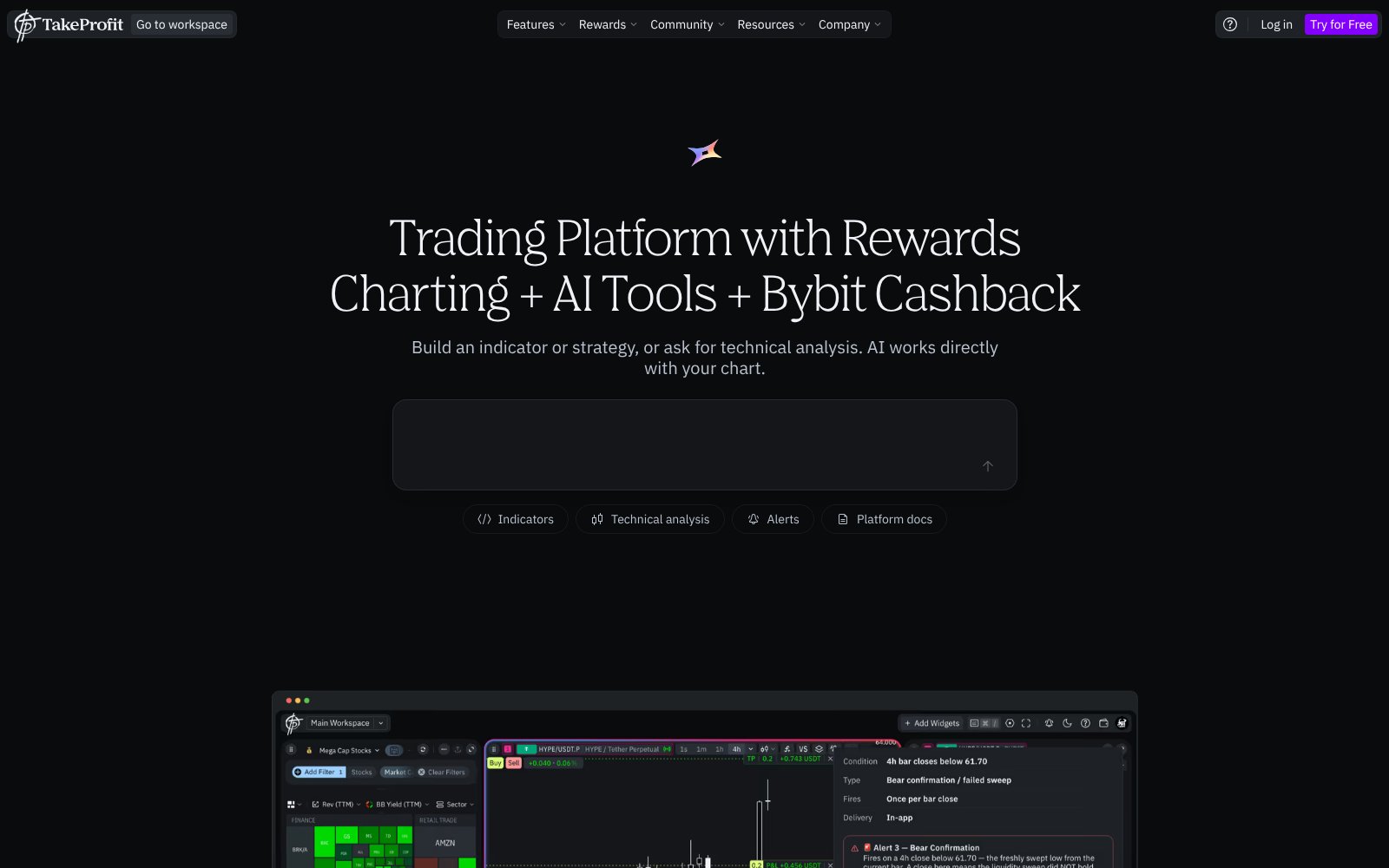
Screenshot of the TakeProfit homepage
The TakeProfit homepage

The Alpha Score Breakdown

TakeProfit scores 74 out of 100 across five pillars, 20 points each.

  • Signal Quality15 / 20
  • Transparency15 / 20
  • Price-to-Value17 / 20
  • Usability16 / 20
  • Community Verdict11 / 20
How we score →

The Verdict

TakeProfit scores 74, and price-to-value carries it at 17. Every feature sits in one All-In plan at $20 a month or $120 a year, new accounts get the full plan free for 30 days, and the Freeroll tier stays free afterward with core charting and multiple watchlists. The charting engine is its own WebGL build rather than embedded TradingView, cloud alerts run 24/7 without expiring, and Indie, the Python-style scripting language, comes with an AI assistant that writes, debugs and converts Pine scripts. Users who switched from TradingView describe it as fast and easy to customize, and usability scores 16 for that reason. The score comes from FullStack Alpha desk research plus public user sentiment, and the pillar split is provisional.


The Watch-Out

Community verdict is the weak pillar at 11: only 7 Trustpilot reviews and a thin Reddit footprint, so there is little long-term evidence yet. Trading and the cashback program are crypto-first today (Bybit and 70+ crypto exchange data feeds), and users are still asking for stock, futures and options broker support. Bar replay and a mobile app are on the wish list, not shipped.

Who It's For

Hover, tap, or focus a card to see who we'd point at this tool — and who should walk away.

Who this is for

The traders who get the most out of TakeProfit.

Flip to see the list

Who this is for

  • TradingView users squeezed by the one-watchlist free plan
  • Indicator builders who prefer Python-style syntax over Pine Script
  • Crypto traders who want fee cashback paid in USDC
  • Anyone who wants non-expiring cloud alerts sent to Telegram or webhooks

Who this isn't for

Where TakeProfit is the wrong spend.

Flip to see the list

Who this isn't for

  • Stock and futures traders who need to execute from the chart today
  • Phone-first traders, until the mobile app ships
  • Traders who study setups with bar replay
  • Anyone who wants years of community scripts and tutorials to lean on

The Pain It Solves

A real complaint from the trading forums, and what this tool actually does about it.

—
Trustpilot
“I just changed from TV interface change and alerts malfunction.”

Source: Trustpilot

TakeProfit logo

TakeProfit

TakeProfit's answer is a terminal you control: alerts run in the cloud and never expire, layouts are modular, and the free tier keeps multiple watchlists. The honest caveat is reach. If your broker is a stock or futures broker, you will still place orders somewhere else for now.

What Users Say

Sentiment pulled from two independent sources, kept separate so you can weigh each one yourself.

Trustpilot logo3.9 from 7 reviews
“I have been using it for about 3 months now and am doing about 90% of my charting on it. Very customizable and you dont have to worry about them pushing updates that you dont want and annoy users.”
Read the original on Trustpilot →
Trustpilot logo3.9 from 7 reviews
“An excellent modern platform. I mainly use it for technical analysis because of how quickly I can develop indicators on Indie.”
Read the original on Trustpilot →
Trustpilot logo3.9 from 7 reviews
“the platform is fast, well responsive and looks modern.”
Read the original on Trustpilot →
Trustpilot logo3.9 from 7 reviews
“Using free plan for now. charts are clean, alerts work, indie language is interesting. couldnt find pricing easily at first, had to ask in discord.”
Read the original on Trustpilot →
Trustpilot logo3.9 from 7 reviews
“It needs a bar replay so you can better study setups, and it needs a mobile app.”
Read the original on Trustpilot →

Every quote is real and traceable. How we source them →

Pricing

Freeroll

Free

Permanent free tier with core charting features. No forced upgrade and no expiry on the account.

Our pick

All-In (monthly)

$20 / month

Every feature: 400 non-expiring cloud alerts, unlimited workspaces, custom timeframes, Indie scripting, backtesting and chart trading. New accounts get 30 days free.

All-In (annual)

$120 / year

The same All-In plan billed yearly, which works out to $10 a month.

Cashback program

Up to 50% of fees back

Rebates of up to 50% of trading fees paid in withdrawable USDC on supported crypto exchanges.

Prices change. Check the vendor’s page before you buy.

Pros and Cons

What works

  • One $20 All-In plan with everything included, or $120 billed yearly
  • 30-day free trial of the full plan, then a permanent free Freeroll tier
  • Own GPU-accelerated charting engine that users call fast and responsive
  • Indie scripting with an AI assistant that converts Pine and MQL code
  • 400 cloud alerts that never expire, with webhook and Telegram delivery

What doesn’t

  • Execution and cashback are built around crypto exchanges for now
  • No mobile app and no bar replay yet, per active users
  • Thin public review base: 7 Trustpilot reviews at a 3.9 rating
  • Pricing was hard to find for at least one free user, who had to ask in Discord

TakeProfit FAQ

The Alpha Report

We test the tools. You get the verdict.

One email a week. What we tested, what scored, and what we'd skip. Written for traders, not for clicks.

No spam. Unsubscribe anytime.

Related Reading

74/ 100

Our verdict on TakeProfit

TakeProfit scores 74, and price-to-value carries it at 17.

Visit TakeProfit

This is an affiliate link. It never affects our score. Why →