Koyfin API: What You Can Pull, What You Can't, and Workarounds

Quick answer: The koyfin api is not available as a public developer product. Koyfin’s API FAQ says the company cannot provide API access because of restrictions imposed by its data providers. Eligible exports can support spreadsheet work, but automated scripts need a separately licensed data source.
Key takeaways
- A Koyfin subscription buys application access, not a developer feed.
- There are no published public endpoints, API keys, or request quotas.
- Download eligibility depends on the dataset, view, subscription, and applicable permissions.
- An imported CSV is a snapshot, not a live Excel or Google Sheets connection.
- Advisor integrations do not establish general outbound market-data access.
- Financial Modeling Prep, Polygon, Alpha Vantage, and Alpaca are candidates for different automation needs.
- Unofficial libraries cannot grant rights that Koyfin and its providers have not granted.
- Swing traders should separate research, data delivery, and execution requirements.
This assessment uses desk research and public user sentiment as qualitative context, with official documentation taking priority over third-party impressions.
Koyfin overview: What does the software actually do?
Koyfin is a financial research workspace for analyzing securities, comparing companies, monitoring markets, and reviewing portfolios. The product is useful for investment decisions inside its interface, but that does not make its underlying datasets available to external applications.
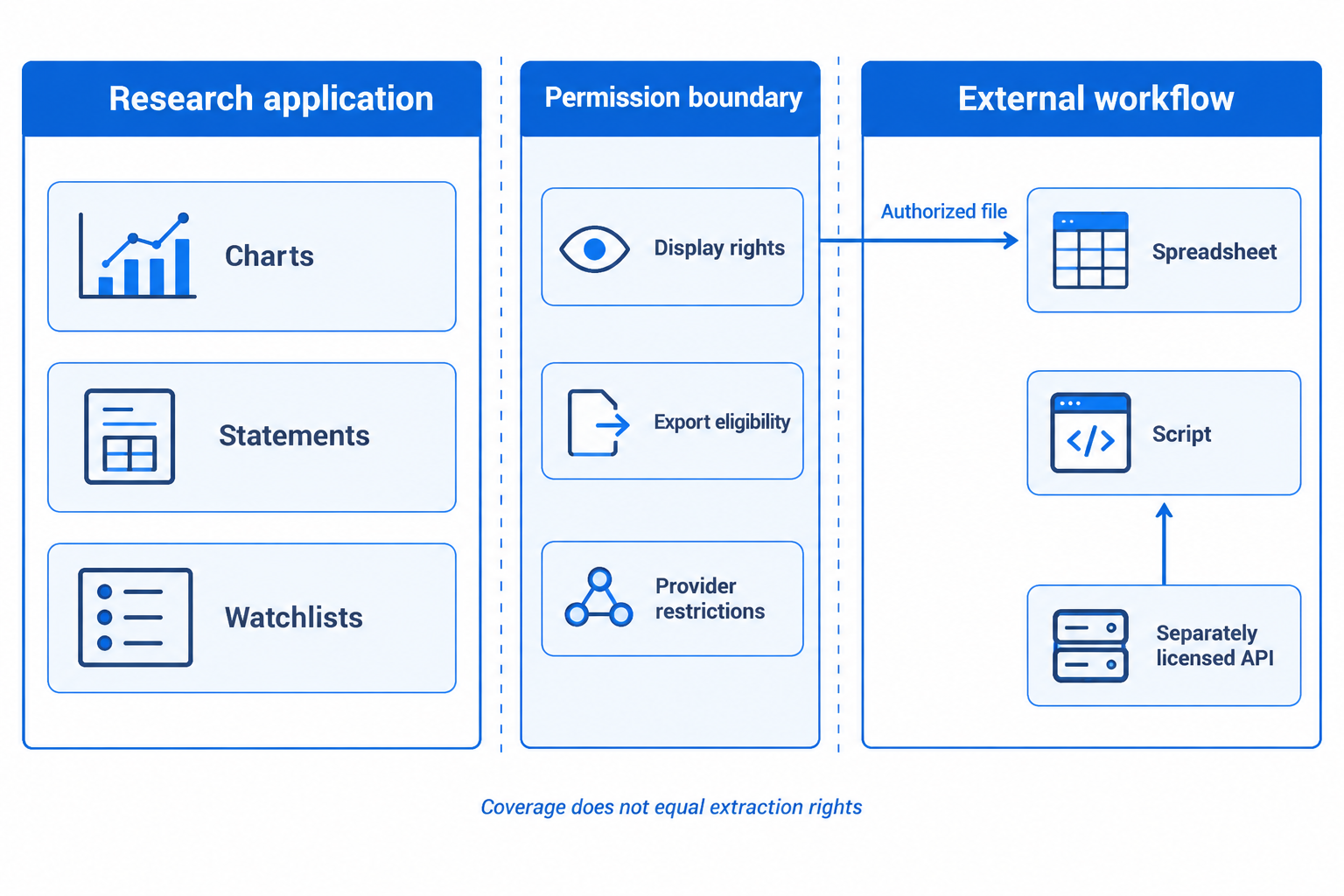
Koyfin’s product website describes a platform combining market information, company analysis, charting, and portfolio tools. Consolidation is the attraction: an investor can investigate a business and its market context without rebuilding every screen in a spreadsheet.
For a swing trader, that might mean comparing a stock with its sector, checking valuation, and reviewing earnings expectations before adding the security to a watchlist. For a long-term investor, financial statements and comparative charts may matter more than frequent price updates.
The common mistake is assuming that visible information is downloadable information. Display rights, file-export rights, and machine-access rights are separate permissions.
A useful buying rule follows: choose Koyfin if the research interface improves decisions. Choose a licensed data provider if the requirement is repeatable delivery into code. Some investors need both, but neither purchase automatically replaces the other.
The broader Koyfin review covers platform fit beyond the koyfin api question.
Does Koyfin have an API? The koyfin api policy
No public customer API is offered under Koyfin’s published policy. The company’s official API answer attributes that limitation to restrictions from its data providers, rather than to a missing premium feature.
What is koyfin api, and what can you do with it?
The phrase koyfin api describes a connection people want, not a documented product they can activate. There is no supported public service through which customers can request Koyfin prices, fundamentals, estimates, or screening results from a script.
That distinction matters for project planning. A developer should not budget for an integration on the assumption that a dashboard subscription includes machine access.
A sensible first step is to list the desired outputs independently of the interface. “Daily adjusted closes for a watchlist” is a data requirement. “Whatever appears on the dashboard” is not a sufficiently precise specification.
How do you get started with koyfin api authentication?
There is no published developer onboarding flow or official API-key process for the koyfin api. A Koyfin account login authenticates access to the application, not an external data pipeline.
Start instead by deciding between permitted exports and an independently licensed provider. For an unusual organizational requirement, ask Koyfin support for written clarification before paying or building.
Do not treat browser session tokens as developer credentials. A technically observable request does not establish authorization to reproduce, automate, or redistribute the data.
What are koyfin api pricing and cost? Is it free or paid?
There is no published koyfin api price because there is no public API product to purchase. Free and paid application plans should not be interpreted as free and paid API tiers.
For a 2026 budget, separate three possible expenses: the research subscription, the external data subscription, and any exchange or professional-use entitlements. Storage and maintenance may also matter once the project becomes operational.
The practical cost question is therefore: “What does the complete permitted workflow cost?” A cheaper dashboard cannot offset a missing data license.
Check current application entitlements through Koyfin’s FAQ rather than assuming a particular plan includes export access.
What are koyfin api rate limits and quotas?
There are no published public koyfin api request limits or developer quotas. That absence does not mean unlimited access; it means there is no supported public request service to size.
For an alternative provider, calculate workload before selecting a plan. As an illustrative planning example, requesting 100 symbols across five separate endpoints creates 500 requests per refresh if batching is unavailable. That arithmetic describes a hypothetical workflow, not a Koyfin allowance.
Also check whether a provider limits requests per minute, daily usage, concurrent connections, or returned records. Those restrictions solve different capacity problems.
What data does koyfin api provide? Data types and endpoints
The koyfin api provides no publicly documented customer endpoints for real-time prices, historical series, financial statements, estimates, portfolios, or crypto data. Coverage inside the application cannot be converted into a list of supported API routes.
For every required dataset, write down frequency, history, geography, identifiers, currency, and adjustment rules. “Historical prices” could mean daily closes, intraday bars, or dividend-adjusted returns, each with different requirements.
A visible quote also says nothing by itself about latency. Check the instrument and source rather than assuming every displayed market updates on the same schedule.
Where are koyfin api documentation, examples, and a Python library?
Koyfin does not document an official public API specification or supported Python client. Search results for koyfin api documentation, GitHub projects, or unofficial packages should not be mistaken for company authorization.
Before installing any financial-data connector, check the publisher, permissions, maintenance history, and credential handling. A package that asks for application passwords or browser cookies deserves particular scrutiny.
The compliant Python example later in this article reads an already authorized local file. It does not connect to Koyfin, bypass restrictions, or imply that an official SDK exists.
What financial data can you export without a connection?
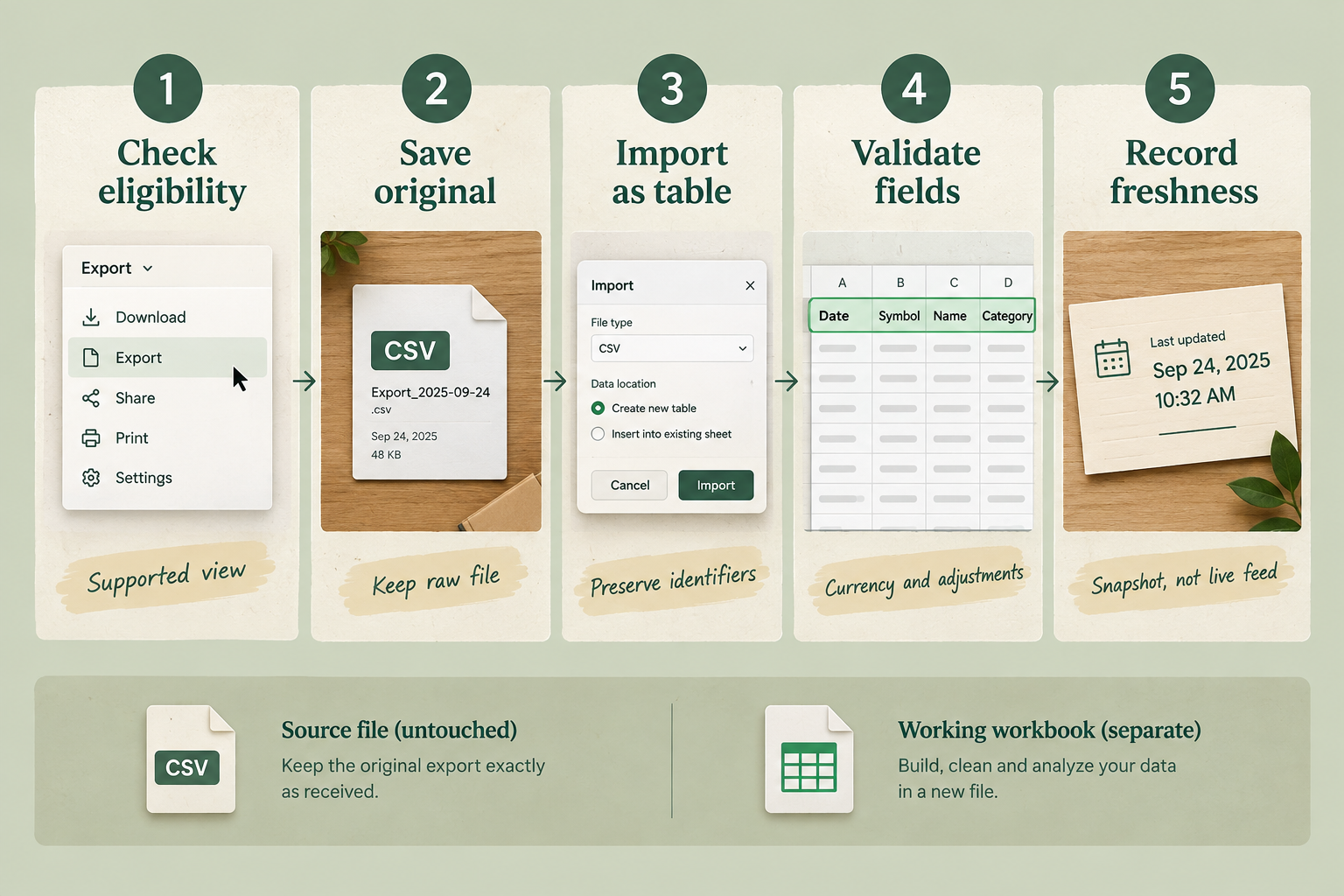
Supported exports are the practical route from Koyfin into an external workbook. Export availability is narrower than application coverage, so confirm the exact view and fields through the interface and Koyfin Help Center before designing a workflow.
Price, performance, technical, economic, fund, and portfolio-related tables may offer eligible downloads where supported. Do not assume that every field within those categories, or every company fundamental visible elsewhere, is exportable.
The decisive check is the specific export control and its documented restrictions. If a required field cannot be exported, use a separately licensed source rather than trying to reproduce the application’s private requests.
Excel and Google Sheets: Files versus live integrations
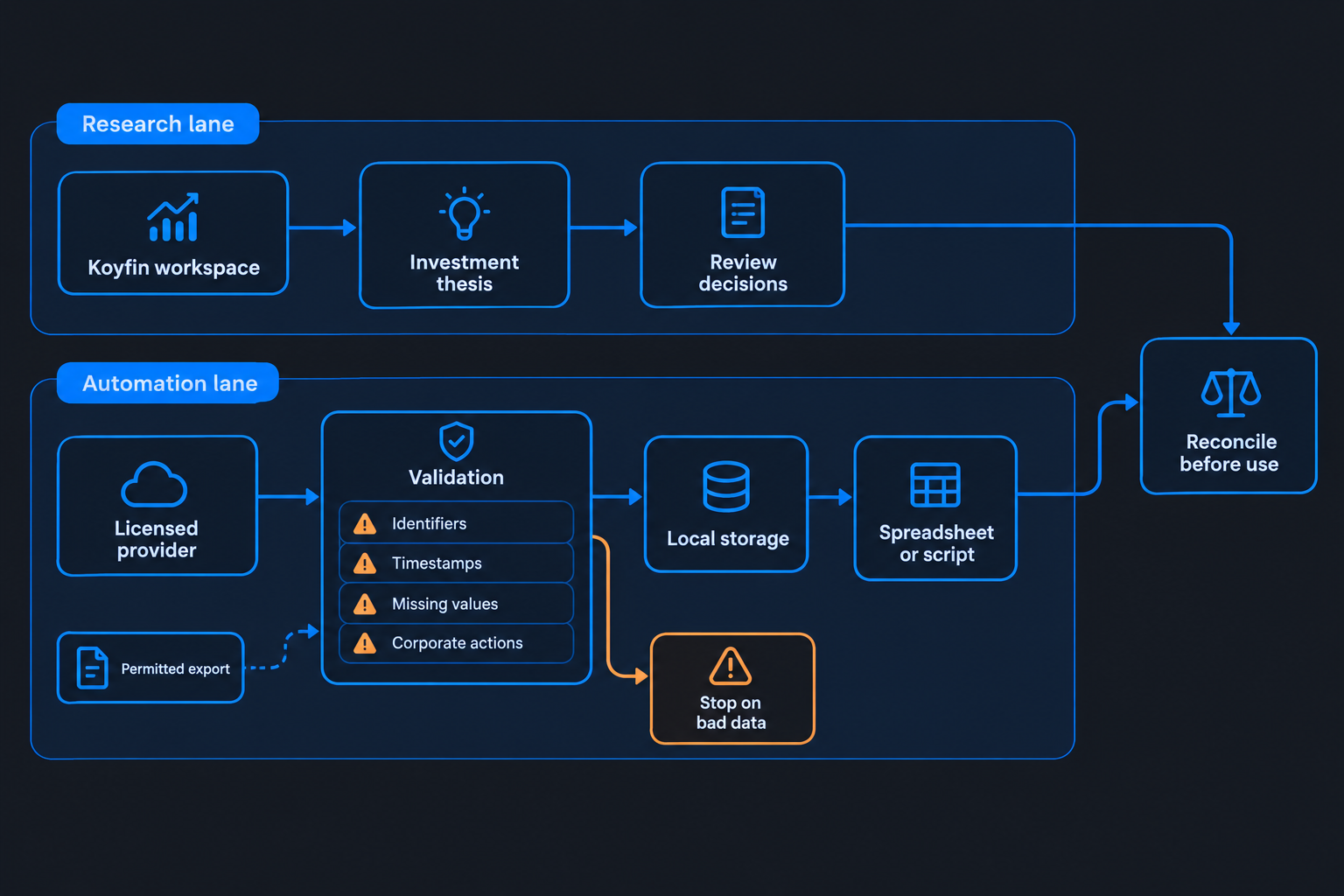
An authorized CSV can be imported into Excel or Google Sheets, but the imported data remains a snapshot. A file import does not establish a supported, full-catalog live integration.
Excel Power Query can transform a local CSV and refresh from that file. However, refreshing Power Query does not cause Koyfin to create a new export. Someone still needs to obtain an updated authorized file through a permitted process.
Google Sheets can also receive uploaded data. Keep the same distinction between updating the workbook and obtaining fresh source data.
A reliable export process is:
- Confirm that the table and required fields support export.
- Save an untouched copy of the downloaded file.
- Record the retrieval time and source view.
- Import into a separate working workbook.
- Check identifiers, currencies, dates, and missing values.
- Reconcile selected rows against the original display.
For example, a Friday watchlist export may support weekend planning. It should not silently become the source for a Monday intraday alert.
Integrations and specs: Which direction does information move?
An integration can bring information into Koyfin without exposing Koyfin’s catalog to outside software. The direction of data movement is essential.
Charles Schwab’s Koyfin provider page describes an advisor-services relationship. That is not documentation for a retail market-data API.
The same principle applies to imported custom datasets. Permission to upload observations does not grant permission to extract unrelated licensed information.
Before treating an integration as a koyfin api workaround, ask four questions: who supplies the data, where the data moves, which accounts qualify, and what downstream uses are authorized?
Who needs a koyfin api alternative?
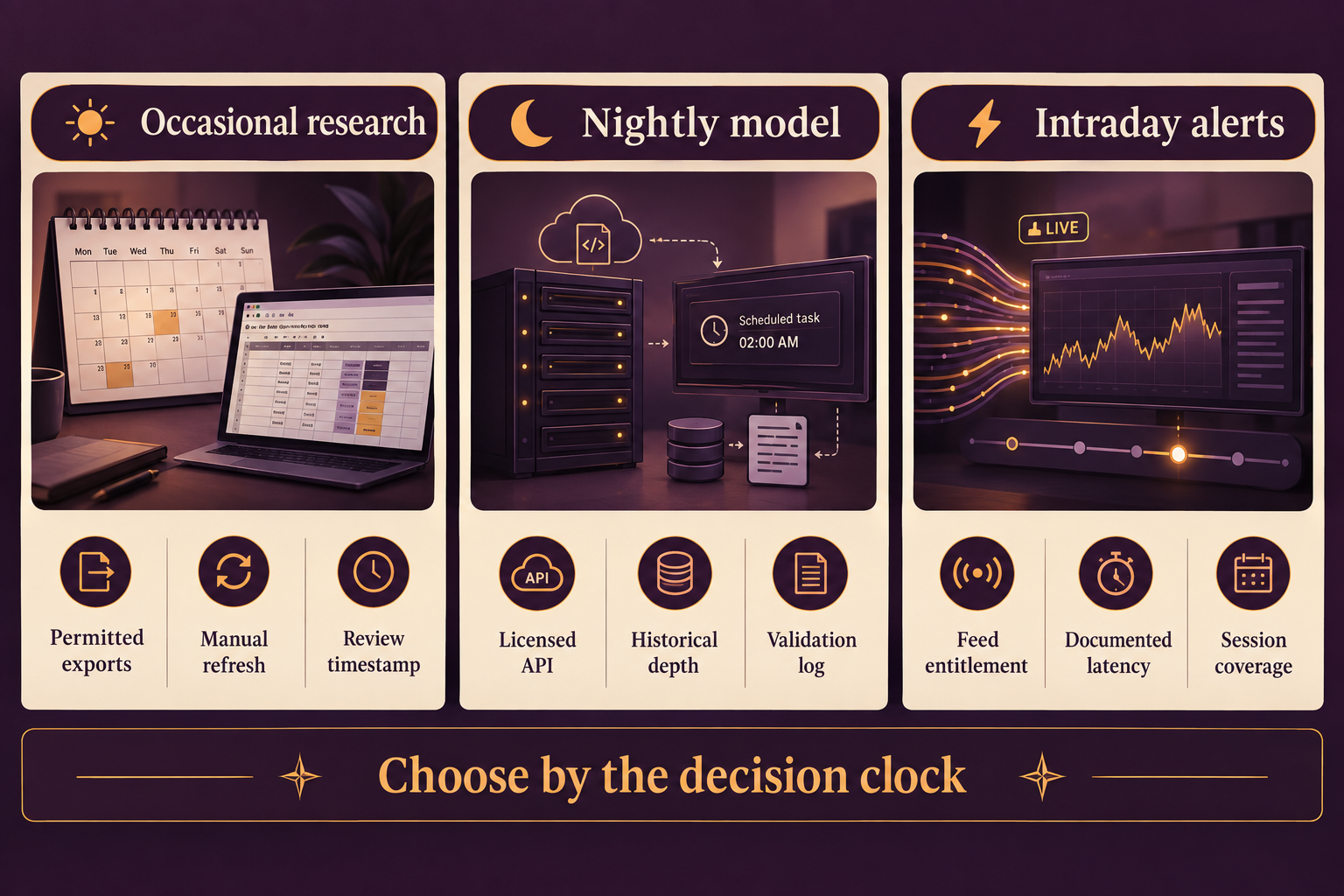
A separate provider is necessary when the workflow depends on scheduled refreshes, repeatable data retrieval, or documented delivery timing. Occasional research may work with permitted exports; unattended models generally need a licensed API.
koyfin api for retail investors vs professionals
Retail investors and professionals face the same absence of public Koyfin developer access, but their external licensing requirements can differ. Personal analysis, advisor reporting, client distribution, and commercial applications should not be assumed to share the same permissions.
A retail swing trader may only need daily bars and a compact watchlist. An advisor may need approved account connections and client reports. A software business may need explicit redistribution rights for customer-facing output.
Professional status can also affect exchange-data entitlements. Ask the prospective provider how it classifies the intended user and use case.
The key mistake is buying a personal-use feed and later placing its values in a client portal. Technical access does not settle redistribution rights.
Choose by the decision clock
The correct refresh frequency depends on when new information could change the decision. A nightly valuation workbook has different requirements from an intraday breakout alert.
For a swing strategy reviewed after the close, daily data may be sufficient if the methodology is designed around that schedule. For an intraday strategy, evaluate latency, session coverage, exchange coverage, and outage behavior.
For scalping or execution-sensitive systems, do not substitute a research dashboard for documented market-data delivery. Brokerage order routing introduces another set of requirements entirely.
A useful project specification names the decision deadline explicitly: “The watchlist must be ready before the next regular session.” That is more actionable than requesting “real-time everything.”
Also define what happens when the deadline is missed. A model should identify stale input and suspend affected signals rather than present an old observation as a current one.
Top 5 features you get without a developer connection
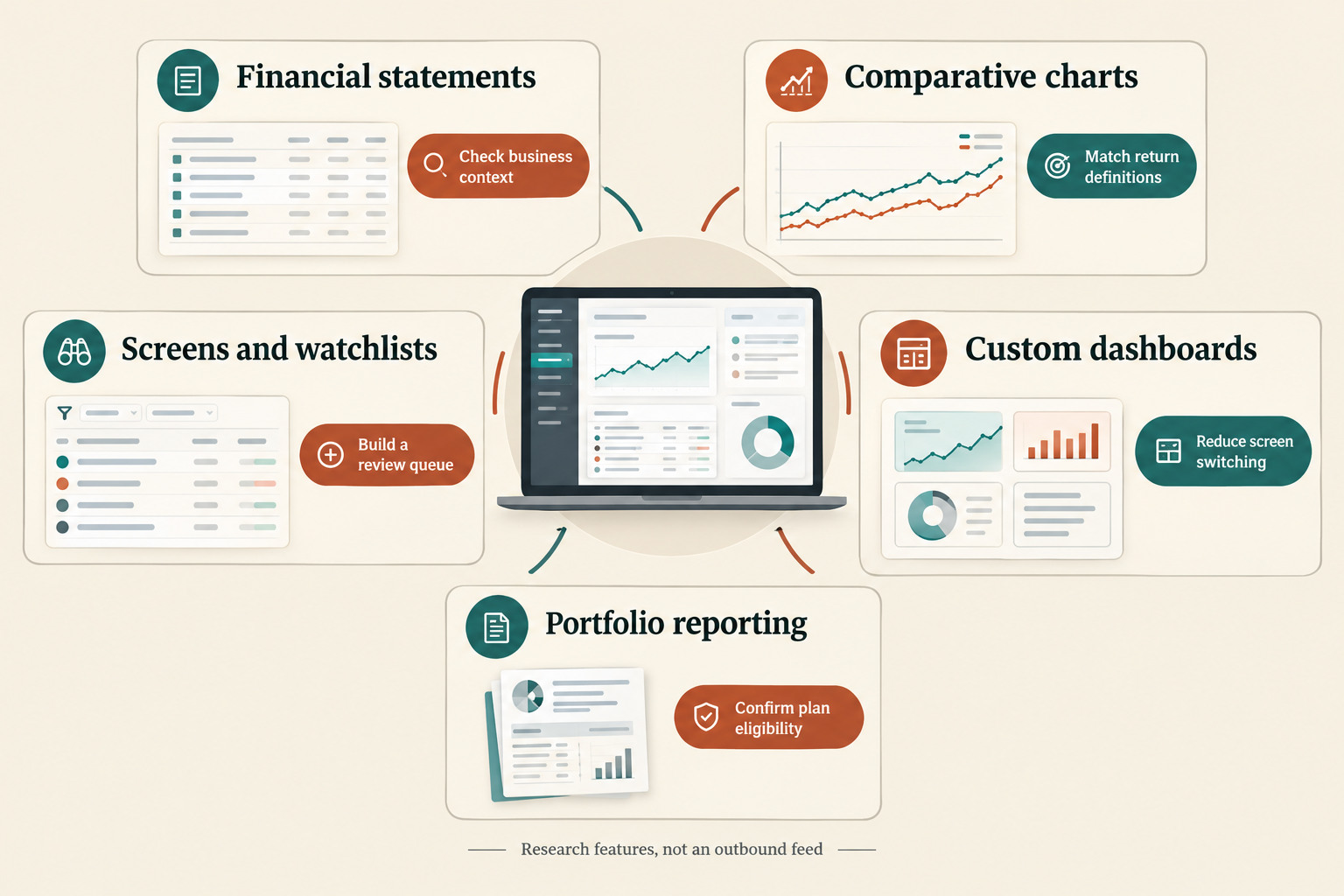
Koyfin’s strongest case is its research workflow, not external automation. These five feature areas can still justify a subscription when the investor wants analysis inside the application.
1. Core functionality: Financial statements
Financial statements and related company analysis help connect valuation with business performance. A chart may show improving momentum while margins or profit expectations tell a less comfortable story.
A practical review compares the company with relevant peers and checks reporting periods before drawing conclusions. Trailing results, fiscal-year estimates, and calendar-year estimates are not interchangeable.
Use the interface to investigate the business, but confirm download eligibility separately if a workbook needs the same figures.
2. Standout features: Advanced charting
Comparative charts help investors examine relative performance and relationships between securities or market variables. For swing traders, that can provide context around an apparently strong price move.
The main pitfall is comparing unlike series. Price return and total return can differ, as can local-currency and converted-currency performance.
Match dates, return definitions, and adjustment assumptions before interpreting an outperforming line as evidence of a better setup.
3. Core features: Screening and watchlists
Screens reduce a large universe to a manageable research queue. Watchlists then help organize follow-up rather than forcing the investor to repeat the same search.
A screen is not a complete trading strategy. Entry criteria, invalidation, position sizing, and event risk still need separate rules.
For a spreadsheet workflow, confirm that the exact watchlist columns are exportable before investing time in downstream formulas.
4. Ease of use: Custom dashboards
Custom dashboards can reduce repetitive screen switching by collecting relevant markets and metrics in one workspace. The benefit depends on disciplined selection, not the number of panels displayed.
A swing trader might group the broad market, sector benchmarks, candidate stocks, and event context. An advisor might prioritize portfolio and client-review information.
Remove panels that do not affect a decision. Too much information can make a research process slower without making it more reliable.
5. Onboarding: Portfolio and reporting tools
Portfolio and reporting workflows may reduce manual assembly for eligible users. Availability still depends on plan details, integration support, and the reporting task.
A sample report should be checked for calculation definitions, presentation needs, and permitted sharing before a team commits.
The free-tier breakdown offers related reading for evaluating the workspace before paying. None of these five features changes the koyfin api policy.
How does the software compare to competitors?
Koyfin should be compared with research platforms for interface quality and with licensed data providers only when evaluating external delivery. Those are different purchases, even when both products display stock information.
Independent coverage such as The CFO Club’s Koyfin review can help frame usability and feature questions. Official documentation should remain the deciding source for access rights.
| Route | Best fit | Delivery model | Main check |
|---|---|---|---|
| Koyfin exports | Periodic spreadsheet analysis | Eligible downloaded files | Exact exportable fields |
| Financial Modeling Prep | Fundamentals-focused evaluation | Documented API products | Definitions and historical coverage |
| Polygon | Market-data evaluation | Programmatic data products | Current offering, feeds, and entitlements |
| Alpha Vantage | Smaller prototypes | Documented endpoints | Quotas and endpoint access |
| Alpaca | Brokerage-connected workflows | Market-data and brokerage services | Feed coverage versus execution access |
These providers are evaluation candidates, not interchangeable replacements. Verify current product names, packaging, documentation, and contracts before selecting one.
koyfin api vs Bloomberg Terminal
The koyfin api is not an available alternative to Bloomberg Terminal connectivity because Koyfin offers no public customer API. Bloomberg-related desktop or enterprise data arrangements require their own product, entitlement, and licensing review.
Compare the actual requirement: interactive research, spreadsheet integration, historical retrieval, organizational distribution, or automated production use.
A terminal subscription should never be treated as blanket permission to publish data elsewhere. Ask about the exact service and intended destination rather than relying on the Bloomberg name.
For an individual investor, the sensible comparison may simply be whether Koyfin’s research tools cover the analytical task at a suitable cost.
Alternatives: Stock Rover, Google Finance, and Bloomberg
Stock Rover belongs on a research-platform shortlist, while Google Finance functions may serve lighter spreadsheet requirements. Neither should be assumed to reproduce Koyfin’s full dataset.
The Koyfin versus Stock Rover comparison addresses the research choice. For spreadsheet functions, verify symbol coverage, refresh behavior, available attributes, and terms before depending on them.
Workiva, Datarails, Causal, and Cube
Planning, reporting, and financial-management software solves a different problem from exchange-licensed market-data delivery. Such tools may organize internal financial information without supplying the external observations a trading model needs.
Choose a reporting system for reporting requirements and a data source for data requirements. A shared “finance software” category is not enough to establish substitutability.
Which tools work as a koyfin api replacement?
A useful koyfin api replacement supplies the required fields through documented, licensed delivery, rather than trying to copy the Koyfin interface. Choose candidates by workload, then validate coverage and permissions with representative records.
koyfin api alternatives and competitors: How to choose
Financial Modeling Prep is a candidate for fundamentals-heavy projects. Polygon merits evaluation for market-data workflows, Alpha Vantage for smaller prototypes, and Alpaca where brokerage integration matters.
The choice should follow a written specification:
- Universe: exchanges, instruments, identifiers, and inactive securities.
- Frequency: daily snapshots, intraday bars, quotes, or streaming events.
- History: required dates and treatment of revisions.
- Definitions: adjusted prices, reporting periods, currencies, and ratios.
- Rights: storage, internal sharing, derived output, and redistribution.
Do not judge coverage from one familiar ticker. Include a renamed company, a foreign listing, an instrument with a split, and an inactive security if those cases belong in the intended universe.
A legal Python workflow for an authorized export
Python can process a file the user is entitled to download and analyze. That is local file processing, not a koyfin api Python integration.
The following example assumes an authorized CSV has columns named Symbol and Close. Adapt those names to the actual export:
from pathlib import Path
import pandas as pd

source = Path("authorized_export.csv")
data = pd.read_csv(source, dtype={"Symbol": "string"})

required = {"Symbol", "Close"}
missing = required.difference(data.columns)
if missing:
    raise ValueError(f"Missing required columns: {sorted(missing)}")

data["Close"] = pd.to_numeric(data["Close"], errors="coerce")

invalid = data["Symbol"].isna() | data["Close"].isna()
if invalid.any():
    raise ValueError("Review missing symbols or invalid close values")

if data["Symbol"].duplicated().any():
    raise ValueError("Review duplicate symbols before continuing")

data.to_csv("validated_watchlist.csv", index=False)
The duplicate check suits a one-row-per-symbol snapshot. A historical dataset needs a compound key, typically including date and a sufficiently specific security identifier.
The script validates basic structure, not licensing, quote freshness, or investment suitability. Preserve the original export and record its source timestamp separately.
koyfin api common errors and troubleshooting
There is no official koyfin api error catalog because there is no public service. If an unofficial connector fails, do not assume that changing headers, copying cookies, or bypassing access controls is an acceptable fix.
For authorized files, common problems include changed column names, locale-specific number formats, duplicate identifiers, and spreadsheet conversions. Keep identifiers as text where necessary, and inspect decimal separators before calculating returns.
For a licensed replacement API, follow that provider’s documentation:
- Stop and investigate authentication failures.
- Respect retry instructions on rate-limit responses.
- Retry transient server failures with bounded backoff.
- Keep missing observations separate from valid zero values.
- Log response timestamps and incomplete retrievals.
A successful HTTP response does not prove the dataset is complete. Validate the expected universe and date coverage before updating a model.
Automated trading, errors, and historical depth
Automation needs more than a working connection. Backtests should account for corporate actions, delisted securities, changing index membership, and information availability at the decision date.
A current fundamentals endpoint may contain later restatements. Using those values in an old simulation can introduce information the investor could not have known then.
Ask whether the provider offers point-in-time data when the strategy requires it. The QuantConnect review covers a separate backtesting and execution environment.
For a full stack alpha workflow, keep research, licensed ingestion, validation, signal calculation, and execution as separate components. A failure in one component should not silently contaminate the others.
Related reading: The swing-trading tools guide helps place research software alongside alerts, planning tools, and execution systems.
Frequently asked questions about koyfin api
The koyfin api questions below have the same practical boundary: application access does not establish programmable data rights. Exports and external providers should be evaluated separately.
Can a paid plan activate koyfin api access?
No public API entitlement is documented for paid application plans. Confirm unusual organizational requirements directly with Koyfin before making a purchase.
Can Koyfin send live data into Excel?
An eligible export can be imported into Excel, but that is not a live connection. Do not assume a supported streaming add-in exists without current documentation.
Can Google Sheets refresh a Koyfin export automatically?
A spreadsheet can refresh from an accessible file, but that does not automatically obtain a fresh Koyfin export. Source acquisition must remain authorized.
Is there an official koyfin api Python package?
Koyfin does not document an official public Python client. Unofficial package names do not establish company support or extraction permission.
Can an exported watchlist feed another provider?
Potentially, if the export and downstream use are permitted. Map identifiers carefully because ticker symbols alone may be ambiguous across exchanges.
Can Koyfin exports support backtesting?
Only where permissions, field availability, history, and timestamps satisfy the model. A current snapshot cannot reconstruct a historical investment universe by itself.
Does an advisor integration provide market-data API access?
An advisor integration may support account or portfolio workflows. It does not, by itself, authorize general extraction of Koyfin’s market-data catalog.
What is the best workaround for daily automation?
Use a separately licensed API with suitable daily coverage, storage rights, and documented quotas. Keep Koyfin as the research interface if its tools remain useful.
Does Koyfin have an API?
No. There is no public koyfin api; Koyfin's own FAQ says restrictions imposed by its data providers prevent API access. Eligible exports can feed spreadsheet work, but scheduled scripts need a separately licensed data source.
What is the best API for financial data?
There is no single best one, so pick by workload. Financial Modeling Prep suits fundamentals-heavy projects, Polygon market-data workflows, Alpha Vantage smaller prototypes, and Alpaca brokerage-connected builds. Verify coverage, quotas, and licensing with representative records before you commit.
Is Koyfin data accurate?
Koyfin's data comes from third-party providers, which is also why it cannot offer API access. Treat it as solid research data, but confirm field definitions, reporting periods, and timing against the original filing before a decision rests on one number.
Alpha Score: How does Koyfin rate for this workflow?
Koyfin earns an editorial Alpha Score of 85/100 as a research platform, not as an API provider. The pillar split is provisional and should not be interpreted as measured trading performance or a surveyed customer rating.
| Pillar | Provisional score | Rationale |
|---|---|---|
| Signal Quality | 17/20 | Strong analytical context, without a claim of proven trading returns |
| Transparency | 18/20 | Clear public explanation of the API restriction |
| Price-to-Value | 18/20 | Attractive research value when the interface meets the user’s needs |
| Usability | 16/20 | Centralized research, with manual friction for external workflows |
| Community Verdict | 16/20 | Cautious qualitative editorial assessment, not a quantified user vote |
| Total | 85/100 | Strong workspace, unsuitable as a public data feed |
The score favors investors who value integrated research. For a developer whose non-negotiable requirement is scheduled extraction, the missing API is a disqualifying constraint regardless of the overall rating.
Final verdict: Should you build around Koyfin?
Build research around Koyfin if the interface supports better decisions, but do not build an automated pipeline around an assumed koyfin api. The official policy makes the boundary clear: public programmable access is unavailable because of provider restrictions.
For occasional spreadsheet analysis, check the exact exportable fields and preserve source timestamps. For recurring scripts, license the necessary data elsewhere and validate definitions before combining results with Koyfin research.
The clean architecture is simple: Koyfin for investigation, permitted files for occasional transfer, and a documented provider for automation.
Compare research and automation tools at Full Stack Alpha before choosing the subscriptions your workflow actually needs.
References
Official documentation supports the access-policy conclusions; third-party commentary provides research-platform context. Undated pages are identified without assigning an unverified publication year.
- Koyfin, undated: Can I get the data via API?
- Koyfin, undated: Comprehensive financial data analysis
- Koyfin, undated: Frequently asked questions
- Koyfin, undated: Help Center
- Charles Schwab Advisor Services, undated: Koyfin provider information
- The CFO Club, undated: Koyfin review: Pros, cons, features, and pricing
Affiliate disclosure: This article may contain affiliate links, and the publisher may earn a commission from qualifying purchases at no additional cost to the reader.
We test the tools. You get the verdict.
One email a week. What we tested, what scored, and what we'd skip. Written for traders, not for clicks.
More from FullStack Alpha