Best Day Trading Apps for iPhone: 7 Built for One-Thumb Trading
Reviewed by Jay Rocco, Chief Editor
Quick Answer
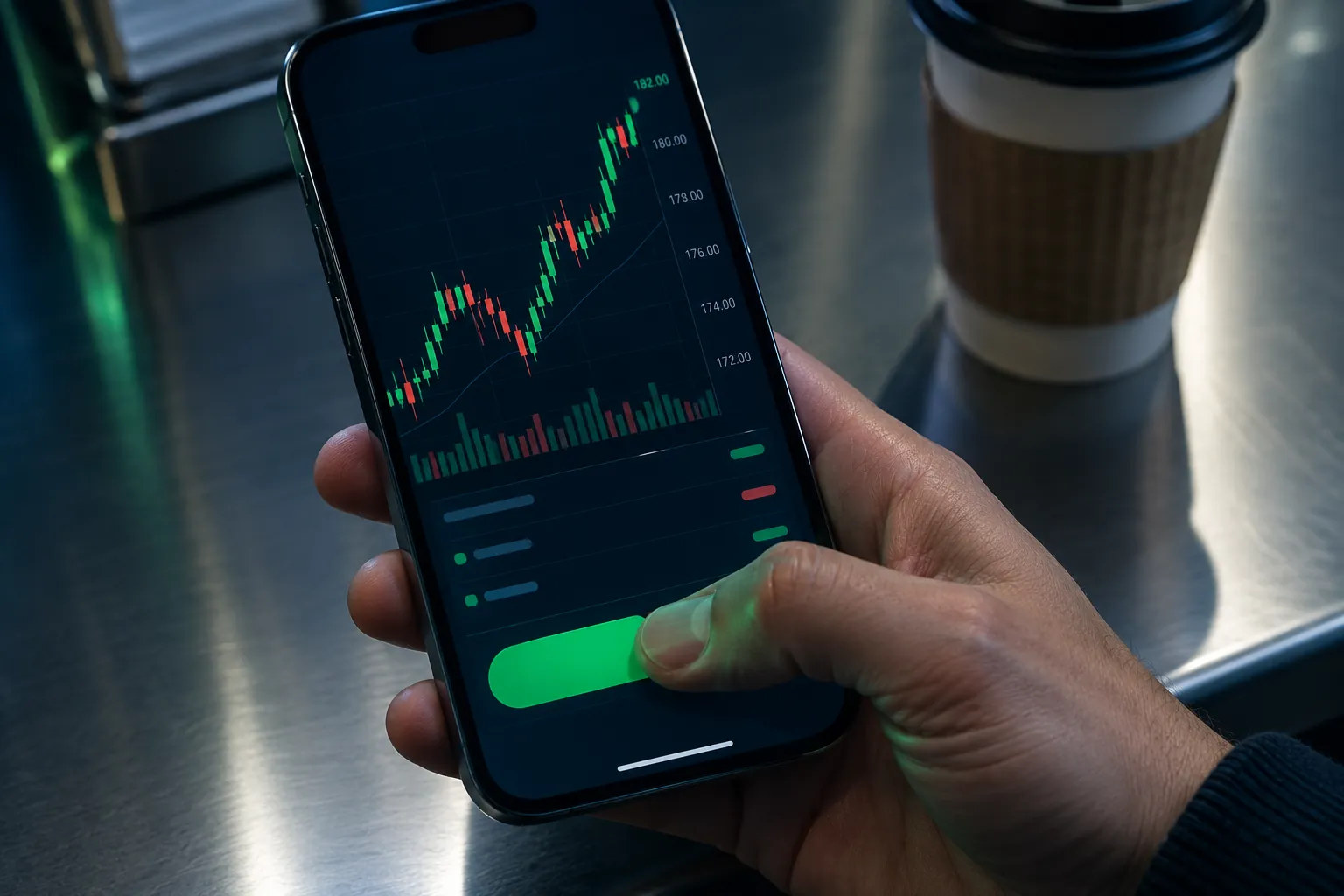
The best day trading apps for iPhone in 2026 come down to what you're doing with your thumb between meetings. Webull is the top overall pick for iPhone day traders who want real charting, extended-hours access, and free paper trading without paying commissions. Robinhood wins on raw speed of order entry, moomoo wins on free market depth, and Interactive Brokers wins on routing and global access. Every pick here trades stocks and options with $0 online commissions, so the real decision is interface speed versus data depth.
Best day trading apps for iPhone: key takeaways
- Webull is the overall pick: $0 commissions on stocks, ETFs, and options, no account minimum, free paper trading, and pre-market plus after-hours access on mobile.
- Robinhood has the fastest order flow of any major iPhone app. Robinhood Gold adds Level 2 market data for a monthly fee.
- moomoo gives away data most free apps charge for: order book depth, capital flow, short interest, and free Level 2 quotes for eligible users.
- thinkorswim (Schwab) includes thinkScript custom studies and paperMoney simulated trading with $0 online stock and ETF commissions.
- Interactive Brokers offers 150+ markets, some of the lowest margin rates among U.S. brokers, and a full API. IBKR Pro per-share pricing and data fees hurt small accounts.
- Public pays options rebates of $0.06 to $0.18 per stock or ETF contract based on monthly volume, plus a variable 3.30% APY cash account and no payment for order flow on stocks.
- Power E*TRADE has the strongest visual options risk analysis on mobile, backed by Morgan Stanley.
- FINRA's change to the $25,000 pattern day trader rule took effect June 4, 2026, and brokers are phasing it in through October 2027, so many accounts can now day trade on margin with the standard $2,000 minimum.
How did we pick the best day trading apps for iPhone?
We picked on four things a day trader actually feels on a phone: how many taps it takes to place and cancel an order, whether quotes stream in real time or on a delay, whether alerts push fast enough to matter, and whether the iPhone app is a real platform or a shrunken brochure.
Here's the criteria in order of weight:
- One-thumb order entry. Can you open the app, pull up a ticker, and submit a bracketed order without moving your hand? If it takes two hands and a squint, it fails on a work break.
- Real-time data, not delayed. A 15-minute delayed quote is a history lesson. Level 1 streaming should be standard. Level 2 depth is a bonus and we note who charges for it.
- Alerts and widgets. Price alerts that fire in seconds, and a Lock Screen or Home Screen widget so you don't have to open the app, load, and wait.
- Cost transparency. $0 commission is table stakes. We flag payment for order flow, per-share pricing, and market data fees, because the commission line isn't the whole bill.
- Practice mode. Paper trading matters more on mobile than desktop, because fat-finger risk on a 6-inch screen is real. Paper trade it first.
Every one of the best day trading apps for iPhone on this list passed those five tests. What we did not weight: social feeds, confetti animations, and referral bonuses. Those are marketing, not execution. If you want a broader view of how AI tools layer on top of a broker, the AI trading platforms breakdown covers the software side.
Comparison table: the 7 best day trading apps for iPhone
| App | Paper trading | One-tap orders | Real-time data | Alerts | Widgets | Best for | Price |
|---|---|---|---|---|---|---|---|
 Webull Webull |
Yes, free | Yes, saved order presets | Yes, Level 1 free; Level 2 available | Price and technical alerts | Yes | Chart-focused traders who outgrew a beginner app | Free, $0 commissions, no minimum |
 Robinhood Robinhood |
No | Yes, fastest in class | Yes; Level 2 via Gold | Price alerts | Yes | Beginner and casual day traders who want speed | $0 commissions; Gold is a monthly fee |
 moomoo moomoo |
Yes, free | Yes, one-tap trade panel | Yes, free Level 2 for eligible users | Price, volume, and news alerts | Yes | Data-hungry active and options traders | $0 commissions on U.S. stocks and ETFs |
 thinkorswim thinkorswim |
Yes, paperMoney | Yes, order ticket presets | Yes, streaming | Custom study-based alerts | Yes | Options traders who want pro analytics | $0 online stock and ETF commissions |
 Power E*TRADE Power E*TRADE |
Yes | Yes, options ladder entry | Yes, streaming | Price and options alerts | Yes | Options traders who want visual risk graphs | $0 online stock and ETF commissions |
 Interactive Brokers Interactive Brokers |
Yes | Yes, advanced order types | Yes, subscription market data | Highly configurable alerts | Yes | Serious traders who want routing and global markets | IBKR Lite $0; IBKR Pro per-share plus data fees |
 Public Public |
No | Yes, clean order flow | Yes, real-time quotes | Customizable alerts | Yes | Part-time traders who want a simple modern app | $0 stock commissions; options rebates $0.06 to $0.18/contract |
We left App Store star ratings out on purpose. They move weekly, and the review prompts tend to fire right after a winning trade. Reddit threads on the same brokers read very differently, and that gap is usually the most honest information available.
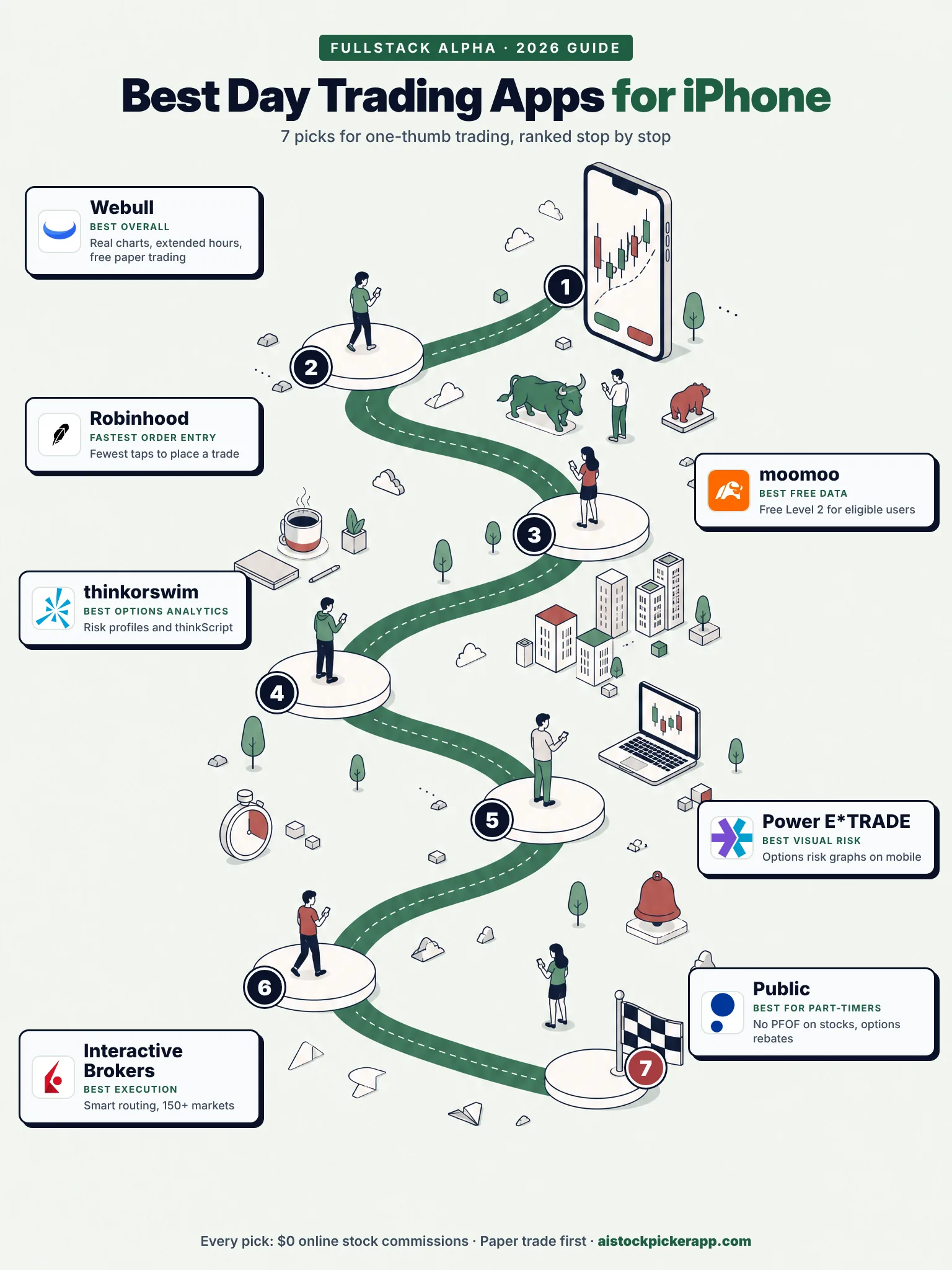
The seven picks at a glance, from best overall to best for part-time traders.
1. Webull: best overall of the day trading apps for iPhone
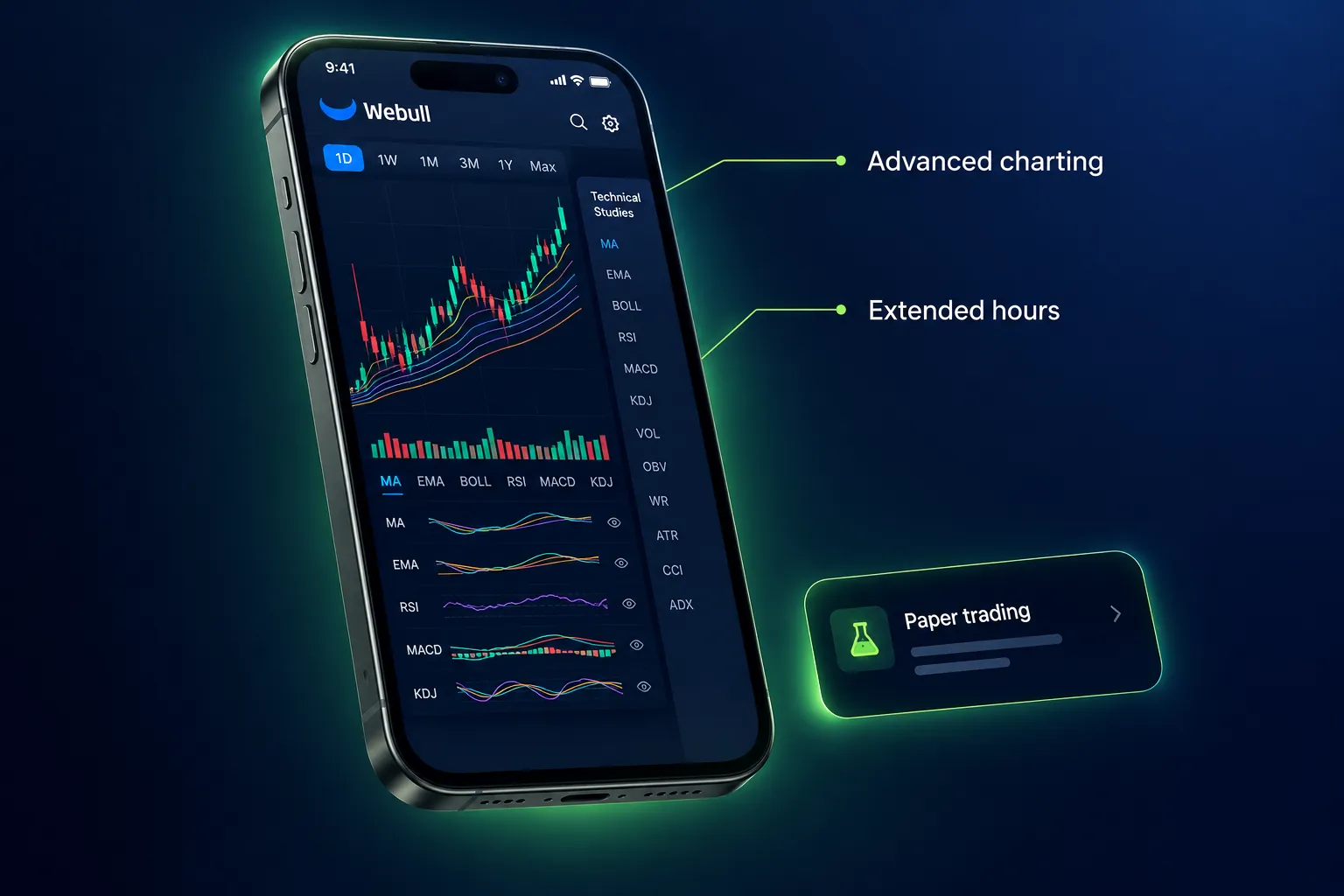
Best for: chart-focused traders who outgrew a beginner app.
Webull is the pick if you want real technical analysis on a phone screen. It's a commission-free broker built for active traders who want actual charting and extended-hours access, not just a big green buy button. You get zero-commission stocks, ETFs, and options, fractional shares, pre-market and after-hours trading, free paper trading, and IRAs, with no account minimum.
The mobile charting is the reason it's here. Most free apps give you a line graph and three indicators. Webull gives you multi-timeframe candlesticks, drawing tools, and a study list deep enough that you'll turn most of it off. That last part matters. Signal over noise applies to your indicator panel too, so pick three studies you trust and mute the rest.
One thing to know before you fund it: in October 2026 a House China committee report called Webull a national security risk over its ownership. Nothing changed for customer accounts, but our breakdown of the Webull report covers what it means. For our hands-on scoring, see the full Webull review and the Webull day trading playbook.
Extended hours is the other quiet advantage. If you trade gaps, pre-market access on your phone at 7:15 a.m. is worth more than any feature on a slick homepage.
Pros - ✅ Advanced charts and indicators most free apps lack - ✅ Free paper trading to test before real money - ✅ Extended pre-market and after-hours access - ✅ Commission-free stocks, ETFs, and options - ✅ Fractional shares and IRAs available
Cons - ❌ Steeper learning curve than Robinhood for beginners - ❌ Payment for order flow means the spread is the real cost, not the commission - ❌ Customer support is slow, a common Reddit complaint - ❌ Fewer long-term account features than a full broker
Decision rule: Choose Webull if you read price action off a chart before you click, and you want that chart on your phone without paying for it. Skip it if your first trade is next week and you get overwhelmed by settings screens.
2. Robinhood: best for fastest one-thumb execution
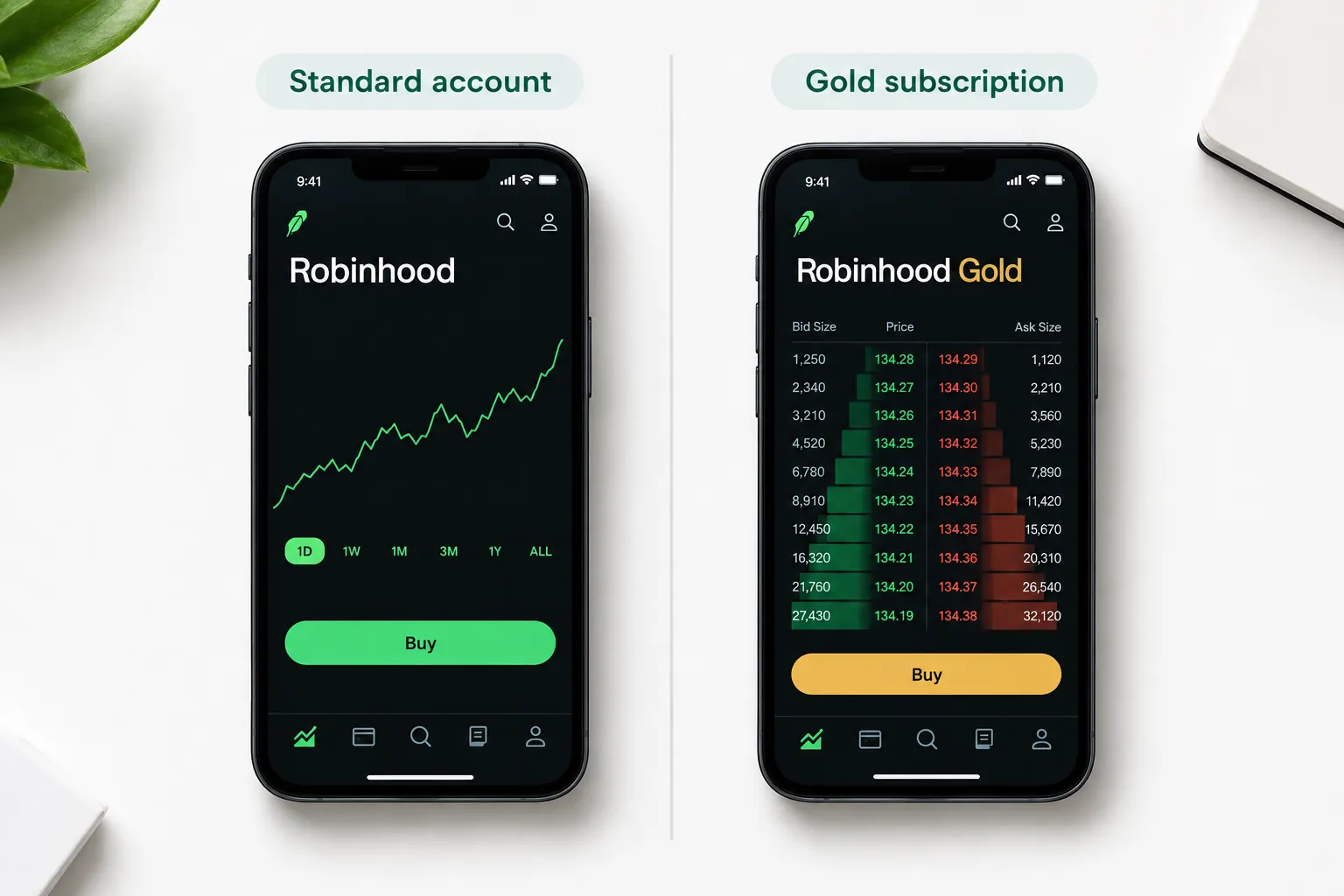
Best for: beginner and casual day traders who value a simple, fast mobile experience.
Robinhood has the easiest order flow of any major app, full stop. Commission-free stocks, ETFs, options, and crypto, plus Robinhood Legend on desktop for active traders, and Robinhood Gold adds Level 2 market data and extra features for a monthly fee.
The speed is the product. Ticker, swipe, size, submit. When you've got four minutes between a standup and a client call, fewer taps is a genuine edge, and Robinhood engineered its way to the smallest number of taps in the category. Fractional shares and a 24-hour market on select stocks round it out.
There's also no paper trading account, which matters on a 6-inch screen. Our guide to whether Robinhood has paper trading lists three free ways to practice first.
The tradeoff is analysis depth. Compared to thinkorswim or moomoo, the tools are thin. And the payment-for-order-flow model draws steady criticism, which is worth understanding rather than ignoring: your broker gets paid to route your order, and the price you actually fill at is where that cost shows up. The SEC's investor guidance on order execution explains the mechanics in plain English.
Pros - ✅ Commission-free stock, ETF, and options trades - ✅ Very clean, fast mobile interface - ✅ Robinhood Legend desktop platform for active traders - ✅ Robinhood Gold adds Level 2 market data and extras - ✅ Fractional shares and 24-hour market on select stocks
Cons - ❌ Fewer advanced analysis tools than thinkorswim or TradeStation - ❌ The payment-for-order-flow model draws criticism from some traders
Decision rule: Choose Robinhood if your setups are decided before market open and the phone is purely an execution tool. If you're doing your analysis on the phone, you'll outgrow it in a few months.
3. moomoo: best free market data on mobile
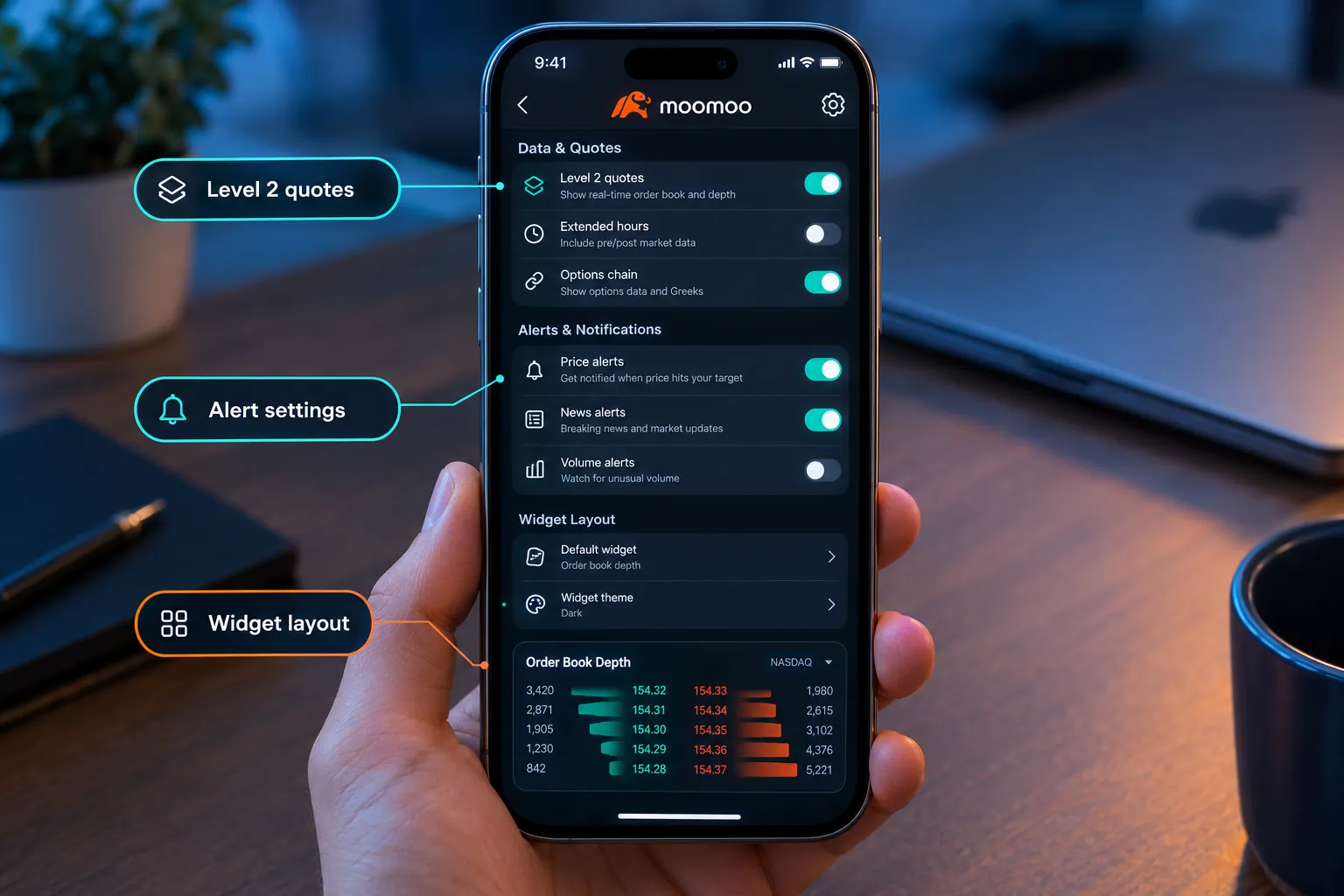
Best for: active day traders and options traders who want deep market data on mobile at no platform cost.
moomoo, from Futu, hands you data most free apps put behind a paywall. Commission-free U.S. stock and ETF trades, real-time quotes, free Level 2 for eligible users, detailed options chains, order book depth, capital flow, institutional tracking, and short interest, all inside a phone app.
Reading the tape on mobile used to be a joke. moomoo makes it plausible. If you scalp low float names or care about where the size is sitting on the bid, having depth of book on your iPhone changes how you size and where you place a stop.
The cost is cognitive. The interface is dense, and a beginner will drown. There's a built-in learning hub and paper trading, which helps, but expect a real ramp. Some data perks and promotions also depend on account size or activity, so read the terms before you assume the Level 2 is permanent.
Pros - ✅ Commission-free U.S. stock and ETF trades - ✅ Deep market data such as order book, capital flow, and institutional tracking - ✅ Detailed options chains and strategy tools - ✅ Paper trading and a built-in learning hub - ✅ Strong desktop app alongside mobile
Cons - ❌ The dense interface has a learning curve for beginners - ❌ Some promotions and data perks depend on account size or activity
Decision rule: Choose moomoo if you want Level 2 depth without a monthly data bill and you're willing to spend a weekend learning the layout. Skip it if a crowded screen makes you freeze. Analysis paralysis costs more than a data subscription.
4. thinkorswim: best options analytics on iPhone
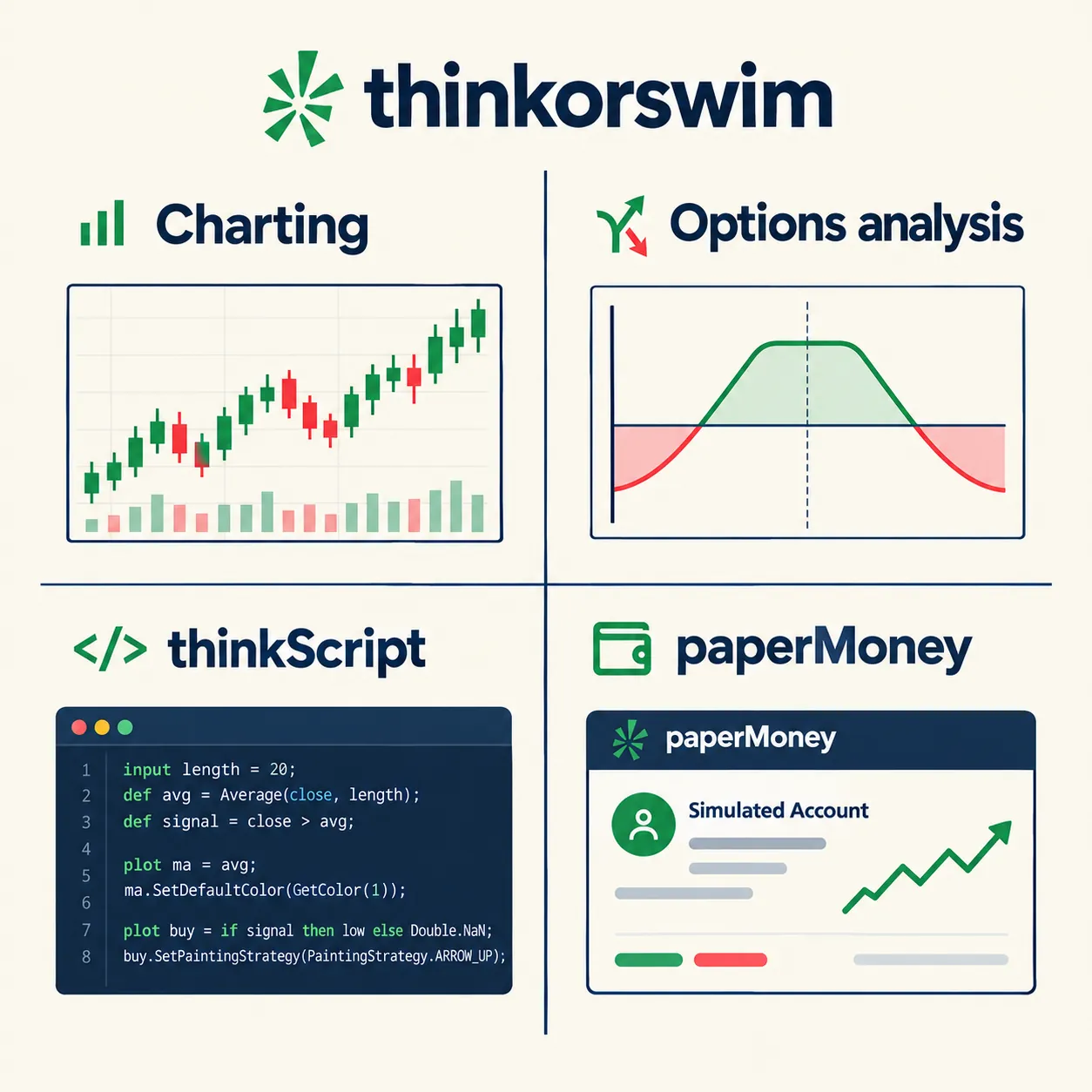
Best for: active stock and options traders who want deep analysis tools at a major broker with $0 online stock commissions.
thinkorswim is Charles Schwab's trading platform across desktop, web, and mobile, with pro-level charting, options probability tools, risk profiles, thinkScript custom studies, and paperMoney simulated trading. Options analytics and scripting that normally live behind a paid platform come free with a Schwab account.
For an iPhone trader, the mobile app is more capable than it has any right to be. You can pull up an options chain, check probability of expiring, and see a risk graph before you send the order. That's the difference between a considered position and a guess with a strike price attached.
thinkScript is the real moat. You can write a custom study or scan and have it available on your phone. Nobody else on this list gives you that for free. The cost is learning time. Hundreds of settings, a heavy desktop platform that crawls on older machines, and a learning curve that will eat a month.
Pros - ✅ $0 online stock and ETF commissions at Schwab - ✅ Powerful options analysis, probability tools, and risk profiles - ✅ thinkScript lets you build custom studies and scans - ✅ paperMoney simulated trading for practice - ✅ Full platform on desktop, web, and mobile
Cons - ❌ The desktop platform is heavy and can feel slow on older computers - ❌ Steep learning curve with hundreds of settings
Decision rule: Choose thinkorswim if options are more than a quarter of your volume and you want your analysis and your broker in one place. Skip it if you trade shares only and hate configuration. For the software side of options analysis, our AI options tools roundup covers what sits on top.
5. Power E*TRADE: best visual risk analysis on mobile
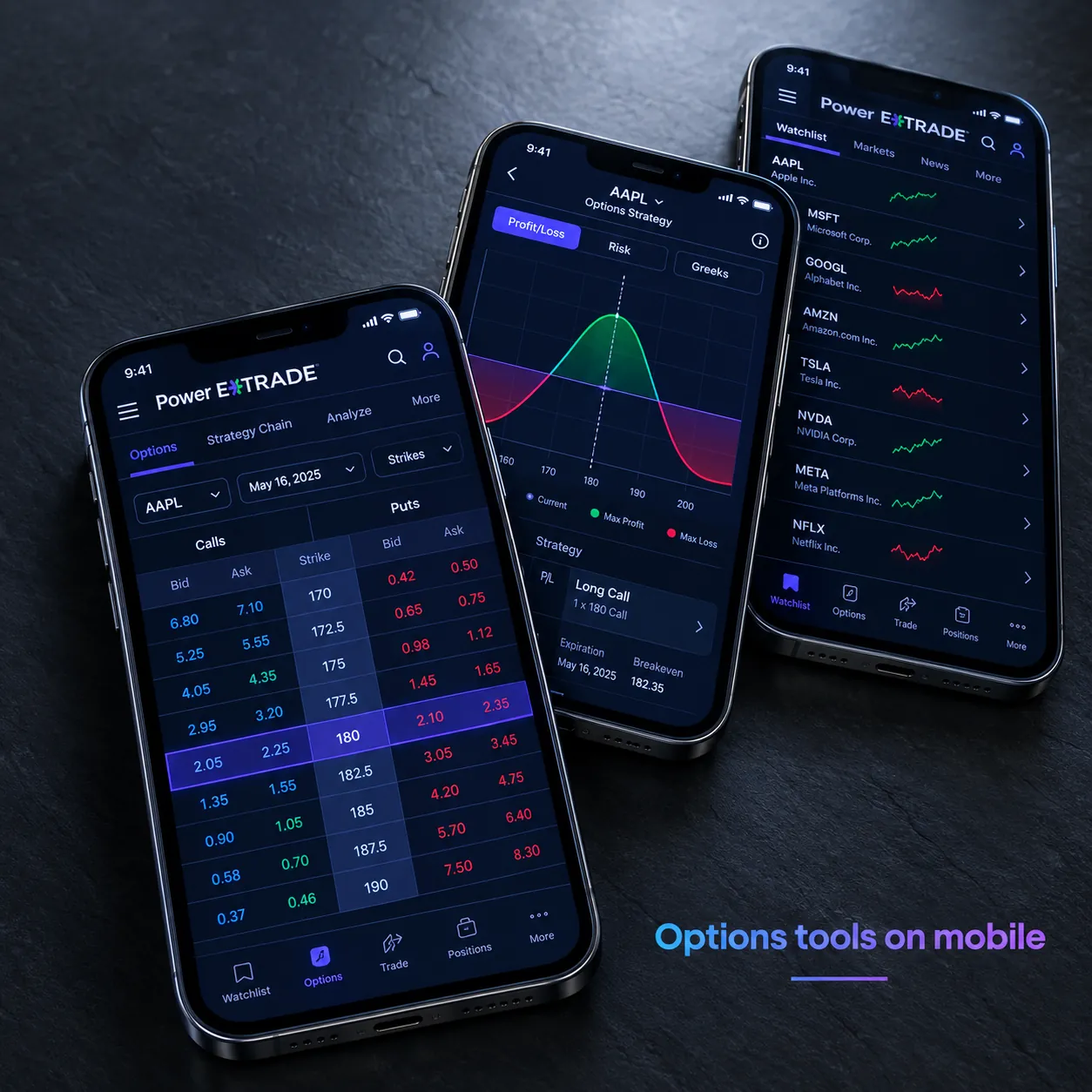
Best for: active traders who want a full-featured platform backed by a large brokerage and $0 online stock commissions.
Power E*TRADE is E*TRADE from Morgan Stanley's active-trader platform on web and mobile, with advanced charting, options strategy tools, streaming data, and paper trading. The standout is a genuinely strong options experience on a phone, with risk visualizations that show you the shape of your downside before you commit.
That visual risk graph is underrated for one-thumb trading. When you're placing a spread on a break and can't sit with a spreadsheet, seeing max loss drawn as a curve is faster than reading four numbers and doing math in your head. Position sizing gets easier when the risk is a picture.
The gaps are real. Customization and automation lag TradeStation, and a few advanced features are simply easier on web than on iOS. If you plan to build automated rules, look elsewhere.
Pros - ✅ $0 online stock and ETF commissions - ✅ Strong options tools with visual risk and probability analysis - ✅ Advanced charting with many studies - ✅ Paper trading for practice - ✅ Backed by Morgan Stanley's brokerage
Cons - ❌ Fewer customization and automation options than TradeStation - ❌ Some advanced features are easier to use on web than on mobile
Decision rule: Choose Power E*TRADE if you want a big-brokerage account with options tools you can actually run from a phone, and you don't need scripting or automation.
6. Interactive Brokers: best execution and market access
Best for: serious day traders who want low margin rates, smart order routing, and access to global markets.
Interactive Brokers gives you stocks, options, futures, forex, and bonds across 150+ markets through the IBKR Mobile app, the Trader Workstation desktop platform, and a full API. IBKR Pro's smart order routing aims for price improvement rather than selling your flow, and margin rates are among the lowest of any U.S. broker.
If you trade size, margin cost and fill quality dominate everything else on this page. A few basis points of price improvement across hundreds of trades a month outweighs whether an app has a nice widget. IBKR is the only pick here that competes on execution economics rather than interface polish.
The catch is that it feels built for professionals, because it was. TWS and the mobile app are dense. IBKR Pro's per-share pricing and market data subscriptions add up fast on a small account, which is exactly backwards for a $3,000 trader. IBKR Lite exists at $0 commissions if you want the brokerage without the per-share math.
Pros - ✅ Access to stocks, options, futures, and forex on global exchanges - ✅ IBKR Pro smart order routing aims for price improvement - ✅ Some of the lowest margin rates among U.S. brokers - ✅ TWS desktop platform with hotkeys and advanced order types - ✅ Full API for algorithmic traders
Cons - ❌ TWS and the mobile app feel complex for beginners - ❌ IBKR Pro per-share pricing and market data fees add up for small accounts
Decision rule: Choose Interactive Brokers if you're trading futures or foreign listings, using margin regularly, or planning to automate. Skip it if your account is under $5,000 and you'd be paying data fees for depth you don't use yet. If automation is where you're headed, read what to know before you automate trades first.
7. Public: best simple iPhone app for part-time trading
Best for: iPhone users who want a simple, modern app for part-time trading and investing.
Public is the simplest of the best day trading apps for iPhone. It covers stocks, ETFs, options, bonds, and crypto in one clean app, with options rebates of $0.06 to $0.18 per stock or ETF contract based on monthly volume, a high-yield cash account at a variable 3.30% APY as of October 2026, bond and Treasury accounts, and direct indexing from a $1,000 minimum.
Two things make it interesting for a trader who isn't at the screen all day. First, Public doesn't take payment for order flow on stocks, so the business model is out in the open rather than buried in your fill price. Second, you get paid per options contract instead of paying, which changes the arithmetic if you trade volume.
What you don't get is speed gear. No hotkeys, no Level 2 depth, fewer day trading tools than Webull or thinkorswim. If you're scalping a low float name on a one-minute chart, this isn't the app.
Pros - ✅ Clean, fast iPhone app - ✅ Options trading with per-contract rebates - ✅ Stocks, ETFs, bonds, and crypto in one app - ✅ Real-time quotes and customizable alerts - ✅ Transparent business model with no payment for order flow on stocks
Cons - ❌ Fewer advanced day trading tools than Webull or thinkorswim - ❌ No hotkeys or Level 2 depth for fast scalping
Decision rule: Choose Public if you take two or three trades a day, hold some cash between setups, and want a single app that handles both. Skip it if your strategy depends on reading depth of book.
Top 5 iPhone features for the best day trading apps
The iPhone has a handful of native features that matter more than anything in the app's marketing copy. These are the ones traders actually use on a break.
- Lock Screen widgets. Your position and the ticker price without opening the phone. Saves four seconds, which is four seconds in a fast tape.
- Push price alerts. Set the alert at your entry and your stop, then put the phone down. The alert replaces the urge to check the chart 40 times an hour.
- Face ID for order confirmation. Fast authentication that still puts a half-second gate between an impulse and a filled order. That gate prevents more revenge trading than any rule you write down.
- Focus modes. A "market hours" Focus that allows your broker and silences everything else, so a group chat notification doesn't pull you out of a setup.
- Back Tap and Shortcuts. Double-tap the back of the phone to open your broker app straight to a watchlist. It's the closest thing iOS has to a hotkey.
Configure all five before your next session. It takes eleven minutes and removes most of the friction that makes phone trading feel sloppy.
📌 What You Should Know
- $0 commission is not $0 cost. Payment for order flow, data subscriptions, and margin rates are where the best day trading apps for iPhone actually make money from you.
- Most day traders lose money. A large study of Brazilian futures day traders found 97% of those who persisted for more than 300 days lost money. The app can't fix that. Your process can.
- The phone is an execution device. Plan setups the night before on a laptop, then let the phone place and monitor them.
- Paper trading is not equal across apps. Webull, moomoo, thinkorswim, Power E*TRADE, and IBKR have it. Robinhood and Public don't.
- The PDT rule changed. FINRA's change took effect June 4, 2026, with brokers phasing it in through October 2027. Ask your broker when your account switches.
- Journal every trade, even on mobile. Our best trading journal comparison covers tools that import from these brokers automatically.
⚠️ What to Look Out For
Look at execution speed, data cost, and whether the app can hold your risk rules. Everything else is preference. Run this checklist before you pick any of the best day trading apps for iPhone:
- Count the taps. Open the app cold and time yourself placing a limit order with a stop. Under 15 seconds is good. Over 30 and you'll miss entries.
- Check the data tier. Is Level 1 streaming free? What does Level 2 cost per month? On a $3,000 account, a $30 monthly data bill is a 1% drag before you trade.
- Test bracket orders on mobile. Can you set entry, stop loss, and target in one ticket? If not, you'll be managing risk manually with one thumb, which is how accounts get hurt.
- Find the cancel button. Seriously. In a fast move, knowing exactly where cancel-and-replace lives is worth more than any indicator.
- Read the margin rate. If you use margin more than occasionally, the rate difference between brokers dwarfs commission savings.
- Confirm SIPC coverage. It protects against the broker failing, not against your trade going against you. Two different things.
-
Paper trade for two weeks. Webull, moomoo, thinkorswim, and Power E*TRADE all include simulated accounts. Use one before you fund.
-
Watch for fake-money apps posing as brokers. "Day trading simulator" games in the App Store are fine for practice, but they don't route real orders. Use a broker's own paper account so the practice matches the live app.
The common mistake: choosing on features and ignoring fees you'll pay every month. The second most common: picking the app with the most tools when you only use three. Systems over hacks.
Free, beginner, and paper trading apps for iPhone: what those searches really ask
People search for the best day trading apps for iPhone a dozen ways. Here's the short answer to each.
- Best day trading app for iPhone (free): Webull and moomoo are both $0 commission with free real-time Level 1 data and free paper trading. Public is free on stocks with options rebates.
- Best day trading app for beginners: Robinhood for the simplest order flow, Webull once you want charts. Start in paper mode either way.
- Paper trading app / day trading app with fake money: use a broker's built-in simulator (Webull, moomoo, thinkorswim paperMoney, Power E*TRADE, IBKR). Our list of free paper trading simulators compares seven.
- Fidelity day trading app: Fidelity's mobile app handles $0 online stock trades well, but it lacks the charting and Level 2 depth of the seven picks here, which is why it's not on this list.
- Best day trading apps for iPhone on Reddit: Reddit leans Webull and thinkorswim for tools, IBKR for execution, and complains most about support wait times at every broker.
- Best day trading platform overall: if you'll trade from a desk too, read our best day trading platform comparison and the directory's best stock apps for day trading.
How do these compare to other options?
iPhone apps trade off screen real estate for availability. A desktop platform gives you six charts and hotkeys but only when you're sitting at it. That's the whole comparison.
Android apps. Webull, Robinhood, moomoo, thinkorswim, Power E*TRADE, IBKR Mobile, and Public all ship Android versions with near-identical features. Android gives you more widget flexibility and true default-app control. iOS usually gets new features first and has more consistent low-latency push notification delivery. If you're already on Android, none of these picks are off the table.
Desktop platforms. Trader Workstation, thinkorswim desktop, and Robinhood Legend give you hotkeys, multi-monitor layouts, and Level 2 ladders at a size you can read. That suits full-time traders and scalpers who need sub-second order modification. It does nothing for someone trading on a lunch break.
Charting and scanner tools. TradingView and similar platforms handle analysis better than any broker app, then you route the order through your broker. Suits swing traders and anyone who does their homework the night before. Our swing trade scanner comparison covers that stack.
Which of the best day trading apps for iPhone suits you: - Full-time at a desk: desktop platform, IBKR or thinkorswim. - Trading around a job from a phone: Webull or Robinhood, with alerts doing the watching. - Options-heavy from a phone: thinkorswim or Power E*TRADE. - Data-driven scalping on mobile: moomoo. - Two trades a day plus idle cash: Public.
The honest version: your phone is an execution and monitoring device. Analysis on a 6-inch screen is worse than analysis on a laptop, and pretending otherwise is how people end up chasing a green candle at lunch. Build the watchlist the night before. Let the phone execute it.
Sell options more than you buy stock? Our tastytrade review covers the options-first app with $1 per contract to open, $0 to close and a $10 cap per leg.
Final verdict
Among the best day trading apps for iPhone, Webull is the overall pick for iPhone day traders who read charts before they click and want extended hours plus free paper trading at no commission. Robinhood is for traders whose plan is set before the open and who need the fastest possible order entry on a break. moomoo is for the data-first trader who wants Level 2 depth and order book flow without a monthly bill. thinkorswim is for options traders who want pro analytics and scripting inside a major brokerage. Power E*TRADE is for options traders who think in risk graphs. Interactive Brokers is for serious traders who care about routing, margin rates, and global markets more than interface polish. Public is for the part-time trader who takes two setups a day and wants a clean app that also pays on idle cash.
Your next step, today, with any of the best day trading apps for iPhone: open a paper trading account on Webull or moomoo, configure a Lock Screen widget and two price alerts, then place ten simulated bracket orders with your thumb only. Time each one. If you can't get under 20 seconds, the problem is the app, not you. Cut the noise, keep the alpha.
If you want the broker side compared at a $2,000 account size, read the best broker for day trading a $2,000 account.
Picking a broker is one decision. Picking what runs on top of it is the next one. FullStack Alpha has tested 200 AI stock tools, and the directory lists them by category and price. Browse the directory → aistockpickerapps.com
Related reading: AI trading app: what to check before you download one and AI stock scanner: 5 filters that cut 200 tickers down to 5.
Some links in this article are affiliate links, and we may earn a commission at no extra cost to you.
We test the tools. You get the verdict.
One email a week. What we tested, what scored, and what we'd skip. Written for traders, not for clicks.
Frequently asked
More from FullStack Alpha