Finviz Elite Subscription: Monthly vs Annual, Which Saves More?

Quick Answer: A finviz elite subscription costs $39.50 monthly or $299.50 annually, according to Finviz’s listed pricing. Annual billing saves $174.50, about 36.8%, compared with twelve monthly payments and becomes cheaper at the eighth paid month. Choose monthly while proving that Elite improves your nightly screening routine; choose annual once regular use is established.
Key Takeaways
- Monthly and annual Elite plans provide the same research features.
- Annual billing requires an upfront payment, not monthly installments.
- Seven monthly payments cost less than an annual subscription; eight cost more.
- Elite adds real-time stock data, advanced screening, alerts, exports, and backtesting.
- Nightly swing traders should prioritize workflow improvements over intraday data speed.
- The seven-day trial requires payment details, so record the cancellation deadline.
- Canceling renewal and requesting a refund are separate actions.
- Subscription value depends on actual use, not better trading returns.
The assessment uses desk research of Finviz’s documentation and published reviews, with public user sentiment treated as qualitative context rather than a representative survey.
Finviz summary: what are the subscription pros and cons?
A finviz elite subscription makes the most sense for traders who already use Finviz regularly and can identify a paid feature that removes repetitive work. Annual billing rewards consistent use; monthly billing limits the cost of a mistaken purchase.
The central advantage is a familiar screening environment with more capable research tools. The central drawback is paying for capabilities that may already exist in a brokerage account or another subscription.
| Advantages | Limitations |
|---|---|
| Screening, charts, and market context in one workspace | Primarily suited to U.S. stock research |
| Real-time data and extended-hours research | Research access does not replace order execution |
| Alerts and exports reduce repetitive checking | Benefits depend on configuration and consistent use |
| Lower effective cost with annual billing | Annual payment commits cash upfront |
| Backtesting supports historical rule evaluation | Historical results can encourage false confidence |
For nightly swing traders, the buying question is specific: does Elite shorten watchlist preparation without weakening the process?
A trader who repeatedly copies screening results into a journal may value exports immediately. A trader who checks a few daily charts after work may find the free version sufficient.
Treat a finviz elite subscription as an operating expense. The fee remains payable during losing months, vacations, and periods when market conditions produce few suitable setups.
What does a finviz elite subscription include?
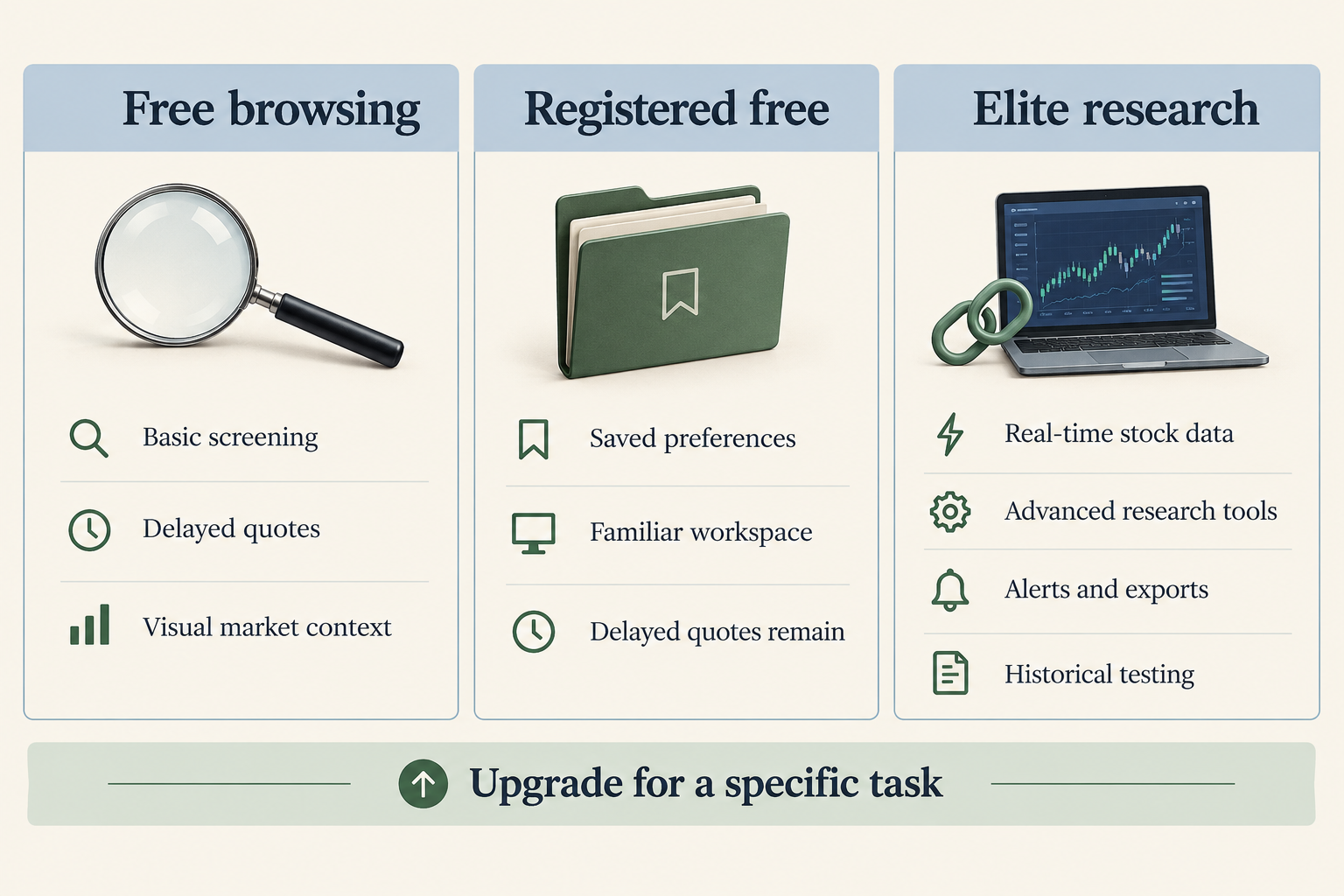
A finviz elite subscription is Finviz’s paid research tier, combining real-time stock data with advanced screening, interactive charts, alerts, exports, and historical testing. Monthly and annual billing provide the same Elite package, as described on the official Elite feature page.
What is Finviz Elite, and how does it work?
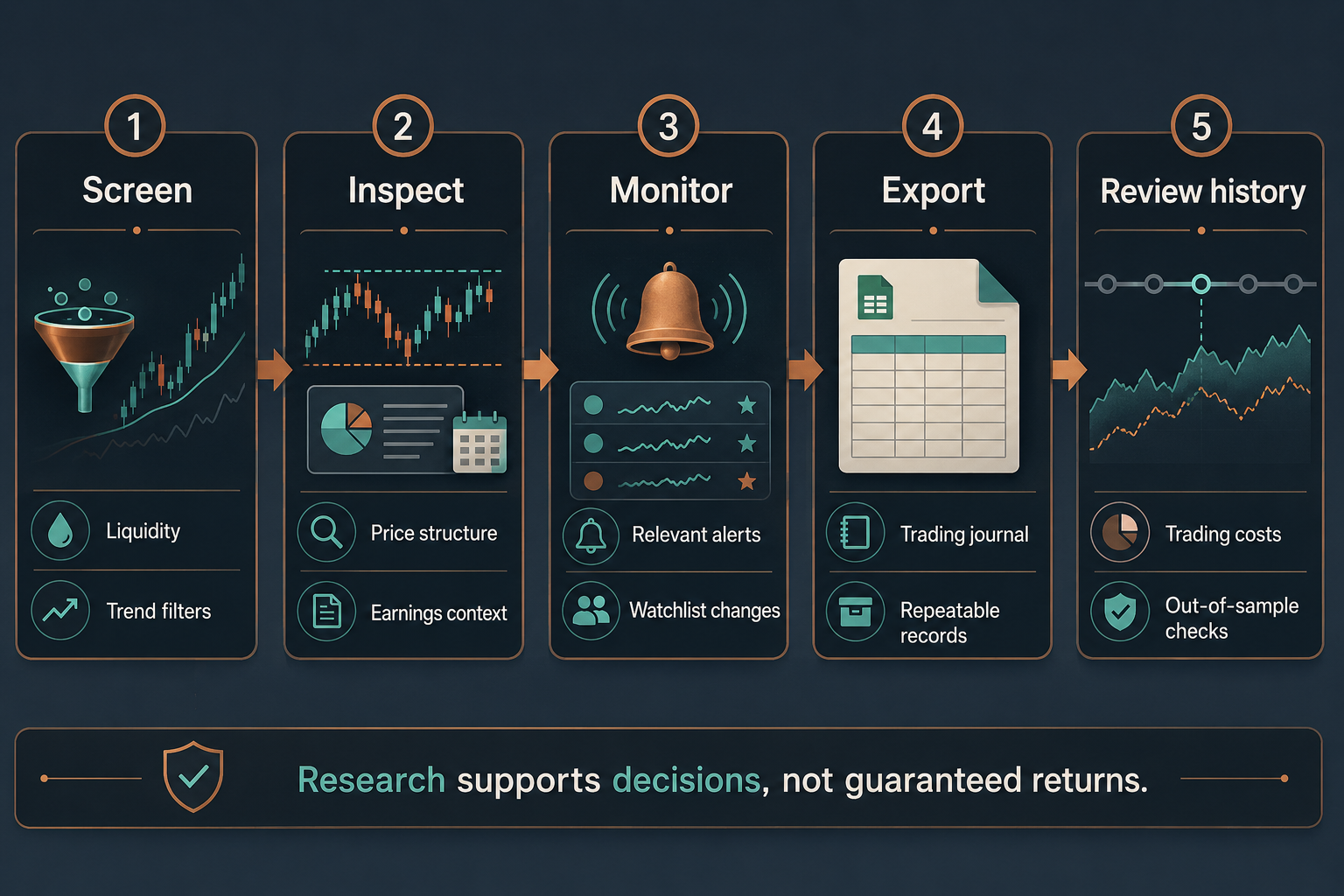
Finviz Elite helps users narrow a stock universe through fundamental, technical, and descriptive filters, then investigate matching companies. A swing trader can screen for liquidity and trend conditions, review charts, build a watchlist, and monitor candidates.
Finviz does not turn screening results into a complete trading strategy. Entry rules, position sizing, earnings risk, and exit decisions remain the trader’s responsibility.
An effective nightly sequence is straightforward: identify candidates, reject unsuitable charts, check upcoming events, and record a plan. Paid features should make that sequence easier rather than encourage unnecessary research.
Free plan without registration
Free Finviz provides screening, stock pages, charts, news links, and visual market context. The Free vs ELITE comparison explains the access differences.
Delayed quotes matter less for a completed daily-chart review than for an intraday entry. However, always confirm the displayed session and timestamp before treating a price as current.
Free plan with registration
A registered free account adds saved-work conveniences without converting the service into Elite. Registration can therefore solve an organizational problem without creating another recurring expense.
The broader Finviz Elite review provides context for readers comparing the whole product rather than only billing schedules.
Decision rule: keep free access if the missing feature rarely interrupts the workflow. Consider a finviz elite subscription when the same limitation creates friction most evenings.
Does Finviz Elite include real-time data?
Yes. Finviz lists real-time stock data and extended-hours research among Elite’s benefits. Check the Elite specifications for current coverage and restrictions rather than assuming every instrument or dataset has identical update timing.
Real-time does not mean a research page replaces an execution platform. Use the broker’s order ticket to confirm tradable prices, spreads, and buying power.
For after-close screening, exports or alerts may justify the upgrade more convincingly than quote speed.
How much is Finviz Elite per month vs per year?
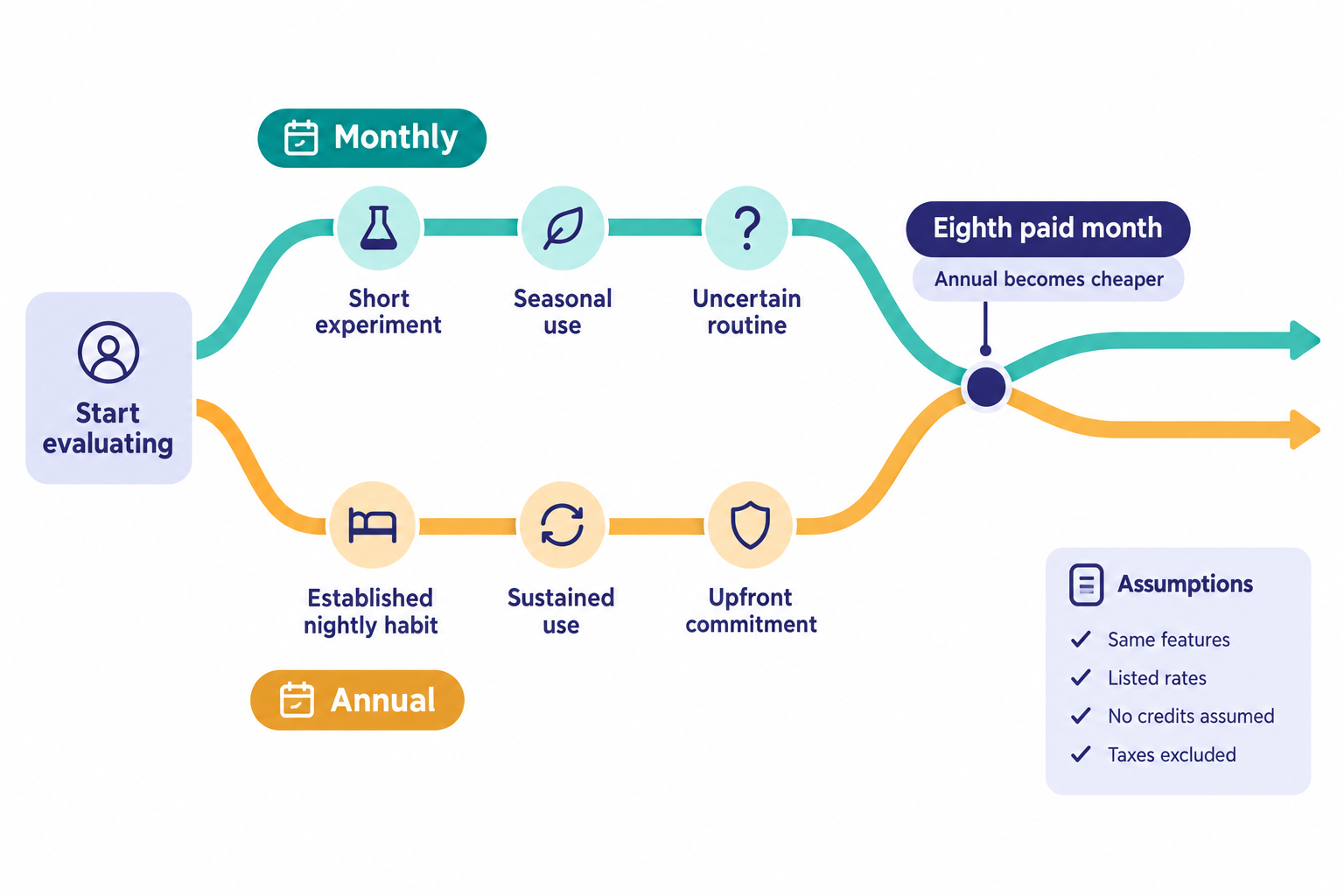
For traders asking how much is finviz elite, the listed answer is $39.50 monthly or $299.50 annually. The annual plan works out to approximately $24.96 per month, but the full annual payment is collected upfront, according to Finviz pricing.
Cost and plan comparison for 2026
The following calculations use Finviz’s published list rates, without taxes, currency conversion, promotional adjustments, or future price changes. Confirm the checkout total before purchasing a finviz elite subscription.
| Billing option | Payment schedule | Cost for twelve paid months | Effective monthly cost |
|---|---|---|---|
| Free | No subscription payment | $0 | $0 |
| Elite monthly | $39.50 each month | $474.00 | $39.50 |
| Elite annual | $299.50 upfront | $299.50 | About $24.96 |
Source: Finviz Elite pricing. Annualized and effective monthly figures are calculations, not separate offers.
How much does annual billing save?
Annual billing saves $174.50 over twelve monthly payments, approximately 36.8%. The calculation uses the official monthly and annual rates:
- Monthly billing for a year: $39.50 × 12 = $474.00.
- Difference: $474.00 − $299.50 = $174.50.
- Percentage saved: $174.50 ÷ $474.00 × 100 = 36.8%.
- Break-even duration: $299.50 ÷ $39.50 = 7.58 months.
Because monthly subscriptions are purchased in billing periods, the practical crossover is the eighth monthly payment.
| Paid monthly periods | Monthly total | Less expensive option |
|---|---|---|
| 3 | $118.50 | Monthly |
| 6 | $237.00 | Monthly |
| 7 | $276.50 | Monthly |
| 8 | $316.00 | Annual |
| 12 | $474.00 | Annual |
Source: calculations from Finviz’s listed rates, comparing monthly payments with the $299.50 annual commitment.
The distinction matters: annual billing is cheaper for sustained access, not automatically for every buyer. Someone who needs only six paid months should not buy twelve merely because the monthly equivalent looks attractive.
What if monthly billing comes before annual billing?
A monthly evaluation followed by an annual purchase is a different comparison from choosing annual on day one. Do not assume earlier monthly payments become credits.
For example, one monthly payment followed by an annual purchase totals $339.00, based on Finviz’s listed prices. Without a credit or overlapping-period adjustment, that generally represents thirteen paid months rather than twelve.
Before switching a finviz elite subscription, confirm when the annual term starts, whether any unused monthly time receives credit, and when the next renewal occurs.
What if usage is seasonal?
Monthly billing can win when planned active periods total seven paid months or fewer within the same year. Count billing periods rather than individual trading days, and remember that partial months may still require a full monthly payment.
Annual billing can still suit a trader who screens through quiet markets, because watchlist maintenance continues even when trading slows. A seasonal trader who genuinely stops research has a stronger reason to remain monthly.
Are discount codes or coupons available?
The annual rate is the clear published discount. No additional coupon is verified here.
Evaluate any promotion against the checkout total, renewal price, eligibility, and commitment period. An expired screenshot or forum post does not establish an available offer.
A discounted finviz elite subscription can still be poor value if the tool duplicates an existing platform.
Who should buy the subscription: swing traders, day traders, scalpers, or investors?
Nightly swing traders are a strong fit when Elite supports a repeatable screening process. Day traders may benefit from fresher data, while scalpers and long-term investors should assess whether Finviz matches their main research requirements.
Who should use Finviz Elite for swing trading?
A finviz elite subscription suits swing traders who screen frequently, revisit candidates, maintain structured watchlists, and transfer research into a journal.
For example, a trader might screen liquid stocks above a long-term moving average, inspect consolidation patterns, and exclude companies reporting earnings soon. Elite is valuable if it reduces copying, repeated checks, or unnecessary chart switching.
Traders still learning basic screening should establish a useful routine before committing annually. Paying for more filters does not fix unclear selection rules.
Finviz Elite for day traders vs long-term investors
Day traders may value current stock data and rapid visual research, but should compare alert behavior and screening refresh needs with specialist scanning platforms. A finviz elite subscription does not replace brokerage orders, execution controls, or account risk management.
Long-term investors often place greater weight on valuation, filings, business quality, and portfolio exposure. Free screening plus company disclosures may cover occasional research adequately.
Scalpers have an even stronger reason to prioritize execution-focused software. A chart that looks current is not equivalent to the full execution information needed for a very short holding period.
Is Finviz Elite worth the money?
A finviz elite subscription is worth considering when the value of repeated workflow improvements exceeds the fee. Saved time is a more defensible starting point than assumed trading profits.
Consider an illustrative calculation: saving ten minutes across twenty research sessions frees about three hours and twenty minutes monthly. These are hypothetical assumptions, not measured Finviz performance.
During evaluation, record actual session duration, useful alerts, exports used, and unnecessary platform switching. Avoid valuing every saved minute as billable income unless that reflects reality.
Subscription costs also matter relative to account size. Using Finviz’s annual price, the $299.50 fee equals about 6.0% of a hypothetical $5,000 account or 0.6% of a hypothetical $50,000 account, before other expenses. Those ratios are cost illustrations, not return targets.
For a broader workflow comparison, the swing trading tools guide helps distinguish screening from other research tasks.
Top 5 features that justify the subscription
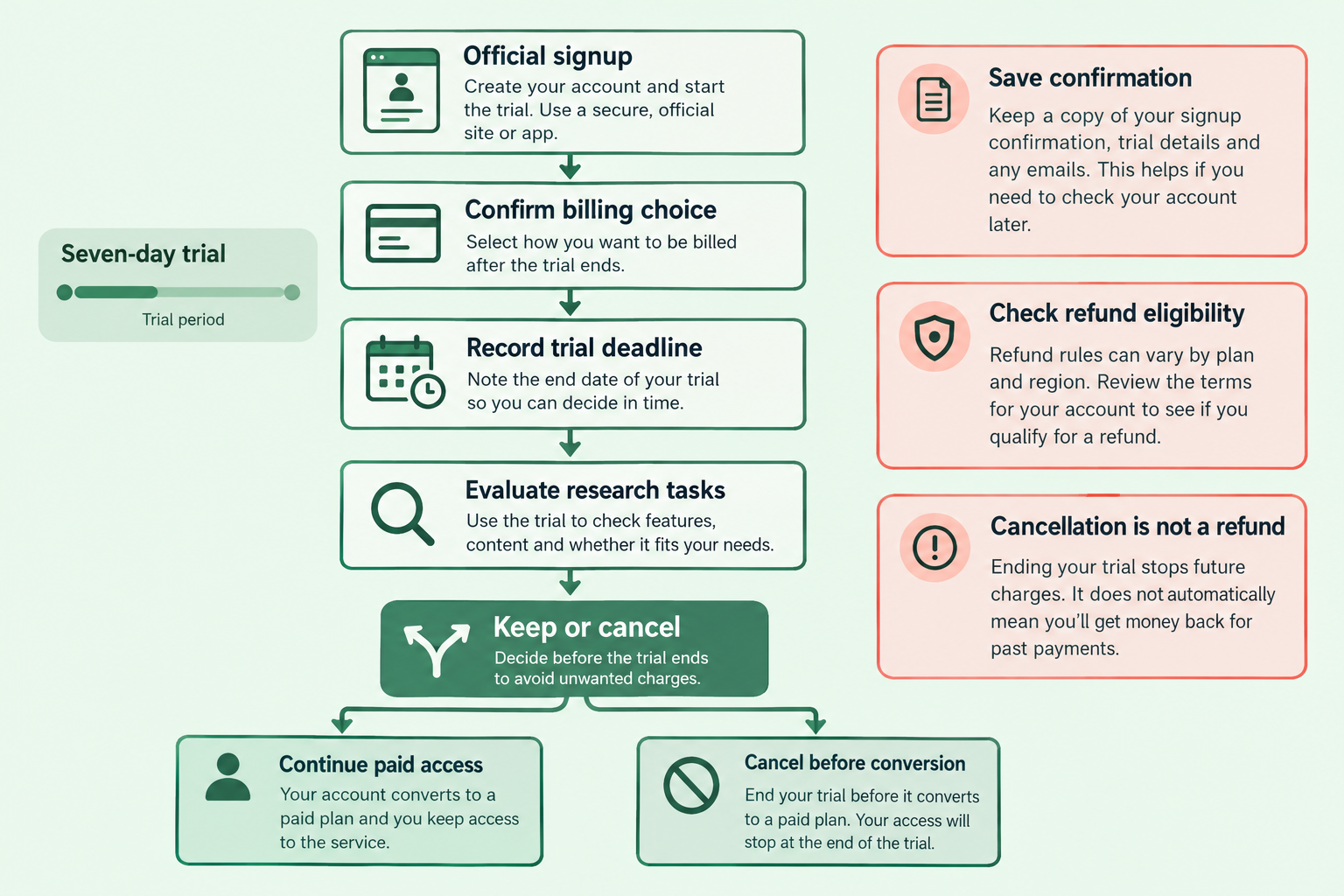
The most persuasive reasons to buy are screening and exports, chart review, alerts, contextual research, and backtesting. A finviz elite subscription should improve a recurring task in at least one of these areas, not merely provide more settings.
Screener and exports
Advanced screening helps narrow candidates consistently, while exports make research easier to preserve and compare. Finviz describes these capabilities on its Elite page.
A useful export records the date, selection criteria, and candidates reviewed. Saving only ticker symbols loses the context needed to understand why a stock qualified.
For automation or API-related workflows, confirm current permissions, supported access methods, and applicable limits. Export access does not imply unrestricted scraping, redistribution, or licensed use in another product.
Common mistake: adding filters until only yesterday’s strongest performer remains. Screening should express a repeatable thesis, not reverse-engineer an attractive historical chart.
Charting and price action
Interactive charts support closer inspection of trend, consolidation, and potential invalidation levels. The value of a finviz elite subscription depends partly on whether those charts reduce switching to another paid tool.
For nightly reviews, compare a candidate’s daily structure with a broader weekly view where available. Check whether a seemingly orderly pullback sits inside a weak longer-term trend.
Record what would invalidate the setup before planning an entry. Chart convenience is useful; visual confidence alone is not evidence of an edge.
Portfolio tracking and alerts
Research lists organize candidates, while alerts can reduce repeated manual checking. Confirm supported alert types and delivery settings in Finviz’s current feature documentation.
Start with a small watchlist and a clear reason for every notification. Excess alerts turn monitoring into noise and can encourage impulsive decisions.
Finviz research portfolios should not be treated as authoritative brokerage records. Brokers remain the source for fills, balances, actual positions, and account statements.
Market news, financial statements, and heatmaps
Market maps and company information help explain why screening results are changing. However, these features are not all exclusive to Elite, as the free-versus-paid comparison makes clear.
A strong sector heatmap can suggest shared momentum, but several correlated watchlist positions may create concentrated exposure. Review the portfolio implication, not only each chart separately.
Confirm material earnings information against company releases. A headline or financial summary should not substitute for reading the relevant disclosure before taking event risk.
Backtests
Backtesting examines how defined rules behaved historically. It does not establish how a future trade will perform.
Before treating a result as useful, ask whether the test accounts for trading costs, slippage, realistic entry timing, and the historical stock universe. Confirm what Finviz’s implementation actually models.
Use separate development and evaluation periods where practical. Repeatedly changing parameters until a backtest looks attractive can produce a strategy fitted to noise.
A finviz elite subscription belongs within a full stack alpha workflow that also includes execution discipline, risk controls, and trade review. Screening and historical analysis cannot replace those functions.
How does Finviz compare with other stock screening platforms?
Finviz is most compelling for fast, visual stock screening. Alternatives may fit better when detailed charting, continuous intraday scanning, or fundamental portfolio analysis is the primary requirement.
The StockBrokers.com Finviz review provides an external perspective. Product comparisons should still be checked against current plans and data entitlements.
| Platform | Main comparison point | Best question to ask |
|---|---|---|
| TradingView | Chart-centered research and broader market coverage | Is chart analysis the main task? |
| TC2000 | Screening connected with chart workflows | Would tighter chart-screen integration help? |
| Stock Rover | Fundamental and portfolio research | Are business quality and allocation the priority? |
| Trade Ideas | Active intraday scanning | Is continuous opportunity monitoring essential? |
| Brokerage tools | Research bundled with an account | Is the required capability already available? |
Feature availability varies by plan. Avoid comparing a basic competitor package with a fully configured platform that includes separate data charges.
Finviz Elite stock screener reviews and ratings
Reviews are useful for identifying workflow strengths and recurring complaints, not proving investment performance. Separate comments about chart usability or billing from unsupported claims that a screener produces profitable trades.
Public user sentiment is self-selected. A positive review from an intraday trader may have little relevance to someone screening after the close.
The provisional editorial rating below addresses research usefulness for this article’s audience. It is not a user-average score, verified satisfaction statistic, or expected-return estimate.
Read next: trading tool guides and alternatives
The TradingView versus Finviz comparison focuses on charting tradeoffs. The Finviz versus Trade Ideas comparison addresses screening versus active scanning.
Keep a finviz elite subscription only when its role is distinct. Two subscriptions that solve the same problem rarely provide twice the practical value.
How do you start, pause, or cancel the subscription?
Start through Finviz’s official signup flow, confirm the billing schedule, and save the renewal details. To stop a finviz elite subscription from renewing, use the account’s subscription controls and retain confirmation; cancellation and refund requests are separate processes.
The Account & Billing FAQ should govern trial, cancellation, and payment decisions.
How long is the free Elite trial, and how do you get it?
Finviz describes a seven-day trial requiring payment details. Access the offer through the official website and verify eligibility, the selected paid plan, and the conversion deadline in the billing FAQ and checkout flow.
The trial converts to the selected paid subscription unless canceled in time. Do not treat seven days as seven trading sessions, because weekends and holidays can reduce available market activity.
Use ordinary research tasks during the trial: run existing screens, inspect charts, create a limited alert set, and export usable results. A short trial can establish workflow fit, but cannot demonstrate reliable investment performance.
What should you check at signup?
Before activating a finviz elite subscription, save a record of:
- The account email and login method.
- The selected monthly or annual schedule.
- The first charge date and applicable time.
- The payment method and final checkout total.
- The cancellation route and refund conditions.
Set a reminder before the deadline, not at the last possible moment. If the trial spans a weekend, plan research sessions accordingly.
How to cancel finviz elite subscription renewal
Cancel through the authenticated account and billing controls identified in the official billing guidance. Interface wording can change, so follow the current subscription-management route rather than an old screenshot.
A practical cancellation checklist is:
- Sign in to the account associated with the charge.
- Open subscription or billing management.
- Complete the cancellation or automatic-renewal cancellation process.
- Save the confirmation and displayed access-end date.
- Check that the account no longer shows an upcoming renewal.
Deleting bookmarks, clearing browser data, or stopping use does not cancel billing. Contact support promptly if the subscription remains active unexpectedly.
Can you pause, switch, or request a refund?
Do not assume Finviz offers a pause function or automatically credits monthly payments toward annual billing. Confirm those arrangements before changing schedules.
Finviz’s billing FAQ addresses an initial 30-day refund period. Treat that as a policy with eligibility conditions, not a universal promise that every renewal or unused month is refundable.
The seven-day trial and initial refund period serve different purposes. A refund request after payment is not the same action as canceling before trial conversion.
For an eligible refund request, contact support promptly with the account email, charge date, and relevant receipt. Do not send a full payment-card number.
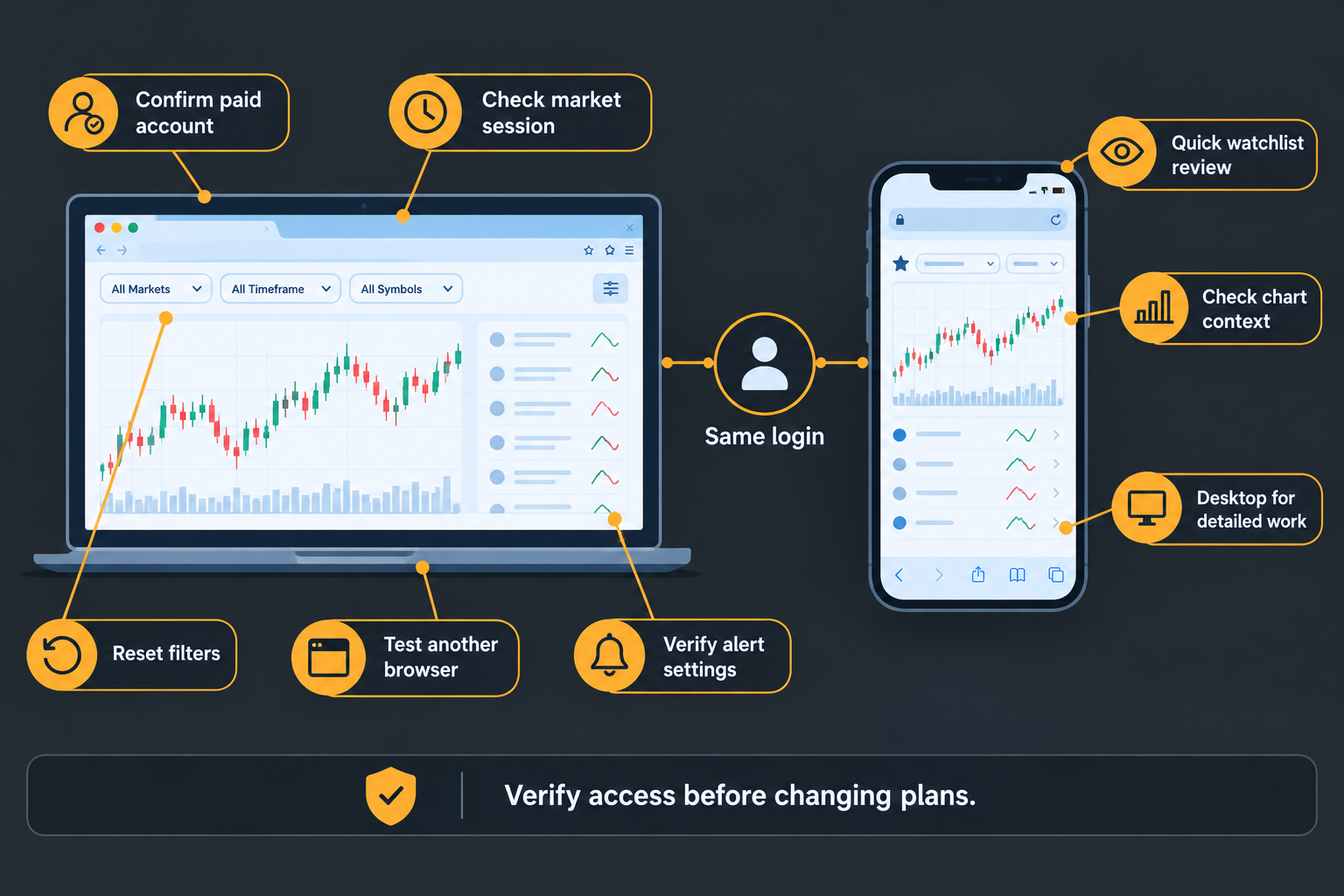
What should you do if Finviz Elite is not working?
First check account access, market-session timing, and browser behavior. A finviz elite subscription problem can involve billing, filters, alerts, or data display, and each requires a different response.
Use the Finviz help FAQ and account support rather than assuming another purchase will restore access.
Finviz Elite not working: troubleshooting checklist
| Symptom | First checks |
|---|---|
| Elite features appear unavailable | Confirm the account email and subscription status |
| Quotes appear unchanged | Check the session, instrument, and displayed timestamp |
| A screen returns no results | Remove restrictive filters and rebuild gradually |
| Charts fail to display | Try a private window or another browser |
| Alerts do not arrive | Review trigger conditions, delivery settings, and spam |
| Export access fails | Confirm the plan entitlement and supported export route |
If browser isolation resolves the issue, review extensions, script blocking, and stored site data. Avoid repeatedly changing billing settings while diagnosing a display problem.
For unresolved issues, provide support with the affected page, approximate time, browser, error message, and a screenshot without sensitive information.
Can you use Finviz Elite on a mobile app?
Plan around browser access rather than assuming a native Finviz Elite app is included. Check Finviz’s official help for current mobile guidance, and verify any app-store listing before entering credentials.
A phone browser can support quick watchlist checks. Dense filter selection, chart comparisons, and export management are generally easier on a larger screen.
Test the actual mobile workflow during the trial if phone access is essential. Desktop suitability does not guarantee comfortable use on every device.
Frequently asked questions about a finviz elite subscription
The billing decision depends mainly on expected paid months and demonstrated workflow value. These answers use the listed rates and distinguish subscription management from trading outcomes.
Is an annual finviz elite subscription always cheaper?
No. Annual is cheaper once monthly payments would reach eight periods, using Finviz’s listed rates. Seven or fewer monthly periods cost less than the annual commitment.
Does monthly billing include fewer features?
No. Finviz presents monthly and annual billing as payment options for the same Elite feature package, not different research tiers.
Is the annual effective monthly price an installment plan?
No. The approximately $24.96 figure divides the $299.50 annual payment by twelve. Finviz lists annual billing as an upfront annual purchase.
Can a finviz elite subscription improve trading returns?
A subscription can improve research efficiency, but does not guarantee returns. Results depend on strategy, execution, risk management, costs, and market conditions.
Is real-time data necessary for nightly screening?
Not always. Traders reviewing completed daily charts may obtain more value from exports, alerts, or workflow convenience than from live quotes.
Does canceling automatically produce a refund?
No. Cancellation stops renewal, while refund eligibility depends on the applicable billing policy and may require a separate request.
Should a beginner choose annual billing immediately?
Usually not without an established screening routine. Free access or a monthly evaluation can reveal whether paid features solve a recurring problem before a longer commitment.
What happens if a trial charge appears unexpectedly?
Check the selected plan, conversion deadline, account email, and cancellation confirmation. Contact Finviz support promptly and ask about eligibility under the billing FAQ.
Alpha Score: Finviz Elite 90/100
Pillar split, provisional: Signal Quality 18/20, Transparency 17/20, Price-to-Value 17/20, Usability 18/20, Community Verdict 20/20.
This provisional editorial assessment reflects suitability for repeatable stock research. Signal Quality describes research usefulness, not predictive accuracy; Community Verdict is a qualitative editorial component, not a measured user approval rate.
Is Finviz Elite worth it?
It is worth it when exports, alerts, and advanced screening save more time each month than the fee costs. A trader who checks a few daily charts after work may find the free version sufficient. Start monthly, then switch to annual once regular use is established.
How much does Finviz Elite cost?
A finviz elite subscription costs $39.50 monthly or $299.50 annually, according to Finviz's listed pricing. The annual plan works out to about $24.96 a month, paid upfront, and saves $174.50 compared with twelve monthly payments.
Which is better, TradingView or Finviz?
It depends on the main task. Finviz is most compelling for fast, visual stock screening, while TradingView is built around charts and broader market coverage. If chart analysis is the core job, lean TradingView; if nightly screening is, Finviz Elite fits better.
What is better than Finviz?
No single platform beats Finviz at every job. TradingView suits chart-centered research, Stock Rover suits fundamental and portfolio research, and Trade Ideas suits continuous intraday scanning. Check whether your brokerage tools already cover the need before adding another subscription.
Conclusion: should you choose monthly or annual?
Choose an annual finviz elite subscription when nightly screening is established and at least eight paid months of access are likely. Choose monthly while evaluating the workflow, during seasonal use, or when another platform may already cover the same tasks.
At Finviz’s listed rates, annual billing saves $174.50 against twelve monthly payments. The stronger decision combines that arithmetic with evidence that Elite reduces repeated work.
Use the trial to test existing screens, useful alerts, exports, and chart review. Read billing terms before committing, and record renewal dates.
Compare stock research tools before adding another recurring subscription.
References
These official documents and the independent review support the pricing, feature, and billing discussion. Undated pages can change; confirm transaction terms at checkout.
- Finviz Elite. Undated live product page; basis for the 2026 pricing calculations.
- Finviz Free vs ELITE. Undated plan comparison.
- Help: Frequently Asked Questions. Undated product help.
- Account & Billing FAQ. Undated subscription and billing guidance.
- StockBrokers.com: Finviz Review. Independent review; publication year not confirmed.
Affiliate disclosure: Some links may earn a commission at no additional cost to the reader.
We test the tools. You get the verdict.
One email a week. What we tested, what scored, and what we'd skip. Written for traders, not for clicks.
More from FullStack Alpha