Tradervue Alternatives: 7 Trading Journals Worth Switching To
Reviewed by Jay Rocco, Chief Editor
7 Tradervue Alternatives for Traders Who Outgrew 30 Trades
Read the transcript
Tradervue's free plan lets you log thirty trades a month. A scalper burns through that before lunch on the first Monday. That's exactly the kind of number that sends traders searching for Tradervue alternatives at eleven p.m. on a Sunday. This is FullStack Alpha, and here are seven of them in about two and a half minutes.
First, the honest part. Tradervue isn't a bad journal. It's one of the originals, and it's stable. If it's working for you, switching costs a weekend and gains you nothing. But if you want AI feedback, real mobile apps, replay or backtesting, there are better fits.
Quick answer. TraderSync is the best all-around alternative, starting at $29.95 a month on its Pro plan, with broad broker coverage, iPhone and Android apps, market replay, a simulator, and AI insights on your patterns. TradesViz is the cheapest credible switch, with a free plan for stock traders that allows three thousand executions a month. And Edgewonk is the pick if your problem is psychology, not data.
The most important things you need to know. The seven, and who each one is for.
One. TraderSync, for active multi-asset traders on desktop and phone.
Two. TradeZella, the all-in-one workflow, with journaling, playbooks, replay and backtesting in one window.
Three. TradesViz, the best free journal that isn't secretly a trial.
Four. Edgewonk, for traders whose profit and loss problem is behavioral.
Five. Deepvue, for swing traders who want the journal attached to the scanner. Then there's Greenwick, a lightweight daily log for people who abandon every journal they start. And finally, a structured spreadsheet. Zero dollars, and it still humbles people.
What to watch out for. Every tool has a catch, and none gets a free pass. Subscription stacking is the big one. A journal you pay for and open twice a month is a donation. Broker sync quality varies, so test your own broker before you commit. And switching tools won't fix a habit problem. If you didn't review trades in Tradervue, you won't review them in anything shinier.
The verdict. TraderSync for most active traders. TradesViz if price is why you're leaving. Edgewonk if you keep breaking your own rules. And if your account is under five thousand dollars, a spreadsheet might be the most honest journal you'll ever own.
Your next step. Write down the one reason you want to leave Tradervue. Then trial only the alternative that fixes that reason, import your last three months of trades, and see if the first report tells you something new.
All seven, with prices and drawbacks, are right below this player. Prices change, so check the table for current numbers. Your market edge starts with the right tool. Stay alpha.

Here's the honest version before anything else: Tradervue is not a bad journal. It's one of the originals, it's stable, and plenty of serious traders have logged a decade of fills in it without complaint. If it's working, switching costs you a weekend and gains you nothing.
But if you want AI feedback on your mistakes, native mobile apps, replay, backtesting, or you just don't want to pay for a tool you open twice a month, the market in 2026 has better-fitting options. Seven Tradervue alternatives are below, ranked, with what each one costs and where each one falls apart.
Quick answer: the best Tradervue alternative for most traders

Hunting for a lower price? Check our AI stock tool deals page.
If you want the cheapest credible switch, 
If you're switching because you keep repeating the same psychological mistake, 
Three different reasons to leave, three different landing spots. The rest of this piece is about matching your reason to the right tool instead of buying whatever the loudest affiliate page pushed this quarter.
Is Tradervue free, and when is it still the right journal?
Yes, Tradervue is free, with a catch that matters more than it sounds like it should.
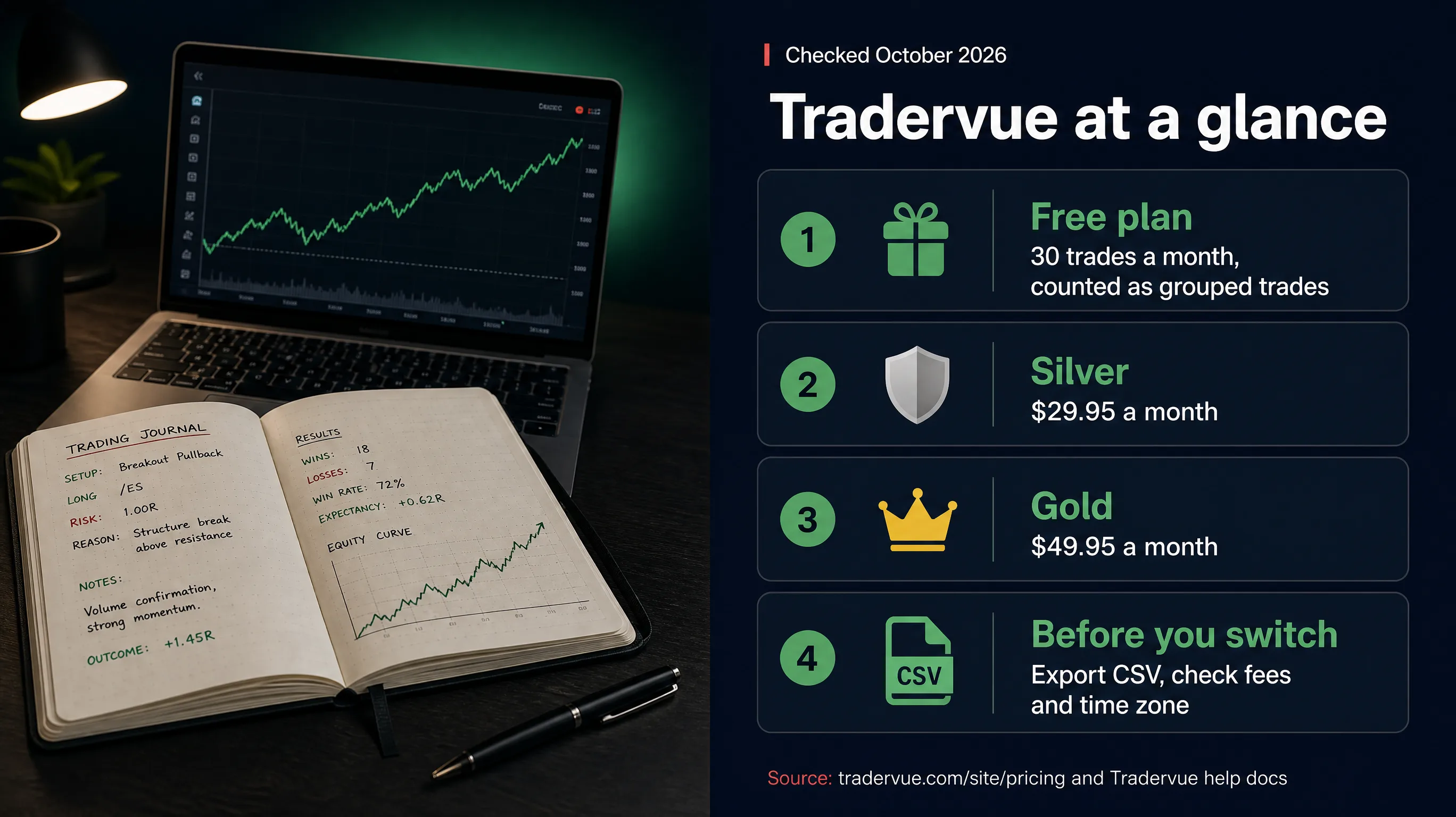
The free plan caps you at 30 trades per calendar month, according to Tradervue's own trade import quota help page. Those are grouped "logical" trades, not individual fills. So if you scale into a position with eight orders and scale out with six, that's one trade, not fourteen. A scalper doing forty round trips a day blows the cap on day one. A swing trader taking six positions a month will never touch it.
That distinction is the whole story on Tradervue pricing. The free tier is generous for low-frequency traders and useless for high-frequency ones. The paid Silver ($29.95/month) and Gold ($49.95/month) plans remove the trade cap and add more than 100 advanced reports, plus the sharing features that trading groups and educators actually buy it for (per tradervue.com).
When you should stay put
Stay on Tradervue if any of these describe you:
- You're a swing trader taking fewer than 30 positions a month and the free plan covers you. Paying $30 a month to journal 18 trades is a bad trade in itself.
- You're in a prop firm or an education group that already runs on Tradervue's shared journals. Your reviewer's workflow matters more than your feature wishlist.
- Your edge is already documented, you review weekly, and you've got no open question the tool can't answer. A journal you actually use beats a better journal you don't.
Switching tools is the most popular form of procrastination in trading. It feels like work. It isn't. If you haven't opened your current journal in six weeks, a new subscription won't fix that, your review habit will. Our Tradervue scorecard goes deeper on where the platform earns its verdict and where it doesn't, and the directory keeps a running Tradervue listing.
When you should move
Three honest triggers:
- You've outgrown the import limits and the paid tier costs as much as tools that do twice as much.
- You want feedback, not just records. Tradervue tells you what happened. The newer platforms try to tell you why, with pattern detection across your tagged setups.
- You trade from your phone. TraderSync and TradesViz both list native iOS and Android apps on their own sites, and mobile is where the newer journals are putting real effort.
Everything else is shopping, not solving.
The 7 best Tradervue alternatives, ranked
Ranked by how well each of these Tradervue alternatives replaces the original for a self-directed retail trader, not by what they pay anybody. Every price was checked against the vendor's own site. Verify before you buy, because this category changes prices faster than it changes features.
Two strengths and two drawbacks each. No tool gets a free pass.
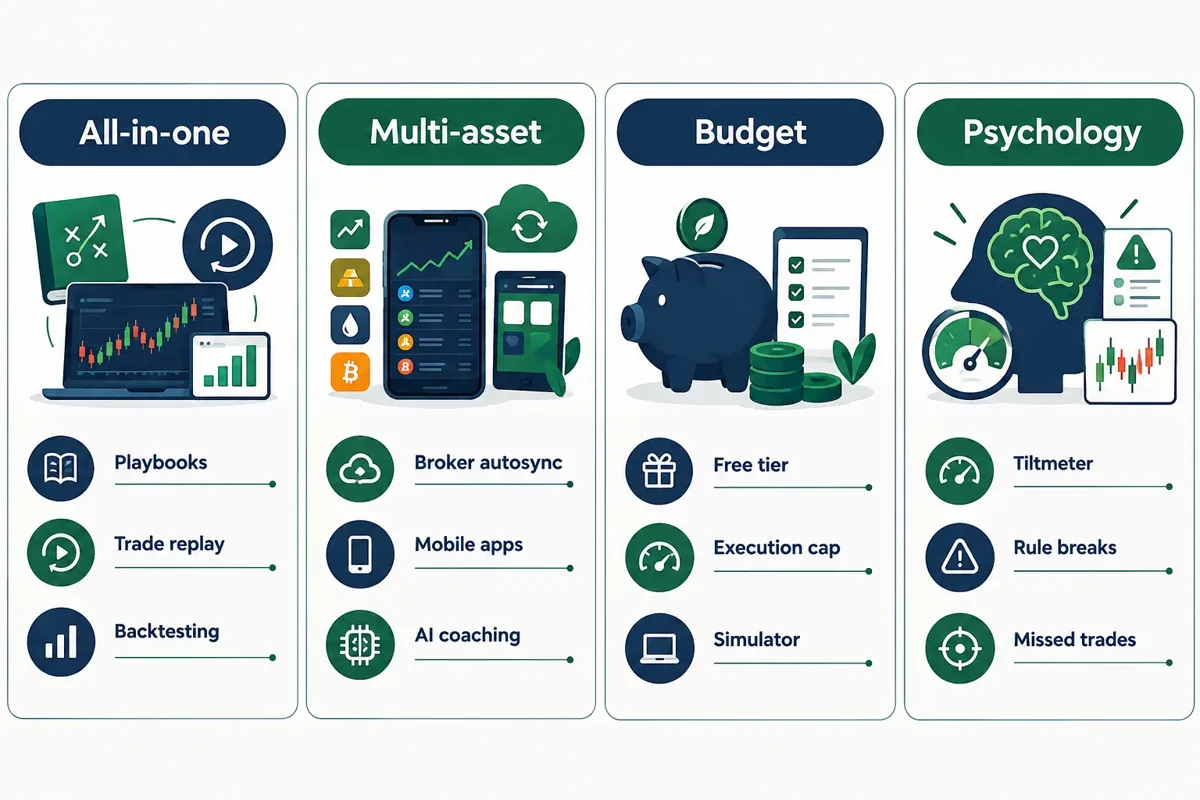
1. TraderSync, the best overall Tradervue alternative
Best for: active multi-asset traders who want one tool to cover stocks, options and futures, on desktop and phone.
Price: Pro $29.95/month, Premium $49.95/month, Elite $79.95/month, with a 7-day free trial. Annual billing cuts those to roughly $26, $43.42 and $69.50 per month.
TraderSync shows up near the top of most independent journal comparisons as the cleanest Tradervue replacement for people who actually trade a lot. The pitch is breadth: broker coverage, mobile apps that aren't an afterthought, stock market replay so you can watch the chart move bar by bar the way it did when you were sweating, a trading simulator, and AI insights that look across your logged trades and flag the behaviors costing you money.
That last part is the real upgrade over Tradervue. A journal that stores data is a filing cabinet. A journal that surfaces "your win rate drops on trades taken in the first five minutes" is a coach.
Strengths:
- The broadest broker list of any journal here. A
Kagels Trading comparison counted 503 broker or platform entries on October 25, 2026, with 195 flagged for automatic sync.
- Native iOS and Android apps with full journaling, not a stripped read-only view.
Drawbacks:
- "Supported" and "autosync" are not the same word. Of those 503 entries, fewer than 200 sync automatically. Check your broker in the table below before you pay, and if broker connections are new territory, read how AI trading platforms connect to your broker.
- The interface carries a lot of features, and the first week is cluttered. Budget an evening to configure it or you'll bounce.
| Broker | TraderSync connection |
|---|---|
 Interactive Brokers Interactive Brokers |
Autosync |
 Schwab Schwab |
Autosync |
 TradeStation TradeStation |
Autosync |
 Tradovate Tradovate |
Autosync |
 tastytrade tastytrade |
Autosync |
 NinjaTrader NinjaTrader |
Autosync |
 MetaTrader 4/5 MetaTrader 4/5 |
Autosync |
 Zerodha Zerodha |
Autosync |
 Robinhood Robinhood |
File upload |
 Webull Webull |
File upload |
 Fidelity Fidelity |
File upload |
Source: the Kagels Trading journal comparison cited above.
Full breakdown: TraderSync scorecard.
 2. TradeZella, the all-in-one workflow
Best for: traders who want journaling, playbooks, replay and backtesting living in the same window.
Price: Essential $35/month, Pro $59/month, Ultra $99/month. Annual billing works out to $26, $44 and $74 per month, which is roughly a 25% discount. Annual totals are $315, $531 and $891 against $420, $708 and $1,188 if you pay monthly.
TradeZella now runs three tiers, and the price sits alongside Zella AI, three AI agents (auto-tagging, session review and a game plan agent), tick-by-tick trade replay and automated AI backtesting. Whether that's fair depends entirely on whether you use any of it.
The tradervue vs tradezella question usually comes down to philosophy. Tradervue is a record. TradeZella wants to be the whole process: define the setup in a playbook, grade every trade against it, replay the ones you fumbled, and backtest the variation you think might work better. For a trader building a system rather than keeping receipts, that's a different product category. The directory's TradeZella vs Tradervue comparison lays the two side by side.
Strengths:
- Playbook grading forces you to define a clean setup before you take it, which is the single most useful habit most retail traders skip.
Drawbacks:
- No permanent free tier, and no free trial listed on the pricing page. Tradervue at least lets you log 30 trades a month at zero cost.
- Essential at $35/month is the priciest pure-journal entry point here, tied with Edgewonk's monthly plan. Pay for Zella AI and the playbook engine only if you'll use them weekly, because Essential alone isn't dramatically better than cheaper rivals.
Full breakdown: TradeZella scorecard.
3. TradesViz, the best free trading journal that isn't a trial
Best for: anyone leaving Tradervue over price, plus high-frequency traders who need execution headroom.
Price: Basic is free forever for stock traders, capped at 3,000 executions per month and one trading account. Pro $19.99/month or $14.99/month billed annually. Platinum $29.99/month or $22.49/month billed annually. Paid plans include a 7-day trial and add options, futures and forex.
Three thousand executions a month on a free plan. Tradervue's free tier is 30 grouped trades. Different units, same conclusion: TradesViz gives away more than most competitors sell.
And it didn't stand still in 2026. Its own blog logged an AI coach in June, Mobile V3 for iOS and Android in August, options strategy backtesting in August, an API and MCP connection for 

That's a fast release pace for a tool that still gives its core journal away.
Strengths:
- The free tier is a genuine journal, not a demo. For a $3,000 account, paying $35/month to journal is mathematically silly, and this solves it.
- Replay and backtesting at $19.99/month undercut the entry plans at TraderSync and TradeZella by a third or more.
Drawbacks:
- The interface is dense and engineering-led. It prioritizes depth over a pretty first run, and some traders never get past that.
- Smaller user base than TradeZella or TraderSync, which means thinner public discussion when you hit a problem and fewer community tutorials.
See the TradesViz directory listing, and if free is the whole requirement, also look at our guide to building a free trading journal before you subscribe to anything.
4. Edgewonk, the psychology-first alternative
Best for: traders whose P&L problem is behavioral, not analytical.
Price: $35/month or $197 for 12 months, full features either way (a sale banner showed $169 for the annual plan when we checked). The $197 annual plan works out to about $16.42/month, with a bigger upfront hit.
Most journals answer "what did I trade." Edgewonk is built to answer "why did I do that." Mistake and rule-break tracking, trade checklists, a Tiltmeter that charts how disciplined your trading has been, trading-routine tracking, missed-trade analysis, an automated Edge Finder, and MFE/MAE reports. MAE and MFE, if those are new, measure how far a trade went against you and how far it went in your favor before you closed it. Together they tell you whether your stops are too tight or your targets are too greedy.
The missed-trade feature deserves a mention. Most traders log what they took and ignore what they skipped. That's half a dataset. If you passed on four clean breakouts this month because you were gun-shy after a losing streak, that's a cost, and nothing else on this list tracks it as directly.
Edgewonk's pricing page lists forex, stocks, futures, options, indices and commodities.
Strengths:
- The Tiltmeter and rule-break tracking are the clearest tools available for diagnosing revenge trading and overtrading, which is where most small accounts actually die.
- One flat price, unlimited journals, broker accounts, prop-firm accounts, trades and strategies. No tier math.
Drawbacks:
- The interface looks like 2017 and feels like it. Beautiful it is not.
- Broker import is weaker than TraderSync or TradeZella. Expect more manual CSV work, which is exactly the friction that kills journaling habits.
Full breakdown: Edgewonk scorecard.
 5. Deepvue, for traders who want the journal attached to the scanner
Best for: swing and momentum traders who'd rather not run a separate scanner, charting tool and journal.
Price: $99/month billed monthly, with yearly billing listed at $990 (per deepvue.com). A seasonal yearly discount was running when we checked, so look for one before paying full price.
Of all the Tradervue alternatives here, Deepvue approaches the problem from the other direction. Instead of bolting analysis onto a journal, it bolts a journal onto a scanner and charting platform. Deepvue sells charts, screener, watchlists, the journal and AI in one subscription. For a trader who already pays separately for screening, that's one subscription replacing two.
The argument is about workflow friction. If your setup finder, your chart and your journal are three browser tabs with three logins, you review less. Fewer tabs, more reviews. That's the whole pitch, and it's a decent one.
Strengths:
- Scanning, charting and journaling in one subscription, which cuts both cost and tab-switching if you were paying for a screener anyway.
- Built around momentum and relative-strength workflows, so the journal's tagging fits how breakout traders already think about setups.
Drawbacks:
- The journal is a feature, not the product, and at $99/month it's the most expensive entry on this list by a wide margin. If journaling depth is your priority, Edgewonk and TradesViz go deeper for far less.
- Less useful if you're committed to another charting platform. Paying for duplicate charting to get a journal is backwards.
Check the Deepvue directory listing, and if you're consolidating tools, compare it against a dedicated setup like 
 6. Greenwick, the lightweight daily log
Best for: traders who abandoned every journal they ever started because setup took too long, and who hate subscriptions.
Price: $49.99 one time, no subscription, with a 14-day refund window (per greenwick.trade). Greenwick also offers a free Excel and Google Sheets journal template.
Here's an uncomfortable truth: the most common trading journal in the world is probably a spreadsheet with eleven rows in it, last edited four months ago. Feature depth isn't what kills journaling. Friction is.
Greenwick is the lightest of the Tradervue alternatives on this list, and it aims squarely at that problem. It runs in your browser, imports CSV or Excel broker exports with automatic column matching, and keeps your data on your own computer. You get a daily journal, a playbook and a rules checker. You're not building a quantitative research database. You're writing down what you did and why, every day, which is the version that actually compounds.
Strengths:
- One payment, no account needed, nothing uploaded. Your trade history stays on your machine.
- The simplicity works as a habit starter. A thin journal you fill in daily beats a deep one you open monthly.
Drawbacks:
- No broker sync, no mobile app and no MFE/MAE, per Greenwick's own page. Analytics depth is well below TraderSync, TradeZella or TradesViz.
- You'll outgrow it. Treat it as a stepping stone, not a destination, and plan an export path from day one.
7. A structured spreadsheet, the $0 option that still humbles people
Best for: anyone with an account under $5,000, or anyone who needs to learn what they actually want from a journal before paying for one.
Price: $0.
Spreadsheets get mocked as the beginner option, yet this is the cheapest of all the Tradervue alternatives and plenty of discretionary traders still keep one alongside their platform tools, because a sheet does one thing no SaaS product does: it forces you to decide which columns matter. Nobody hands you a template. You build it, and building it makes you articulate your own process.
Nine columns cover most of the value: date, ticker, setup name, entry, stop, target, position size, exit, and one sentence on whether you followed your rules. That's it. Run it for 30 trades and you'll know more about your edge than three months of auto-imported data you never read.
Strengths:
- Free forever, portable forever, and exportable to any paid tool later with zero lock-in.
- Manual entry is a feature, not a bug. Typing the trade in makes you confront it. Auto-sync lets you skip the thinking.
Drawbacks:
- Doesn't scale. At 40 trades a day, manual entry becomes a second job and you'll stop.
- No replay, no automated analytics, no MAE/MFE unless you build it yourself, which most people won't.
Start from our trading journal template instead of a blank sheet.
Comparison: Tradervue alternatives side by side
Prices below were checked. Vendors change them. Verify before you enter a card.
Read that table twice and one thing stands out: among the dedicated journals, the gap between a free plan and a $35 entry tier is $420 a year. On a $5,000 account, that's 8.4% of your capital spent on record-keeping. On a $100,000 account it's a rounding error. Size the tool to the account, the same way you size the position to the stop.
How to move your trades out of Tradervue
Switching to one of these Tradervue alternatives goes wrong in predictable ways. Here's the order that works.
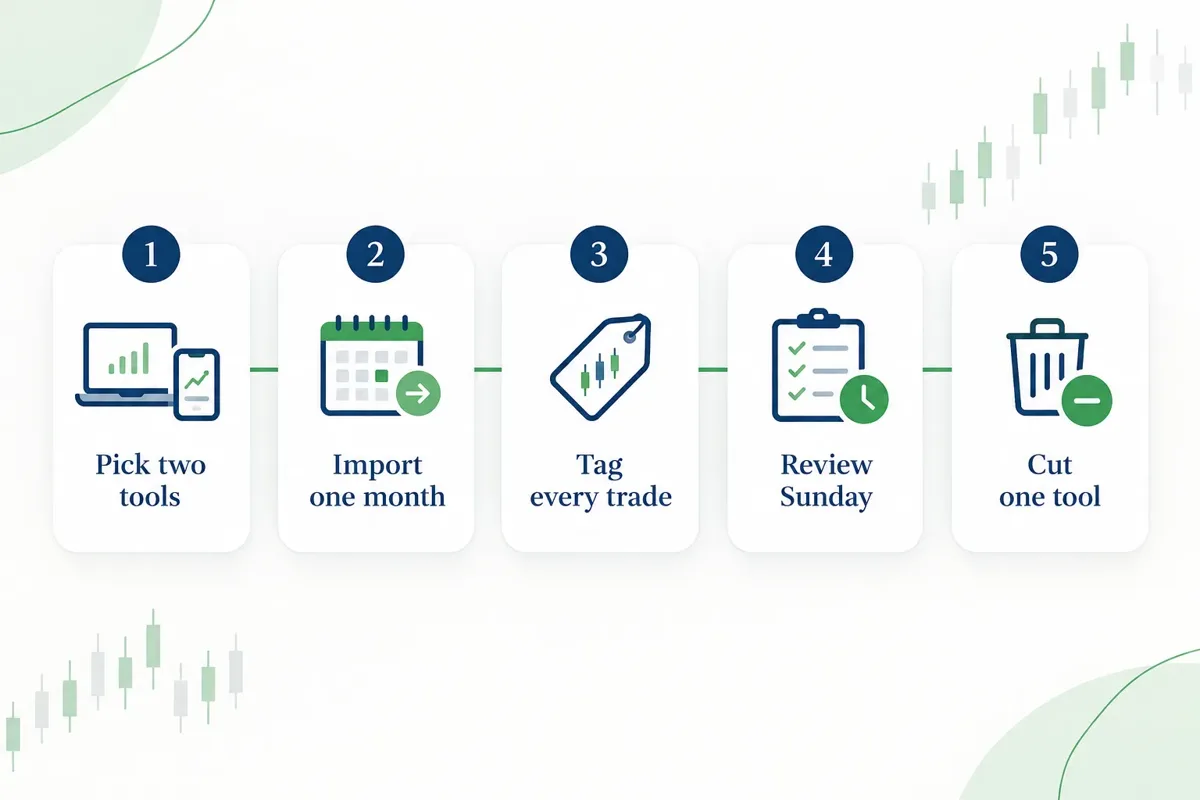
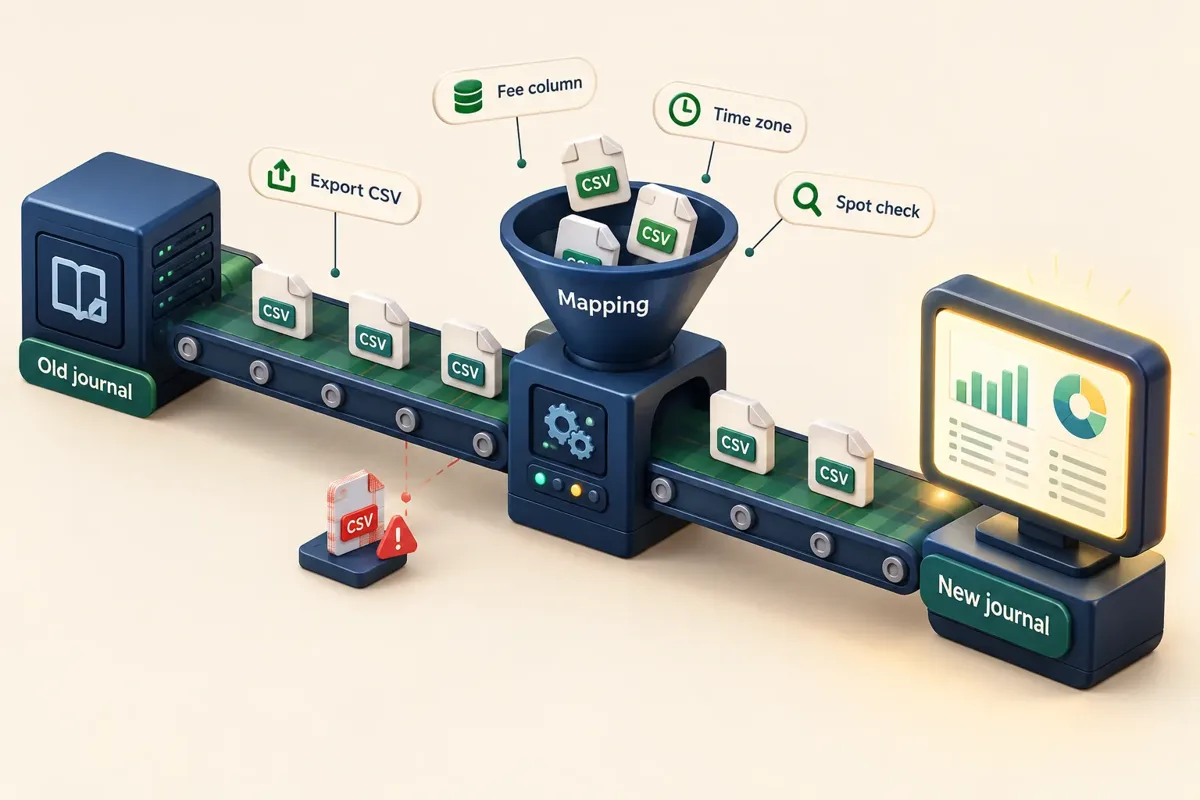
Export before you cancel. Pull a full export of your trade history while your subscription is still live, so you're not finding out after the fact what a downgraded account can and can't export. Losing three years of history is an avoidable, permanent loss.
Don't migrate everything on day one. Import one month into the new tool and check it carefully. Compare the equity curve, the win rate, and the total P&L against your broker statement. If the numbers don't match the broker, the import mapping is wrong, and you'll build a year of analysis on bad data.
Watch three columns specifically. Commissions and fees, which some imports drop entirely and which quietly inflate every performance stat you look at. Time zones, which shift your intraday analysis by hours and make your "best trading hour" report fiction. And trade grouping, since tools disagree on whether four partial exits are one trade or four. That last one changes your win rate.
Re-tag as you go. The temptation is to bulk-import and move on. Don't. Going back through 200 old trades and tagging each one with its setup name is tedious, and it's also the most useful review you'll do all year. You'll find the setup you believed in that's been bleeding money since March.
Run both for 30 days. Keep Tradervue active while you learn the new tool. One month of overlap costs you one subscription and saves you from switching twice. Then cancel the loser.
A journal is only worth the review habit attached to it. Thirty minutes on Sunday going through the week's trades, what matched your plan, what didn't, what you'd skip, will do more for your results than any feature on any pricing page. The traders who improve are the ones who keep a record of being wrong and actually read it. Discipline beats prediction.
Pair the journal with the rest of your process: the real math behind active trading is in our breakdown of whether day trading is worth it, and if your journal is pointing you toward strategy testing, read how to backtest without fooling yourself before you trust any curve-fitted result.
Conclusion
Seven Tradervue alternatives, three real reasons to switch: price, feedback, or mobile. Pick the reason first and the tool picks itself. TraderSync at $29.95 if you're active and multi-asset. TradesViz free if the subscription is the problem. Edgewonk at $197 a year if your mistakes are behavioral.
Do this today: export your Tradervue history before you do anything else, then import one month into whichever tool matched your reason and check the P&L against your broker statement. If it ties out, you've got a migration path. If it doesn't, you just saved yourself a year of bad analytics.
Fewer tabs, one process you actually run. Cut the noise, keep the alpha.
Sources
- Tradervue trade import quota. app.tradervue.com.
- Tradervue pricing. tradervue.com.
- TraderSync pricing. tradersync.com.
- TradeZella pricing. tradezella.com.
- TradesViz pricing. tradesviz.com.
- Edgewonk pricing. edgewonk.com.
- Deepvue. deepvue.com.
- Greenwick trading journal. greenwick.trade.
- Trading journal software comparison. kagels-trading.com.
Still comparing Tradervue alternatives? Put the finalists next to the rest of your day trading stack. The FullStack Alpha directory lists TraderSync, TradeZella, TradesViz, Edgewonk, Deepvue and Tradervue alongside the scanners and platforms active traders actually use. Browse day trading tools in the directory
This is education, not financial advice.
Your market edge starts with the right tool. Stay alpha.
Some links on this page may be affiliate links. Scores and verdicts are never influenced by them.
Prices are subject to change as fast as AI technology.
We test the tools. You get the verdict.
One email a week. What we tested, what scored, and what we'd skip. Written for traders, not for clicks.
Frequently asked
More from FullStack Alpha