Koyfin Stock Screener: 7 Filters Worth Setting Up First
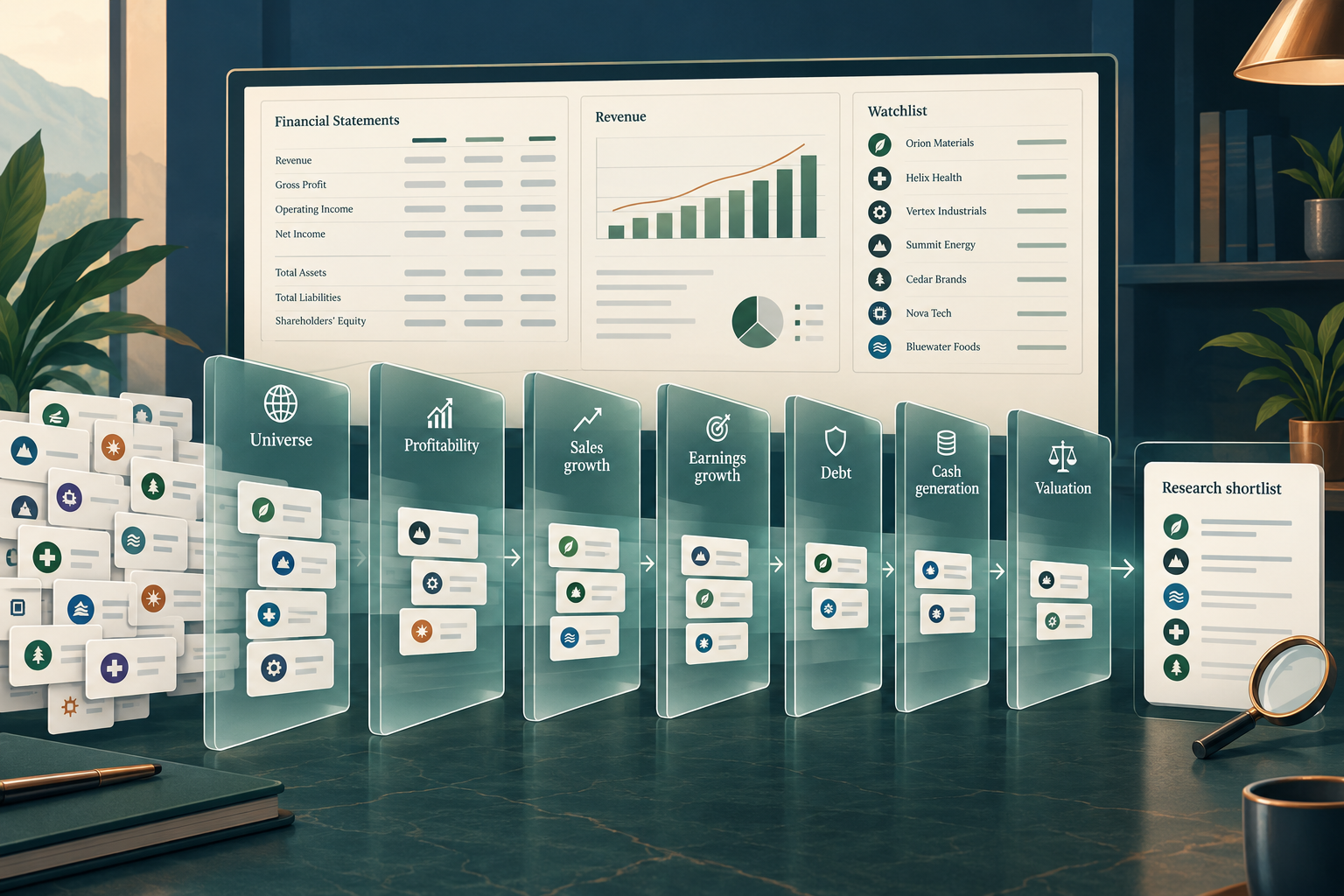
Quick Answer: The koyfin stock screener helps long-term investors find companies with operating profits, growing sales, manageable debt, positive cash generation, and reasonable valuations. Start with the seven filter groups below, then investigate the businesses that qualify. These settings are research assumptions, not tested buy signals, and field availability depends on the current subscription.
Key takeaways
- Use seven complementary filter groups rather than dozens of overlapping conditions.
- Match historical and forecast periods before comparing companies.
- Positive earnings do not guarantee reliable cash generation.
- Banks, insurers, and property companies need different financial frameworks.
- Free access does not guarantee access to every screening field.
- A saved screen is neither a backtest nor a portfolio recommendation.
How were the best stock screeners chosen?
The assessment prioritizes fundamental research, understandable financial fields, historical context, and cost for independent investors. The method combines desk research on product documentation and pricing with public user sentiment as qualitative context, not evidence of investment performance.
For long-term investors, a useful screener should connect a promising result to the financial statements needed to challenge it. A large filter library matters less than knowing what each field measures.
Vendor comparisons can identify alternatives, but their rankings have commercial incentives. The editorial assessment below concerns workflow suitability, not demonstrated excess returns.
What you need in a screener
Choose a platform that makes reporting periods, estimate definitions, and missing values understandable. Before committing, establish whether a ratio uses reported or adjusted earnings and whether international comparisons share a consistent currency basis.
Decision rule: choose research depth over rapid alerts when the intended holding period is measured in years.
What is the koyfin stock screener and what can it filter?
The koyfin stock screener applies financial and security-level conditions to a stock universe, returning companies that meet the selected rules. Its main value is shortening the distance between finding candidates and investigating their fundamentals.
The Koyfin stock screener feature page advertises coverage of 100,000+ securities and 5,900+ screening criteria. Those are vendor-stated scope figures, not a guarantee that every company has complete data or every subscription includes every field.
Built for investors: clear insights before decisions
Screening categories include company characteristics, profitability, growth, valuation, and analyst estimates. For a 2026 research workflow, the practical question is whether the required fields and history are available in the account being considered.
The koyfin stock screener can support global research, but an exchange listing does not establish a company's economic exposure. A U.S.-listed business may earn most of its revenue overseas.
Let AI explain the research, not invent it
An AI assistant can summarize ratios or suggest questions about a filing. Treat that assistance as a separate research aid, not proof of a native Koyfin capability.
Ask for explanations based on dated financial statements. Reject unsourced live values, invented consensus estimates, and claims that passing a screen predicts returns.
Which seven filters should you set up first?
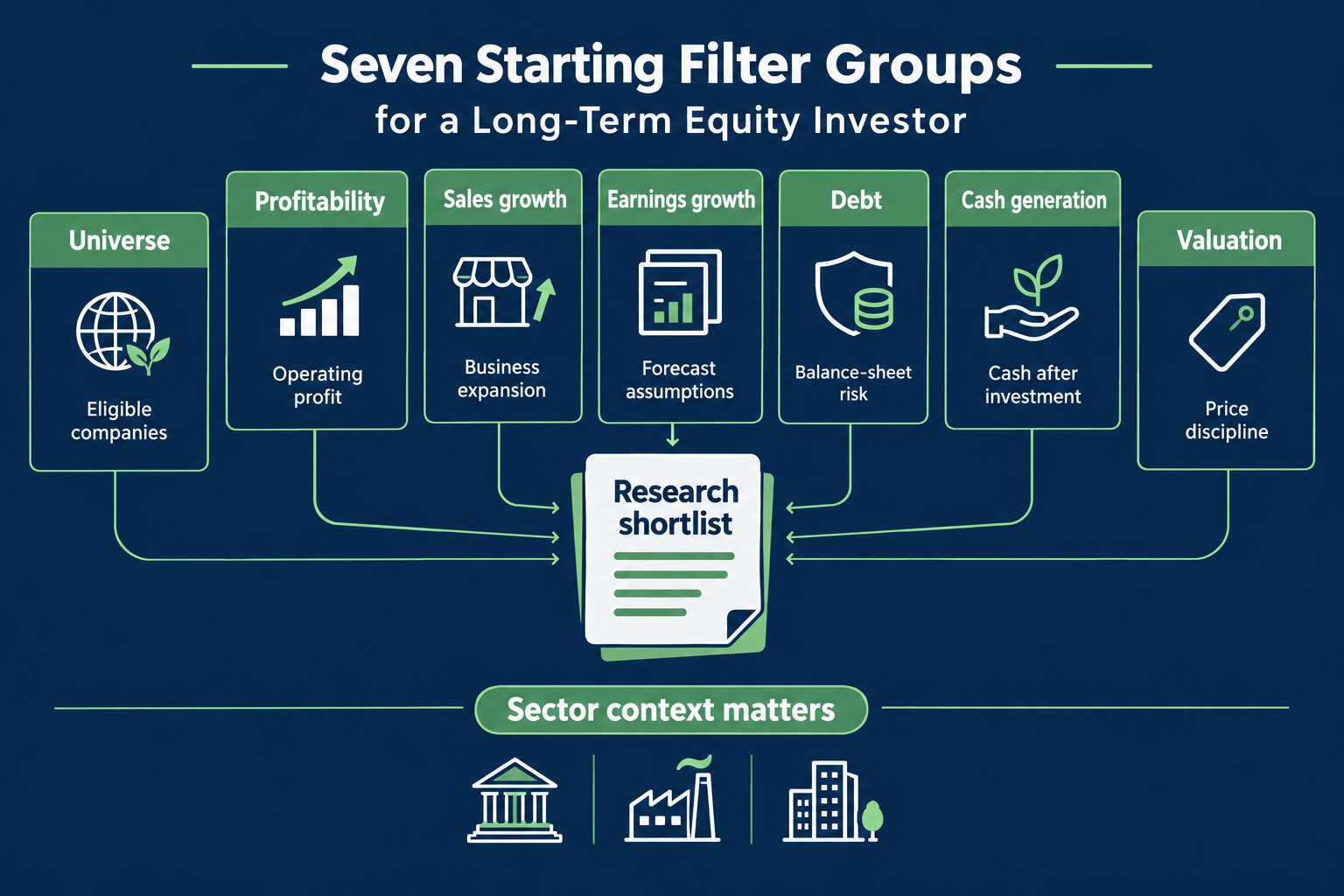
Start with universe, profitability, sales growth, earnings growth, debt, cash generation, and valuation. Together, these seven groups create a quality-at-a-reasonable-price shortlist for ordinary nonfinancial businesses.
The thresholds below are editorial starting assumptions, not Koyfin recommendations or performance-tested settings. Some groups require multiple conditions to prevent misleading results.
How to use the koyfin stock screener for beginners
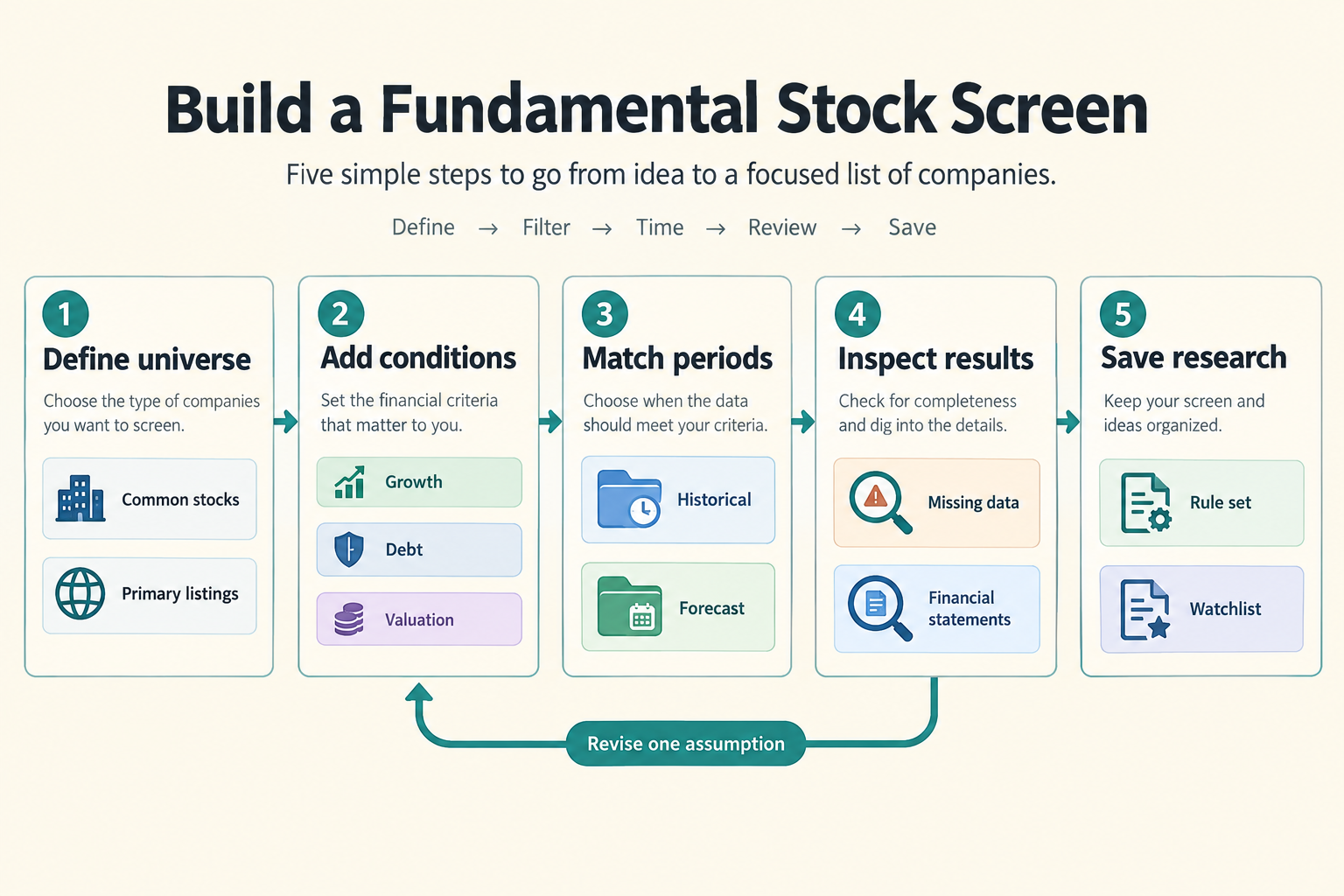
Create a screen in My Screens, establish the eligible universe, and add conditions gradually. The My Screens documentation explains screen creation and result management.
- Choose the market, security type, and size range.
- Add one filter group at a time.
- Confirm each field's definition and reporting period.
- Display the selected metrics as result columns.
- Review exclusions and missing values before saving.
Record the intended strategy in the screen name or accompanying notes. “Profitable nonfinancial growth at a reasonable price” is more useful than “best stocks.”
| Filter group | Suggested starting setting | Why it matters | Main limitation |
|---|---|---|---|
| 1. Universe | U.S. common stocks; NYSE/Nasdaq; market cap at least $500 million | Keeps the search focused | Size does not establish liquidity |
| 2. Profitability | Latest 12-month EBIT above zero | Excludes operating losses | Positive profit may be weak or temporary |
| 3. Sales growth | Three-year revenue CAGR at least 5% | Looks for business expansion | Acquisitions can inflate growth |
| 4. Earnings growth | Next fiscal-year EPS growth at least 5%, with positive comparison EPS | Adds a forward-looking earnings check | Consensus can be wrong |
| 5. Debt | Net debt/EBITDA no greater than 2, with positive EBITDA | Limits financial strain | Poor fit for financial companies |
| 6. Cash generation | Latest 12-month free cash flow above zero | Tests cash after capital spending | Working capital can distort one period |
| 7. Valuation | Forward P/E above zero and no greater than 25 | Adds price discipline | Sensitive to forecast optimism |
Confirm availability of these fields and periods in the koyfin stock screener before subscribing. When an exact field is unavailable, inspect the underlying financials rather than silently substituting a different measure.
1. Universe: search the right stocks
Suggested setting: U.S. common stocks listed on NYSE or Nasdaq, with market capitalization of at least $500 million.
A defined universe reduces accidental comparisons between operating companies, funds, preferred securities, and duplicate listings. The capitalization floor removes some very small businesses, but a qualifying company can still trade infrequently.
Decide whether “U.S. stocks” means U.S.-domiciled businesses or any eligible U.S. listing. Those choices can produce different results, especially if depositary receipts are included.
Start with sectors whose statements are reasonably comparable. Keep banks and insurers outside this general-purpose screen because debt and cash flow have different economic meanings for financial institutions.
For narrower peer research, Koyfin documents custom sub-industry groupings. Grouping comparable businesses helps prevent a software company and a steel producer from appearing interchangeable.
2. Profitability: require positive operating income
Suggested setting: latest 12-month EBIT greater than zero.
EBIT means earnings before interest and taxes. Koyfin's stock-screen creation example includes positive EBIT as a profitability condition.
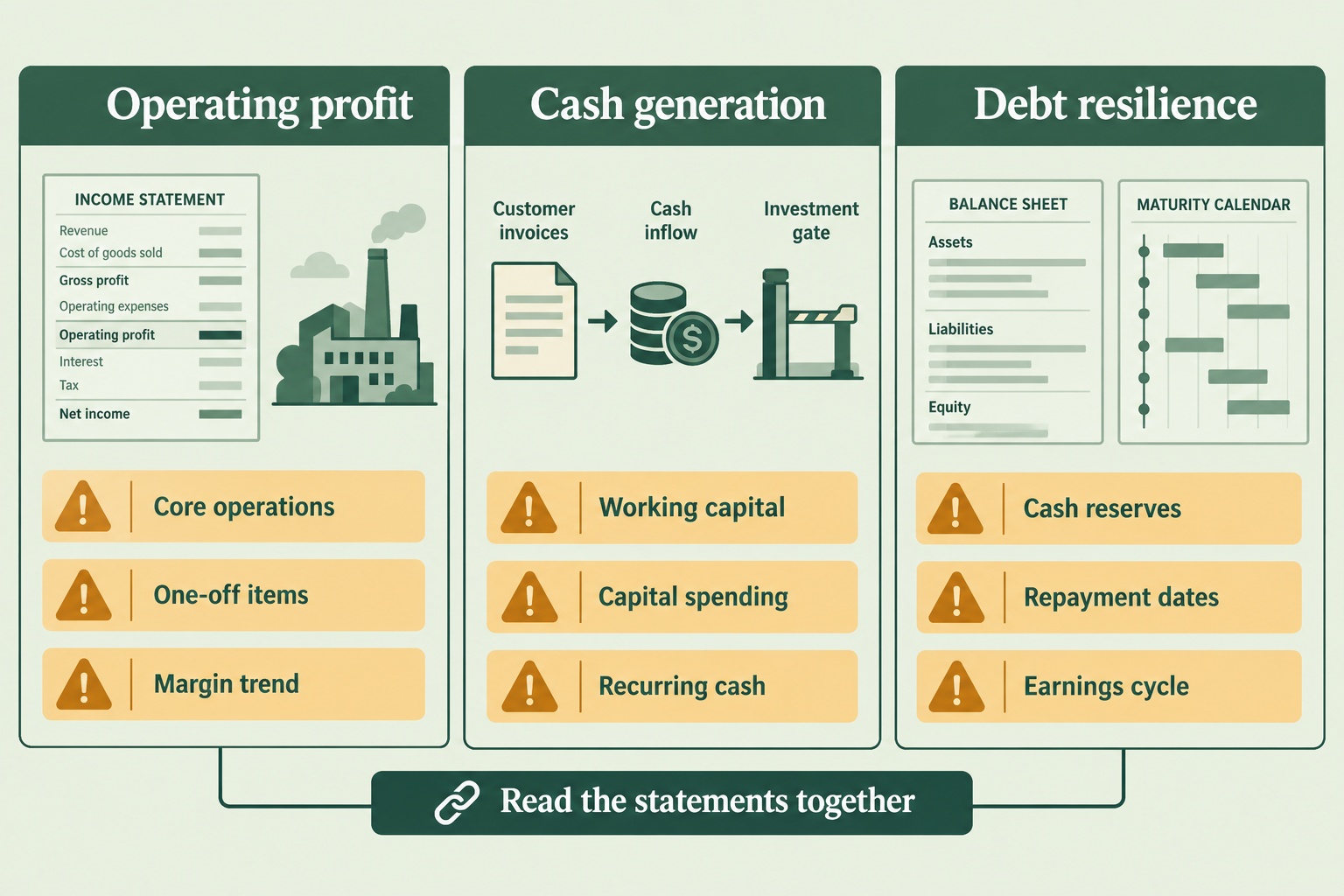
This rule asks whether the business generates operating earnings before considering its financing structure. It is a useful first barrier against companies whose investment case depends entirely on future profitability.
Positive EBIT does not establish quality. A business can pass with a thin margin, unusually favorable demand, or an accounting classification that warrants scrutiny.
After screening, compare operating margins across several years. A modest but stable margin may deserve more confidence than a sudden spike. Check whether restructuring charges recur despite being described as exceptional.
For development-stage biotechnology and other intentionally loss-making businesses, this framework is unsuitable rather than unfair.
3. Sales growth: check several years
Suggested setting: revenue compound annual growth rate of at least 5% over three years.
Revenue CAGR measures the annualized change between two revenue observations. It helps distinguish expanding businesses from companies that grow EPS mainly through buybacks or temporary cost reductions.
Illustrative calculation: revenue rising from 100 to about 115.8 over three years represents roughly 5% annualized growth. Those figures are hypothetical, not company data.
Inspect the path between the endpoints. Steady progress differs from a collapse followed by a recovery, even if both produce the same CAGR.
Acquisitions, inflation, foreign exchange, and accounting changes can increase reported sales without equivalent organic growth. For commodity producers, higher selling prices can disguise declining volumes.
The koyfin stock screener should identify the growth pattern; company filings should explain its cause.
4. Earnings growth: challenge the estimates
Suggested setting: next fiscal-year EPS growth of at least 5%, using a positive comparison base.
Check exactly which years the field compares. Next fiscal-year growth may compare two forecast periods rather than a forecast with the latest reported annual result.
A positive denominator matters. Growth percentages involving losses, near-zero profits, or a change from negative to positive earnings can be economically misleading.
Illustrative example: EPS increasing from 4.00 to 4.40 represents 10% growth. Moving from a small loss to a small profit is better described as a turnaround than an ordinary growth rate.
Investigate analyst coverage and forecast revisions. A consensus built from limited coverage may be fragile, while downward revisions can undermine an apparently attractive forward P/E.
The koyfin stock screener makes forecasts comparable; it cannot make them reliable. Compare expected earnings growth with sales, margins, taxes, and share-count assumptions.
5. Debt: compare similar businesses
Suggested setting: net debt/EBITDA no greater than 2, with EBITDA above zero.
Net debt generally subtracts cash from interest-bearing debt. EBITDA measures earnings before interest, taxes, depreciation, and amortization, subject to the selected provider definition.
Requiring positive EBITDA prevents a negative denominator from producing a deceptively acceptable ratio. A negative net-debt ratio can be reasonable when a company holds more cash than debt.
The threshold is an editorial preference for balance-sheet flexibility, not a universal definition of safety. Utilities, infrastructure businesses, and property companies often require sector-specific analysis.
Inspect debt maturities, interest costs, lease treatment, and cash accessibility. A business can pass the ratio test but face a concentrated refinancing deadline.
Cyclicality also matters: unusually high EBITDA near an industry peak can make borrowing look safer than it is.
6. Cash generation: demand actual cash
Suggested setting: latest 12-month free cash flow greater than zero.
Free cash flow commonly means operating cash flow minus capital expenditure, but confirm the field definition. Positive accounting earnings accompanied by persistent cash outflows deserve investigation.
One positive period is only a starting point. Inventory reductions, faster collections, delayed supplier payments, or postponed investment can temporarily support cash flow.
Review several years of operating cash and capital spending. Separate maintenance requirements from discretionary expansion where the company provides enough detail.
Stock-based compensation also needs attention. It may support reported operating cash flow while diluting shareholders unless offset by repurchases.
The koyfin stock screener can remove obvious cash consumers, but financial statement analysis must determine whether cash generation is repeatable.
7. Valuation: require a sensible earnings multiple
Suggested setting: forward P/E above zero and no greater than 25.
A positive lower bound helps exclude nonmeaningful or negative multiples. The upper bound introduces price discipline without assuming that every low-multiple stock is cheap.
Match the forward earnings period to the growth field where practical. Next fiscal-year earnings and next-12-month earnings are not automatically interchangeable.
A company can pass because estimates are too optimistic. Another can fail because temporary investment depresses near-term earnings despite attractive long-term economics.
Compare valuation with peers, the company's own history, and plausible downside earnings. Avoid treating 24.9 as acceptable and 25.1 as fundamentally different.
In the koyfin stock screener, valuation is a research boundary, not a calculation of intrinsic value.
How does the koyfin stock screener support value investing strategies?
The koyfin stock screener supports value investing by combining price discipline with checks on business quality. A low multiple becomes more useful when earnings, cash generation, and borrowing are also examined.
Distinguish a durable company experiencing temporary weakness from a deteriorating business that merely looks inexpensive. For cyclicals, compare valuation with normalized earnings rather than assuming current profits will persist.
What are common mistakes when using the koyfin stock screener?
Common mistakes include mixing reporting periods, accepting distorted ratios, and adding conditions until a favorite stock survives. Another error is interpreting missing data as evidence of weak fundamentals.
Maintain separate records for the live screen and the researched watchlist. A company that temporarily fails one condition may still warrant monitoring, while a qualifying company may have unacceptable governance or concentration risk.
Who benefits: day traders, swing traders, or long-term investors?
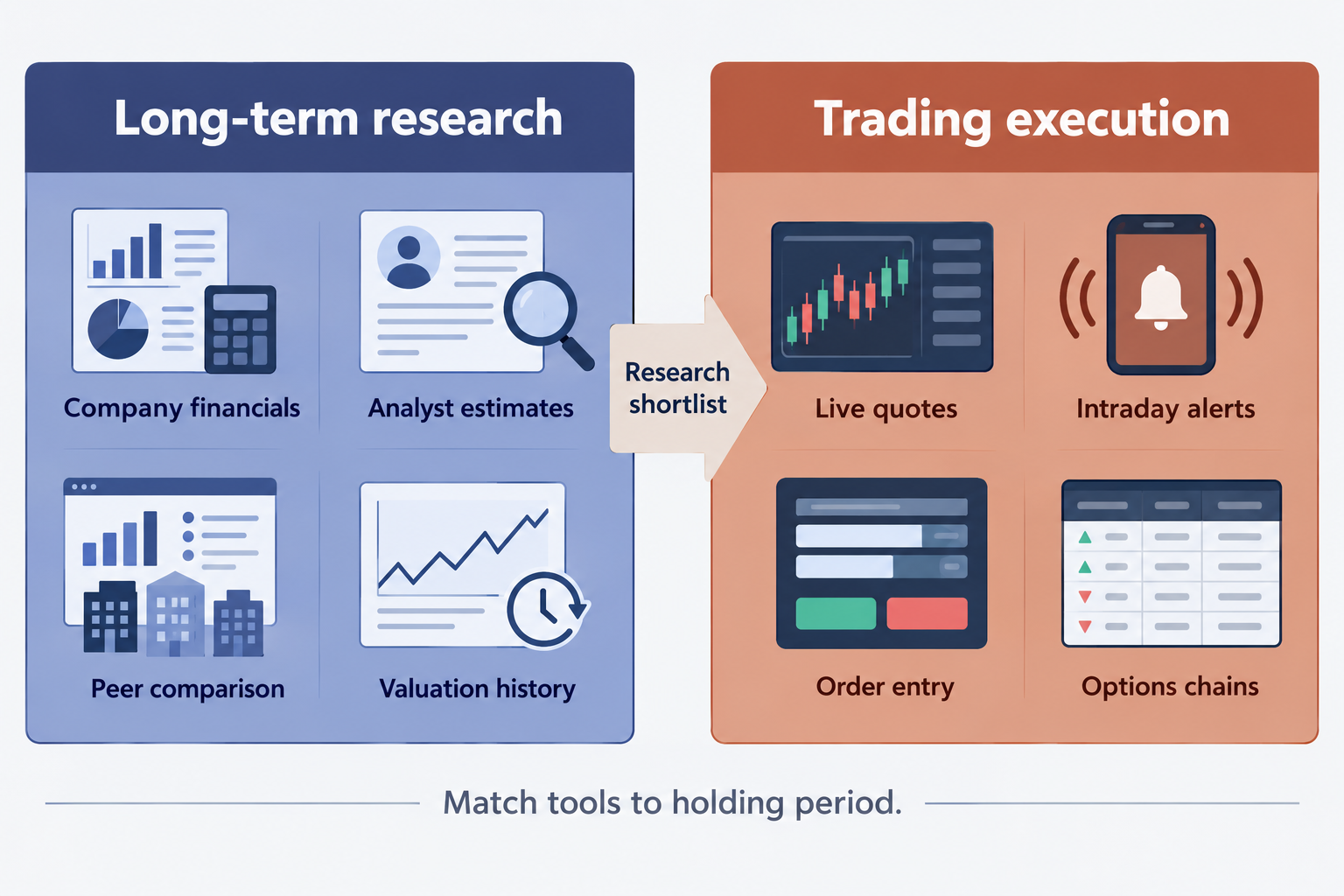
Long-term investors are the strongest fit for this fundamental workflow. Swing traders can use the shortlist as a starting universe, but short-term execution requires a different set of tools.
Who should use Koyfin, and who shouldn't?
The koyfin stock screener suits investors who want financial statements, estimates, and comparative research without purchasing a professional terminal. Its usefulness depends on a willingness to inspect the companies behind the ratios.
Investors seeking automatic buy orders, promised profits, or a complete brokerage workflow should look elsewhere. Extensive data does not replace portfolio construction or judgment.
Is Koyfin good for day trading?
Koyfin can contribute market context, but the koyfin stock screener setup described here is not a day-trading scanner. Daily trading decisions may require low-latency quotes, intraday alerts, order routing, and execution controls.
Choose tools around the trading process rather than assuming a broad research platform covers every requirement.
Does Koyfin have real-time data?
Data timing must be checked by instrument, exchange, and entitlement. A moving quote should not be assumed to be an executable, consolidated real-time price.
Consult current product and subscription information, and inspect timestamps before acting. The Koyfin product features overview describes the wider platform, but broad market coverage alone does not establish quote timing.
Is the koyfin stock screener suitable for options trading?
The koyfin stock screener can help research underlying companies, but these fundamental rules do not select options contracts. Options decisions also require expiry, liquidity, spreads, implied volatility, and Greeks.
A fundamentally attractive stock can still be a poor options trade when the contract is expensive or difficult to exit.
What are the Top 5 Features for screening and research?
The most useful features connect stock selection with company investigation. These five capabilities matter more to long-term investors than the size of the filter menu alone.
1. Everything in one place
Moving between financials, estimates, and charts reduces repeated lookup work. The key benefit is comparing a screening result with the information that produced it.
Decision rule: prioritize connected research when several separate subscriptions would otherwise duplicate the same work.
2. Make it yours: choose useful columns
Display profitability, growth, debt, cash flow, and valuation together. Custom result columns make trade-offs visible instead of hiding them behind a pass/fail label.
Keep periods clear in the column names wherever possible. A historical margin and a forecast multiple answer different questions.
3. Save and analyse results easily
Save the rule set for repeatability and keep the investment watchlist separate. A changing screen should not erase the reasons a company originally attracted attention.
Confirm export permissions before designing a spreadsheet-dependent process.
4. Historical context: can you backtest on Koyfin?
Historical observations are not the same as a strategy backtest. The koyfin stock screener should not be treated as a validated backtesting engine simply because historical data is available.
A credible backtest requires point-in-time fundamentals, historical constituents, delisted companies, execution assumptions, and costs. Using today's surviving companies can introduce survivorship bias.
5. Templates start the research
Templates can shorten setup, but their assumptions still need checking. Review the universe, periods, sector exclusions, and treatment of missing values before adopting a preset.
A template designed for mature businesses may be inappropriate for early-stage growth companies.
How do the best free screeners compare in 2026?
Choose by task rather than by a universal ranking. The koyfin stock screener is most relevant when fundamental screening and follow-up research need to share a workspace.
Koyfin's 2026 stock screener comparison provides a vendor-authored overview of alternatives. Treat feature summaries as a shortlist for verification, not an independent verdict on which platform is best.
How does Koyfin compare to Finviz and thinkorswim?
Koyfin is the research-oriented choice in this comparison. Finviz is worth evaluating for compact U.S. equity screening, while thinkorswim is more relevant when brokerage-connected analysis and execution are central.
| Platform | Primary reason to consider it | What to verify |
|---|---|---|
| Koyfin | Fundamental research and estimates | Required fields, history, and subscription |
| Finviz | Quick visual U.S. stock screening | Data delays and advanced feature access |
| thinkorswim | Trading-oriented analysis and execution | Account eligibility and market-data permissions |
These are workflow distinctions, not feature-complete product audits. The Finviz filter guide provides related reading for investors considering a simpler screening interface.
What are the best alternatives to koyfin stock screener?
Seven alternatives alongside Koyfin create a practical eight-platform shortlist: TIKR, Fiscal.ai, Finviz, TradingView, Yahoo Finance, Stock Rover, and thinkorswim.
Consider TIKR or Fiscal.ai for company-level financial research, TradingView for chart-led analysis, and Yahoo Finance for basic discovery. Evaluate Stock Rover if portfolio-oriented fundamental analysis is central. Product capabilities and free-tier limits require checking individually.
The Koyfin versus Stock Rover comparison is useful when choosing between research depth and portfolio workflow.
What does the koyfin stock screener cost in 2026?
Koyfin offers a free entry tier and paid subscriptions, but the useful cost is the price of the plan containing the required fields. Check the current Koyfin pricing plans for screening allowances, history, estimates, exports, and billing terms.
Paid plans list at about $39 per month for Plus and $79 per month for Premium; confirm the current quote before paying. Monthly and annual billing can change the effective cost, and account-specific offers may differ.
Before paying, confirm whether the free account can reproduce this seven-group setup. If not, identify the exact restriction rather than assuming every advanced-looking field requires the highest tier.
Decision rule: upgrade for a recurring research bottleneck, not merely for access to more metrics.
Why is the koyfin stock screener not loading, and what should beginners do?
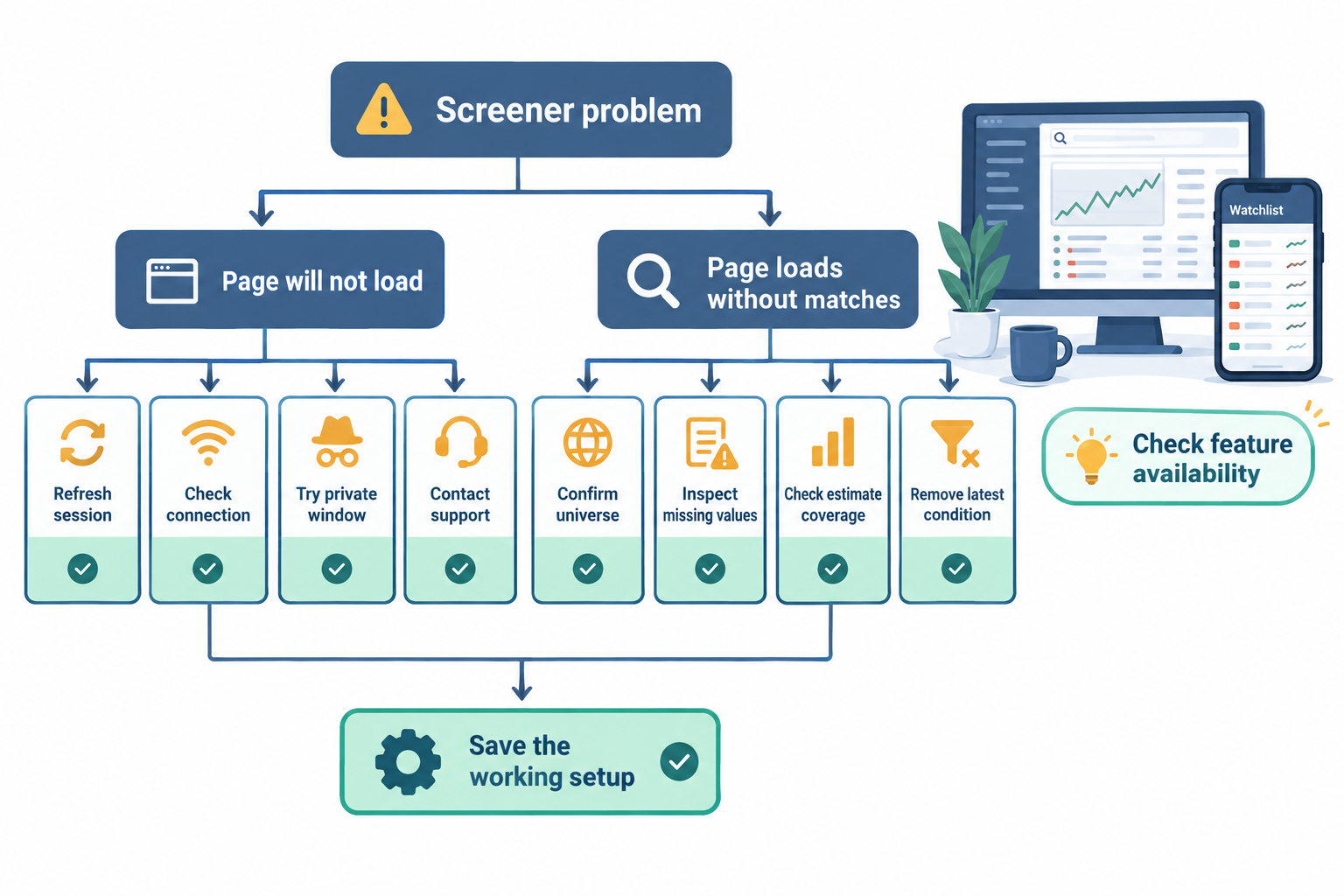
Separate a page-loading problem from a screen that loads but returns no companies. Browser or connection issues and overly restrictive conditions require different fixes.
For a loading failure:
- Refresh the page and confirm the session is active.
- Check the connection and whether other pages load.
- Try a private window or another current browser.
- Temporarily disable extensions that may block scripts.
- Contact support with the screen name and error details.
Never include credentials or sensitive account information in a support screenshot.
If results are empty, return to the universe-only screen and restore conditions individually. Missing estimate coverage, incompatible security types, and negative denominators can explain exclusions.
The koyfin stock screener may be working correctly even when no company qualifies. Relax only one assumption at a time and document the reason.
Koyfin screener mobile app vs desktop: which is better?
Desktop is the safer starting point for building complex screens because multiple columns and field definitions are easier to inspect. Do not assume a mobile interface duplicates every desktop screening function.
Confirm current app availability and feature parity before depending on mobile screen creation or editing. The getting started guide provides product orientation, while account-level checks establish which functions are available.
FAQ: What else should investors know about the koyfin stock screener?
The koyfin stock screener is a candidate-selection tool, not a substitute for company analysis or portfolio risk management. These answers address common decisions after the initial setup.
Is the koyfin stock screener free?
Koyfin has a free entry tier, but screening limits and field access depend on current plan entitlements. Confirm that the required growth, history, and estimate fields are included.
How often should a long-term investor rerun the screen?
A monthly review and a reassessment after earnings are reasonable editorial routines for long-term investors. Changes in debt, guidance, or valuation may justify an earlier review.
Why does a stock pass one screener and fail another?
Providers may use different definitions, reporting periods, update schedules, or missing-data rules. Compare the underlying fields before concluding that either platform is wrong.
Can banks and insurers use the same seven filters?
Not reliably. Net debt/EBITDA and conventional free cash flow are poor universal measures for financial institutions. Banks and insurers need a separate framework built around sector-specific economics.
How many qualifying stocks should the screen produce?
There is no ideal number. A useful shortlist is small enough to investigate but broad enough to avoid forcing the rules around a favorite company.
Does passing the screen make a stock a buy?
No. A company can qualify despite governance problems, customer concentration, litigation, or unrealistic forecasts. Review filings, valuation scenarios, and portfolio exposure before making an investment decision.
Related reading: the Koyfin review covers the broader platform, while the AI stock screener guide discusses where automated assistance fits into research.
Is Koyfin worth it?
For long-term investors who want screening and deeper fundamental research in one workspace, yes. Its strongest use is a disciplined research shortlist, not automatic buy signals. Start on the free tier and upgrade only when a recurring research bottleneck shows up.
What is the most successful stock screener?
No screener wins in general, because results depend on the filters and the discipline behind them. Choose by task: the koyfin stock screener for fundamental research, Finviz for quick visual U.S. screening, and TradingView for chart-led analysis.
Is Koyfin better than TradingView?
They do different jobs. Koyfin is the research-oriented choice for fundamentals, estimates, and valuation screens, while TradingView fits chart-led analysis. Pick the one that matches your main workflow, or pair them if you need both.
How much does Koyfin cost?
Koyfin has a free tier, with Plus at about $39 per month and Premium at about $79 per month. The useful cost is the plan that holds the fields your screen needs, so test the free account first and confirm billing terms on the pricing page.
What does the Alpha Score indicate?
The Alpha Score reflects editorial suitability for long-term fundamental research, not measured trading performance. Koyfin scores 85/100, with a provisional pillar split.
| Pillar | Points |
|---|---|
| Signal Quality | 17 |
| Transparency | 18 |
| Price-to-Value | 18 |
| Usability | 16 |
| Community Verdict | 16 |
| Total | 85/100 |
Signal Quality recognizes useful screening inputs without claiming predictive accuracy. Transparency reflects documented workflows, while field definitions and data timing still need attention.
Price-to-Value recognizes access to a broad research workspace without requiring a traditional terminal. Usability is lower because the breadth of fields creates a learning curve. Community Verdict remains provisional because public sentiment is not a representative satisfaction survey.
For a full stack alpha workflow, Koyfin is best viewed as the research layer. Portfolio construction, execution, and risk controls remain separate responsibilities.
Final verdict: Is Koyfin worth using for long-term stock research?
The koyfin stock screener is worth considering for investors who want to connect valuation and growth screening with deeper fundamental analysis. Its strongest use is producing a disciplined research shortlist, not generating automatic buy decisions.
Start with these seven filter groups, verify the periods, and investigate why each company qualifies. Keep sector exceptions explicit and avoid treating precise cutoffs as economic laws.
Compare stock research tools to identify a platform that fits the intended research process and budget.
References
The sources below cover product capabilities, setup, pricing, and alternatives. Product and help pages are listed as undated where no publication year is established.
- Koyfin Stock Screener Feature (undated).
- My Screens for Stocks (undated).
- Track Custom Sub Industries in Koyfin (undated).
- Create Stock Screener: Find the Best Stocks (undated).
- Koyfin Product Features (undated).
- Best Stock Screeners in 2026: Free & Paid (2026 edition).
- Koyfin Pricing Plans and Subscription FAQ (undated).
- Getting Started with Koyfin (undated).
Affiliate disclosure: This article may contain affiliate links; purchases through them may earn a commission at no extra cost to the reader.
We test the tools. You get the verdict.
One email a week. What we tested, what scored, and what we'd skip. Written for traders, not for clicks.
More from FullStack Alpha