LuxAlgo Smart Money Concepts: Set It Up and Read It Right
Reviewed by Jay Rocco, Chief Editor
LuxAlgo Smart Money Concepts: 4 Settings to Change Before You Trade
Read the transcript
A purple box appears on your chart. It says "order block." Your brain says "institutions." Your account says "please, not again." This is FullStack Alpha, and in about two and a half minutes you'll set up LuxAlgo Smart Money Concepts the right way... and read it without turning into an overtrader.
Quick answer. LuxAlgo Smart Money Concepts is a free TradingView script that draws market structure for you. Break of structure, change of character, order blocks, fair value gaps, equal highs and lows, and premium and discount zones. It labels price action. It does not tell you where institutions are positioned... and LuxAlgo says so itself. Use it if you already trade structure and want the levels drawn for you. Skip it if you're hoping a colored box will tell you when to click buy.
The most important things you need to know. The four settings to change first, plus one timeframe rule.
One. Turn off internal structure, at first. The default shows internal and swing structure together, so labels stack on the same candles. Learn to read swing structure alone for two weeks.
Two. Set swing length to match your timeframe. Higher numbers mean fewer, bigger swings.
Three. Trim the order block count, so the chart stays readable instead of looking like a quilt.
Four. Set alerts to once per bar close. That one change kills a lot of noise.
Five. Start on the one-hour or four-hour chart. Adding it to a one-minute chart to "see more signals" just shows you more noise.
What to watch out for. Here's the quirk behind most "bad signal" complaints. Break of structure and change of character fire when the close crosses a prior swing level. On a live candle, the close is just the current price. So a break can flash on your screen and vanish when the bar closes back inside the range. Order blocks are described by LuxAlgo as zones where institutional activity may rest. Read that word "may" twice. And equal highs and lows act like liquidity magnets, because stop orders pile up just beyond them, which is exactly why price likes to sweep them before the real move.
The verdict. As a labeling tool, Smart Money Concepts saves you from marking levels by hand at six in the morning. As a signal machine, it'll overtrade you into the ground. The indicator is free. The discipline is the expensive part.
Your next step. Load it on a one-hour chart, apply those four settings, and spend one week just labeling. No trades. Write down what each break did after the bar closed. By Friday, you'll know whether this tool sharpens your read or just decorates your chart.
The full setup guide is right below this player. This is education, not financial advice. Your market edge starts with the right tool. Stay alpha.
Last updated: October 28, 2026
Quick answer: what the LuxAlgo Smart Money Concepts indicator plots and who should use it


Use it if you already trade structure and want the levels drawn for you instead of marking them by hand at 6am. Skip it if you're hoping a purple box will tell you when to click buy.
One more thing before you touch a single setting. In the published source, BOS and CHoCH fire when the close crosses a prior swing level, and on a live candle the "close" is just the current price. So a break can flash on your screen and then vanish when the bar closes back inside the range. That single quirk causes much of the frustration people blame on "bad signals." Set your alerts to once-per-bar-close and a lot of that noise disappears.
Everything below is the setup, the settings worth changing, and how to read the thing without turning into an overtrader.
What is the LuxAlgo Smart Money Concepts indicator?
It's a price-action framework rendered as an overlay. Smart money concepts, as a trading idea, assumes large participants leave footprints in price: zones where orders clustered, gaps where price moved too fast to fill, highs and lows that get swept before a real move. The LuxAlgo script finds those patterns mechanically and paints them.
Here's what each plotted object means in plain English.
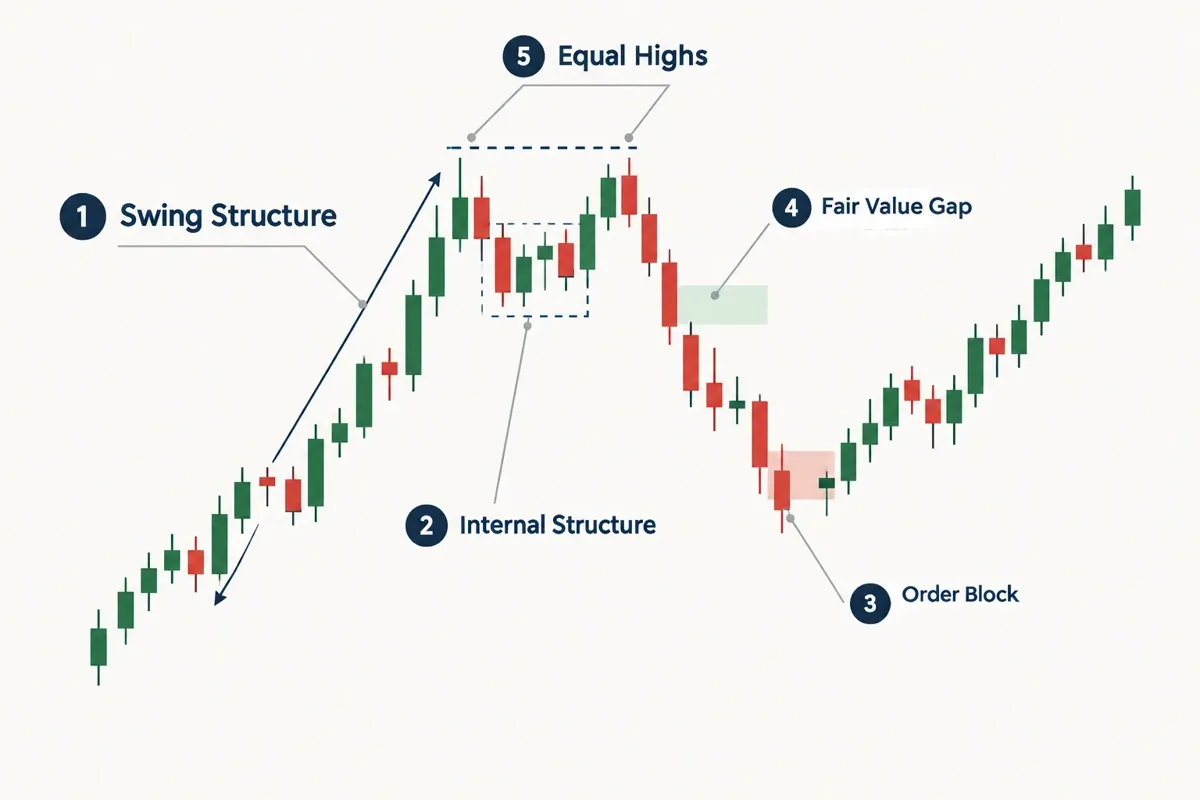
Market structure. The script tracks two layers. Swing structure is the big stuff: the major highs and lows that define the trend. Internal structure is the faster, smaller swings inside it, drawn with dashed lines. LuxAlgo keeps them separate on purpose, and that separation is the most useful thing in the whole indicator.
BOS (break of structure). Price breaks a prior high or low in the direction the trend was already going. Continuation.
CHoCH (change of character). Price breaks structure against the existing direction. An early heads-up that the trend might be rolling over.
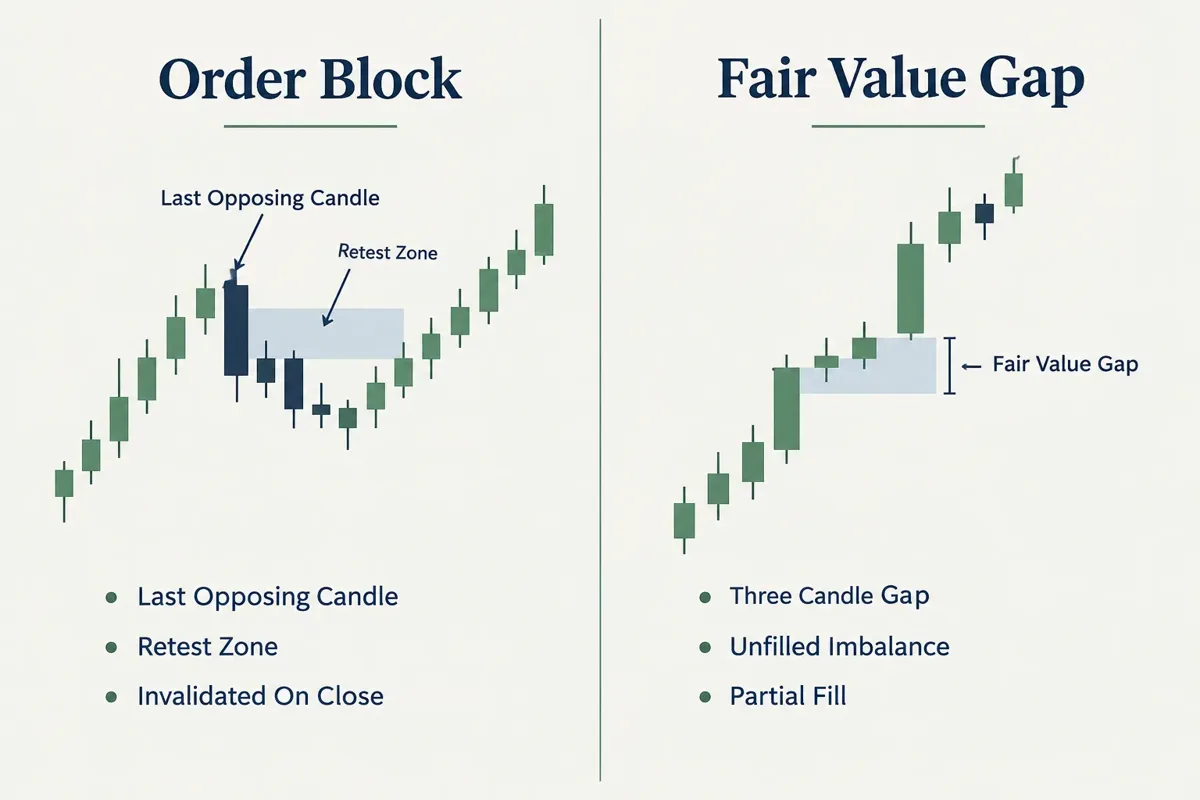
Order blocks. Shaded rectangles marking the last opposing candle cluster before a strong move. The theory: unfilled orders sit there, so price often reacts on a retest. LuxAlgo's own Library page calls these "zones where institutional activity may rest." Read that twice.
Fair value gaps (FVG). A three-candle pattern where price moved so fast it left an unfilled gap between wicks. Markets have a habit of revisiting those gaps.
Equal highs and lows (EQH/EQL). Two or more highs or lows at nearly the same price. Stop orders pile up just beyond them, which makes them liquidity magnets.
Premium and discount zones. The script maps the current swing range. Above the midpoint is premium (expensive, better for selling), below it is discount (cheap, better for buying), and a thin band around the 50% mark is equilibrium. In the published source, the shaded premium and discount boxes only cover the outer 5% of the range at each end, so don't read the empty middle as "no zone."
Who it's actually for
Honest segmentation, since the marketing won't give you one:
| Trader type | Fit | Why |
|---|---|---|
| Total beginner | Poor | Too many objects, no rules attached. You'll see setups everywhere. |
| Beginner who already knows support and resistance | Decent | The labels reinforce concepts you can already name. |
| Intermediate discretionary trader | Strong | Takes over the manual markup you'd otherwise redo every session. |
| Systematic/quant trader | Mixed | Intrabar repaint makes clean backtesting painful. |
| Futures trader | Works | It's a price-structure tool, it doesn't care about asset class. Nearly round-the-clock sessions mean more internal noise, so lean on higher timeframes. |
The honest version: this is a markup assistant, not a signal service. If you can't explain why an order block should hold before the script draws it, the script isn't your problem.
How do you add it on TradingView, step by step?
Six steps, under three minutes. LuxAlgo Smart Money Concepts is free and open-source on TradingView, and LuxAlgo also hosts it as a free Library tool on its Vela platform, with source code you can copy and run anywhere Pine Script runs.
-
Open a chart on TradingView. Pick a liquid symbol you actually trade. SPY, ES futures, QQQ, whatever's on the watchlist. Don't test a structure tool on a low float runner with gappy candles.
-
Click "Indicators" at the top of the chart. The fx icon.
-
Search "Smart Money Concepts LuxAlgo." You want the one published by LuxAlgo, marked as an open-source script. Several knockoffs use near-identical names, so check the author handle on the LuxAlgo TradingView listing before you click.
-
Click it once to add it. Internal structure, swing structure, internal order blocks and equal highs/lows all load at once, so your chart will look busy. That's normal. Fair value gaps, swing order blocks, higher-timeframe levels and premium/discount zones start switched off in the published source, so you'll add those on purpose.
-
Open settings. Hover the indicator name on the chart, click the gear icon. This is where the real work happens, covered in the next section.
-
Save an indicator template. Once you've tuned it, click the templates icon next to "Indicators" in the top toolbar and choose Save indicator template. Name it something boring like "SMC-swing." Future you will not want to redo this.
Setting up alerts without the flicker
This is the step most people skip and then complain about. Because the BOS and CHoCH checks run on live price, an alert can fire on a break that no longer exists by the time the candle completes. The fix: set alert frequency to Once Per Bar Close.
To do it: right-click the chart, Add Alert, pick the SMC condition you want, then set the "Trigger" option to "Once Per Bar Close." Yes, you get the alert later. You also stop getting woken up by breaks that never happened. Our guide to TradingView alerts covers the rest of the alert menu.
If you're piping alerts into an execution layer or a bot, read up on how TradingView alerts connect to automated trading before you wire anything live. Paper trade it first. Every time.
Common mistake at this stage: adding the indicator on a 1-minute chart to "see more signals." You'll see more noise. Start on the 1-hour or 4-hour and work down only once you can read it.
Which settings should you change first?
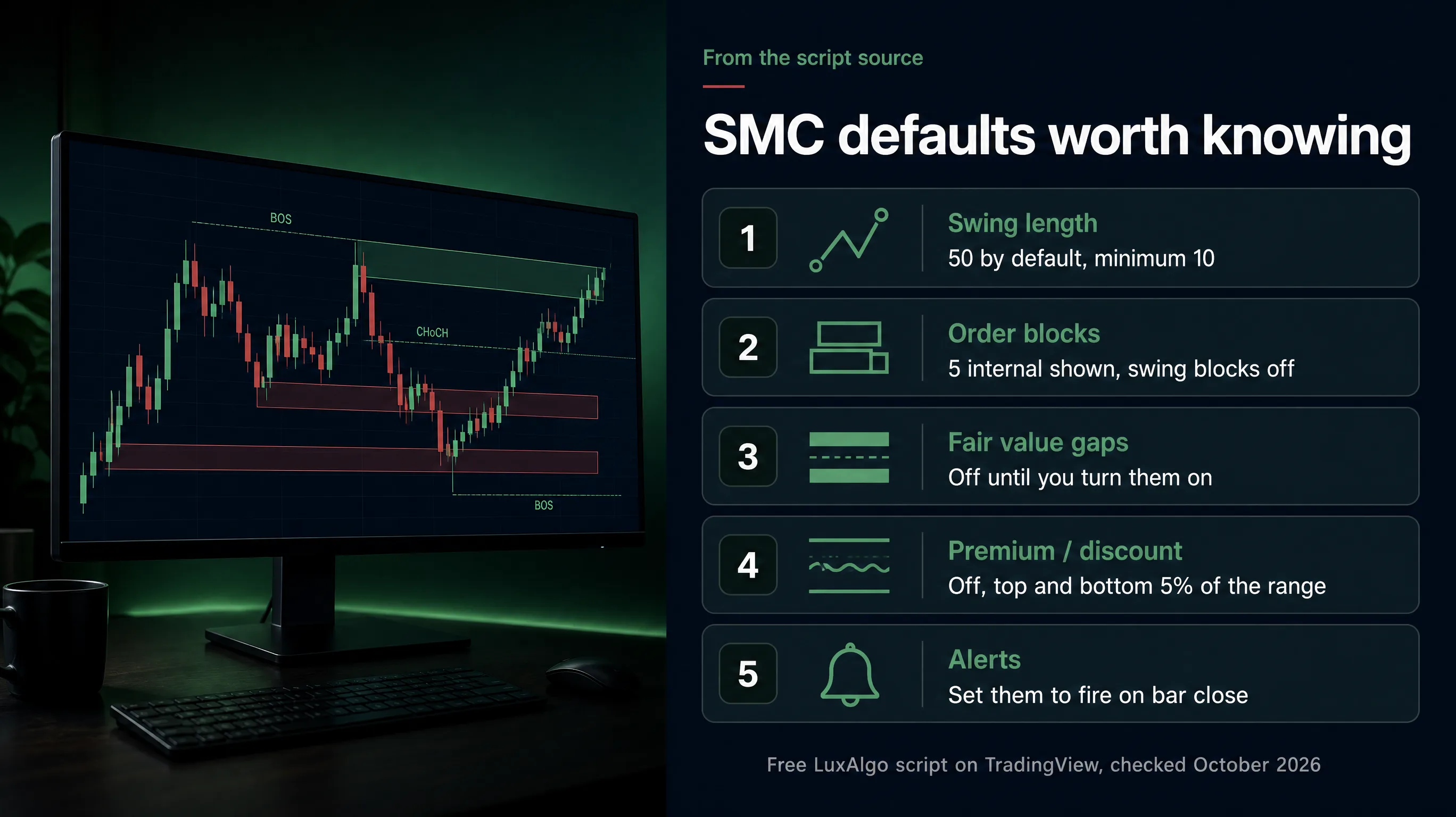
Change four things in LuxAlgo Smart Money Concepts before you change anything else: structure mode, swing length, order block count, and alert frequency. Those four decide whether the chart is readable or a mess.
1. Turn off internal structure (at first). The default shows internal and swing structure together, which means two sets of BOS and CHoCH labels stacking on the same candles. Kill internal structure for your first two weeks. Learn to read swing structure alone. Add internal back once swing structure feels obvious.
2. Set swing length to match your timeframe. The swing length controls how many bars define a pivot. Higher number, fewer and bigger swings. The default is 50 and the minimum is 10. A reasonable starting rule:
- Day trading 5m/15m: swing length around 20
- Swing trading 1H/4H: the default of 50 is fine
- Position trading daily: leave it, and use the higher timeframe levels instead
3. Keep order blocks at 3 to 5. The script shows the 5 most recent internal order blocks by default, and swing order blocks stay off until you enable them. If 5 still looks crowded, drop to 3. The newest zones matter. The one from 400 bars ago has been tested six times and is now just a line.
4. Turn on only the higher-timeframe levels you care about. Daily, weekly and monthly highs and lows ship switched off. Previous day high/low and previous week high/low are genuinely useful. Previous month on a 5-minute chart is decoration.
Second pass settings
Once you've traded it for a few weeks, these are worth a look:
- Order block filter (Atr vs Cumulative Mean Range). Two ways to screen out volatile candles when the script picks order blocks. ATR is the default. Pick one, keep it for 30 days, then judge.
- Style/colors. Switch Style to Monochrome or mute the colors. Bright neon over candles makes it harder to read price, and price is the point.
- Equal highs/lows threshold. If you're seeing EQH labels on every minor wiggle, lower the threshold or raise Bars Confirmation.
- Mode. Switch from Historical to Present if your chart loads slowly. Present only draws recent structure.
Decision rule: if you can't glance at the chart and say what the trend is within three seconds, you have too many features on. Turn one off. Repeat.
How do you read order blocks, BOS and CHoCH?
Read swing structure for direction, internal structure for timing, and treat order blocks as zones to watch, not triggers to fire. That one sentence is most of the skill. LuxAlgo Smart Money Concepts draws the labels; the reading is on you.
The three-step read
Step 1: What's the swing structure doing? Higher highs and higher lows with BOS labels printing upward means the trend is up. The trend is your friend until structure says otherwise. Don't fight it because a single order block looks pretty.
Step 2: Has a CHoCH printed against the swing trend? LuxAlgo describes CHoCH as "the first warning of a potential reversal." A warning, not a confirmation. One CHoCH in an uptrend means momentum stalled. A CHoCH followed by a bearish BOS means structure actually flipped. The difference between those two is the difference between a trade and catching a falling knife.
Step 3: Where is price relative to an order block? In an uptrend, a pullback into a bullish order block is your area of interest. You want price to come into the zone and show you something: a rejection wick, a lower-timeframe CHoCH turning back up, volume picking up. Entry at the zone edge, stop below the zone, target the prior high. That's risk-reward you can actually measure.
A concrete example
An uptrend on the 1-hour. Three bullish BOS labels in a row. Price pulls back 2% into a bullish order block that sits in the discount half of the swing range. You drop to the 15-minute and wait. A bullish CHoCH prints on the 15-minute inside the zone. That's your trigger: two timeframes agreeing, not one indicator shouting.
Stop goes below the order block low, not at some round number you picked because it felt safe. Position sizing comes from that stop distance, never the other way around. If the stop is too wide for your account, the answer is "no trade," not "smaller stop."
An order block is a place to pay attention. It is not a place to blindly buy. LuxAlgo's own Library page describes these as zones where institutional activity may rest. "May" is doing a lot of work in that sentence.
Common mistake: trading every BOS. In a choppy tape, internal BOS labels fire in both directions within the same hour. That's not a trend, that's a range, and you'll get stopped out twice before lunch. Systems over hacks: write a rule that says "no internal BOS trades unless swing structure agrees," and follow it.
Edge case: during the first 15 minutes of the US open and in the last half hour of power hour, structure breaks fire constantly on low timeframes. Volatility manufactures fake breaks. Either widen your timeframe or sit on your hands.
How do fair value gaps and premium and discount zones work?
Fair value gaps mark price inefficiency. Premium and discount zones tell you whether you're buying expensive or cheap inside the current range. Together they answer the question most traders skip: is this a good location, or am I just excited? Both start switched off in LuxAlgo Smart Money Concepts, so toggle them on in settings first.
Fair value gaps, plainly
Three candles. The middle one runs hard. The first candle's wick and the third candle's wick don't overlap, leaving an untraded pocket. The script shades it.
Why it matters: markets often come back to fill those pockets. A gap fill is one of the oldest behaviors on the tape. That gives you two uses:
- As a target. Long into an unfilled FVG above, exit as it fills.
- As support/resistance. In an uptrend, price pulling back into a bullish FVG and bouncing is a continuation setup.
Two rules that keep this honest. First, a fresh, untouched FVG carries more weight than one price has already tapped twice. Second, a gap filled fully and then rejected is better than a partial fill, because you know the level got tested properly.
Don't: treat every FVG as a must-fill. Plenty stay open for months. "It has to fill" is a belief, not a plan.
Premium and discount, plainly
LuxAlgo maps the current swing range into three areas:
| Zone | Location in range | What it means |
|---|---|---|
| Premium | Above the 50% midpoint (shaded box marks the top 5%) | Expensive. Favor shorts, avoid new longs. |
| Equilibrium | Thin band around the 50% midpoint | No edge from location alone. |
| Discount | Below the 50% midpoint (shaded box marks the bottom 5%) | Cheap. Favor longs, avoid new shorts. |
The use case is filtering, not signaling. Combine it with structure:
- Uptrend + price in discount + bullish order block = location and direction agree. That's a clean setup.
- Uptrend + price in premium + a bullish order block from way back = you're buying the top of the range. Pass.
The decision rule: in a confirmed uptrend, only take longs in discount or equilibrium. In a downtrend, only take shorts in premium or equilibrium. That one filter will cut your trade count, and the trades it removes are the ones taken at the worst locations. Fewer trades, better locations. That's the trade.
Edge case: in a strong trend day, price can park in premium for hours and keep going. Premium/discount works best in rotational, range-bound tape. On a trend day with a wide range and no pullbacks, the zones mislead. Know which kind of day you're in before you let the shading veto a trade.
LuxAlgo Smart Money Concepts vs Price Action Concepts: which one?
Smart Money Concepts draws structure objects. LuxAlgo Price Action Concepts is the broader paid toolkit: market structure plus volumetric order blocks, liquidity concepts, imbalance concepts, premium/discount zones and previous highs/lows, according to LuxAlgo's docs. Our LuxAlgo indicators deep dive covers which of the LuxAlgo indicators are worth loading. If you're already overwhelmed, stay on SMC.
Here's the practical split.
| Smart Money Concepts | Price Action Concepts | |
|---|---|---|
| Cost | Free script / free Library tool | Included from the Premium plan up |
| Focus | Structure, order blocks, FVG, premium/discount | Structure plus volumetric order blocks, liquidity and imbalance tools |
| Chart density | Busy by default | Heavier |
| Best for | Learning structure and sticking to it | Traders with an existing system who want more inputs |
| Risk | Over-reading boxes | Analysis paralysis |
Choose SMC if: you trade structure, you want fewer objects, you're still building rules, or you don't want another subscription.
Choose Price Action Concepts if: you already run a profitable structure-based process, you've logged 100+ trades with SMC, and you can name the specific gap in your workflow the extra tools would fill. If you can't name that gap in one sentence, you're shopping, not solving.
How it compares to other smart money indicators
The TradingView SMC category is crowded. Most competitors plot the same six objects with different colors. The differentiators that actually matter:
- Repaint behavior. LuxAlgo's live-price BOS/CHoCH check means breaks can appear and vanish intrabar. Some competing scripts are built around bar-close, non-repainting logic. If backtest fidelity matters to you, ask that question of any SMC script before you trust it.
- Open source. The SMC source on TradingView is visible, which lets you see exactly what triggers a label. Plenty of paid "proprietary SMC AI" scripts won't show you that. Transparency beats branding.
- Ecosystem. LuxAlgo has been pulling SMC into its Vela platform. Per its October 2, 2026 Vela update, the LuxAlgo AI coding agent, Quant, adds the existing SMC Library indicator directly instead of rebuilding an equivalent script, manages several scripts across a workspace in one conversation, and saves its work automatically, with a My Scripts list in the indicator menu. That matters if you want to customize without learning Pine Script.
Want the shortlist of rivals? Our LuxAlgo alternatives page lines them up.
For tracking actual institutional positioning rather than inferred footprints, you need different data entirely: options flow and regulatory filings. Start with how to read unusual options activity on 
Free script or paid LuxAlgo toolkit: what changes?
The LuxAlgo Smart Money Concepts indicator itself is free. As of October 2026, LuxAlgo's Library page lists it as free to use, with source code you can run anywhere Pine Script runs. The paid plans buy platform capability, not a better SMC.
What the paid tiers add
Per LuxAlgo's pricing page, paid plans add deeper chart history (10,000 to 50,000 bars versus 5,000 on Free), longer order-flow lookback, more Quant AI usage, live CME futures data, and, from Premium up, the flagship toolkits including Price Action Concepts. LuxAlgo also announced on October 28, 2026 that price and custom alerts are now unlimited on every Vela plan, Free included, so alert caps are no longer a reason to upgrade on Vela.
Pricing
LuxAlgo's pricing page was running a Halloween sale advertising up to 60% off every plan "until Halloween night." Monthly billing listed Essential at $24.99, Premium at $39.99, Ultimate at $59.99 and AI Ultra at $119.99 per month. The sale prices apply to annual billing: $17.49, $25.99, $32.99 and $48 per month respectively, charged once for the first year ($209.92, $311.92, $395.93 and $575.95), then renewing at $299.88, $479.88, $719.88 and $1,439.88 per year. Every paid plan carries a 30-day money-back guarantee, and the Free plan needs no card. Check the live page before you commit, and know what the renewal number looks like in year two. Promo pricing that renews at roughly double is how subscription fatigue starts.
Hunting for a lower price? Check our AI stock tool deals page.
Should you upgrade?
A straight decision rule:
- Stay free if you trade stocks or ETFs on standard timeframes, use a handful of alerts, and haven't yet traded SMC for 50+ logged trades. The free script gives you everything structural.
- Consider paid if you need live CME futures data on Vela, deeper chart history, or you genuinely want more Quant AI usage to build custom variations without writing Pine.
- Don't upgrade because the free version "isn't giving enough signals." More signals is not the problem you have. Fewer, better ones is the goal.
Full scoring breakdown lives in the LuxAlgo review and scorecard. And if you're weighing tool spend generally, our roundup of AI investment platforms covers what the same money buys elsewhere.
Can you make money trading with it? Nobody can answer that for you, and anyone who does is selling something. The indicator draws levels. Your edge comes from rules, risk management, and whether you actually follow them. LuxAlgo's own disclaimer says it does not execute trades and does not provide personalized investment advice. Treat it accordingly. If you want a reality check on automated signal systems generally, we ran real numbers on AI trading bots.
The 5 mistakes traders make with LuxAlgo Smart Money Concepts
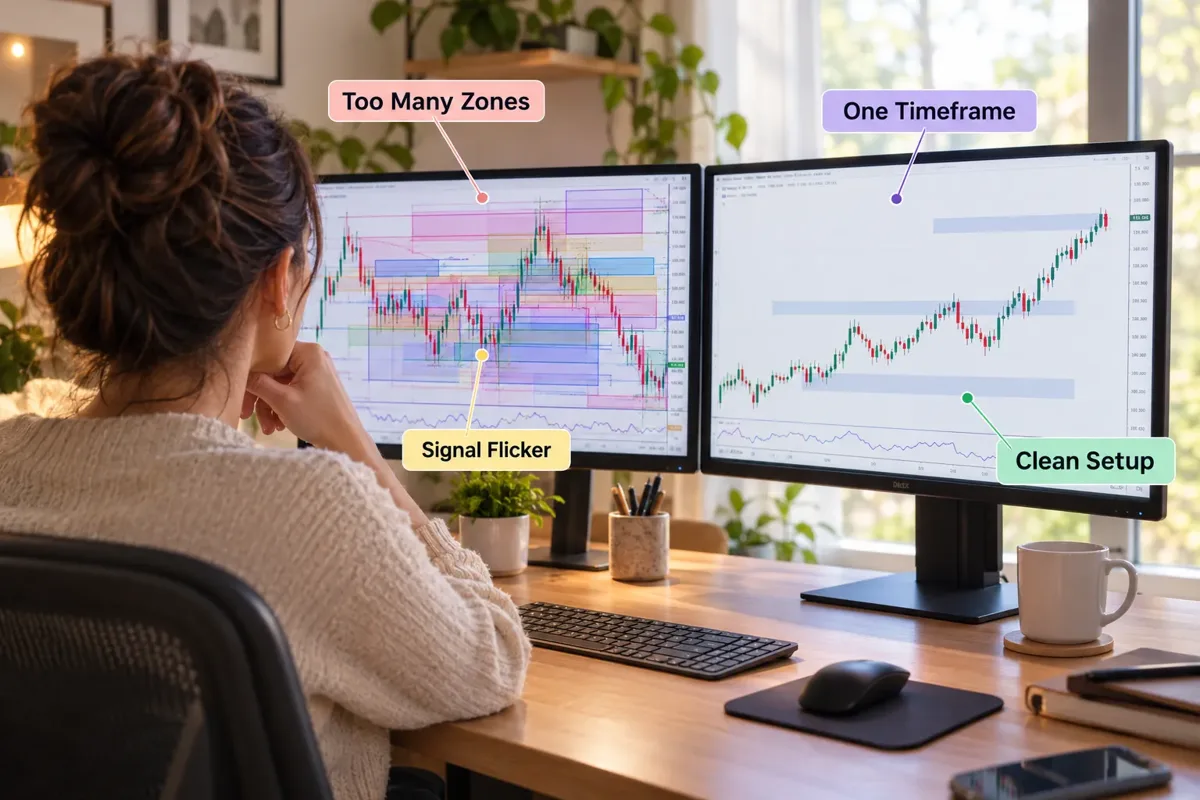
1. Turning every feature on. Internal structure, swing structure, both order block types, every FVG, equal highs and lows, premium/discount zones, and daily, weekly and monthly levels, all at once. That's not analysis, that's confetti. A chart with 40 objects guarantees you'll find a reason to trade in any direction. Run swing structure and three order blocks only for 30 days.
2. Treating the label as the trade. A BOS label is a description of what price did. It isn't an entry, a stop, or a size. Traders see "CHoCH" print and click market buy because the script used a confident-sounding acronym. Then they get stopped out when the bar closes back inside the range... which is exactly the intrabar behavior baked into the live-price logic. Wait for the close. Every time.
3. Believing the "smart money" story literally. The name implies you're watching institutions. You're not. LuxAlgo's Library FAQ asks whether the tool predicts institutional behavior and answers: "No tool can promise that." These are price patterns with a compelling backstory. The patterns can still be useful. The backstory is not evidence.
4. Timeframe hopping until something agrees. No setup on the 1-hour? Check the 15. Nothing there? Try the 5. Somewhere in there a box will line up with whatever you already wanted to do. That's not multi-timeframe analysis, that's confirmation bias with extra clicks. Pick a primary timeframe for bias and one lower timeframe for entry. Two. Not six.
5. Skipping the journal. Most people run LuxAlgo Smart Money Concepts for three months, feel vaguely like it works, and never check. Log every trade: which object triggered it, which timeframe, what the premium/discount read was, the outcome. After 50 trades you'll likely find that two or three of the objects do most of the work and the rest are decoration. You can't find that without data. Data over noise.
How long until you can actually read it?
Honest estimate, not a promise: a few sessions to recognize the objects, four to eight weeks of focused screen time to read structure without second-guessing, and 50 to 100 logged trades before you know which parts of it suit your style. Anyone telling you it clicks in a weekend is selling a course.
What to do if you're seeing no signals at all: check that your symbol has enough history loaded, that swing length isn't set absurdly high for your timeframe, that the features you expect are actually toggled on (several ship switched off), and that you're not on a thin, illiquid chart where pivots rarely form. Usually it's a settings issue, not a broken script.
Sources
- Smart Money Concepts (SMC). luxalgo.com.
- Smart Money Concepts (SMC) [LuxAlgo] script page. tradingview.com.
- Multi Tasking on Vela Chart Workspaces. luxalgo.com.
- Product Updates. luxalgo.com.
- LuxAlgo Pricing. luxalgo.com.
- Price Action Concepts introduction. docs.luxalgo.com.
Deciding whether SMC earns a permanent spot in your swing trading stack? LuxAlgo is one of 200+ AI stock tools catalogued in the FullStack Alpha directory, filterable by category, price and what they actually do. Compare the best AI swing trading tools
This is education, not financial advice.
Your market edge starts with the right tool. Stay alpha.
Some links on this page may be affiliate links. Scores and verdicts are never influenced by them.
Prices are subject to change as fast as AI technology.
We test the tools. You get the verdict.
One email a week. What we tested, what scored, and what we'd skip. Written for traders, not for clicks.
Frequently asked
More from FullStack Alpha