

Charles Schwab Trading Platform Guide: Which One Fits You
Short on time? The Charles Schwab Alpha Score scorecard breaks the 83/100 down by pillar, with pricing and the verdict, in about 90 seconds.
See the score
The Charles Schwab trading platform lineup covers four free products, Schwab.com, Schwab Mobile, thinkorswim desktop, and thinkorswim web, and every one of them ships free with a funded account.
Quick Answer: The Charles Schwab trading platform is really four platforms in one account: a browser dashboard for research and long term investing, a mobile app for quick trades, and thinkorswim desktop and web for options, futures, and active trading. There's no added platform fee for any of them. Stock and ETF trades cost $0 online, options run $0.65 a contract, and the account minimum is $0. The right pick depends on whether you're managing a retirement account or trading the open on power hour.
Key Takeaways
- The Charles Schwab trading platform lineup includes four free products: Schwab.com, Schwab Mobile, thinkorswim desktop, and thinkorswim web, all included at no added cost with a funded account.
- Online commissions sit at $0 for U.S. exchange listed stocks and ETFs, plus $0.65 per options contract, with a $0 account minimum.
- Thinkorswim desktop carries more than 400 technical studies and its own scripting language, thinkScript, for building custom indicators.
- The Charles Schwab trading platform earns an Alpha Score of 83 out of 100, with Signal Quality, Transparency, and Community Verdict each landing at 17 out of 20.
- Fractional share trading now covers most U.S. stocks and ETFs with a $1 minimum, on both the standard platform and thinkorswim.
- Schwab added single stock futures on more than 50 names in August 2026 and plans to expand crypto trading beyond bitcoin and ether to Solana, Avalanche, and Chainlink.
- Independent 2026 rankings from Forbes Advisor and StockBrokers.com both put Schwab among the top full service brokers, while Kiplinger's September 2026 update ranks Interactive Brokers first overall.
What Is the Charles Schwab Trading Platform, and How Does It Work?
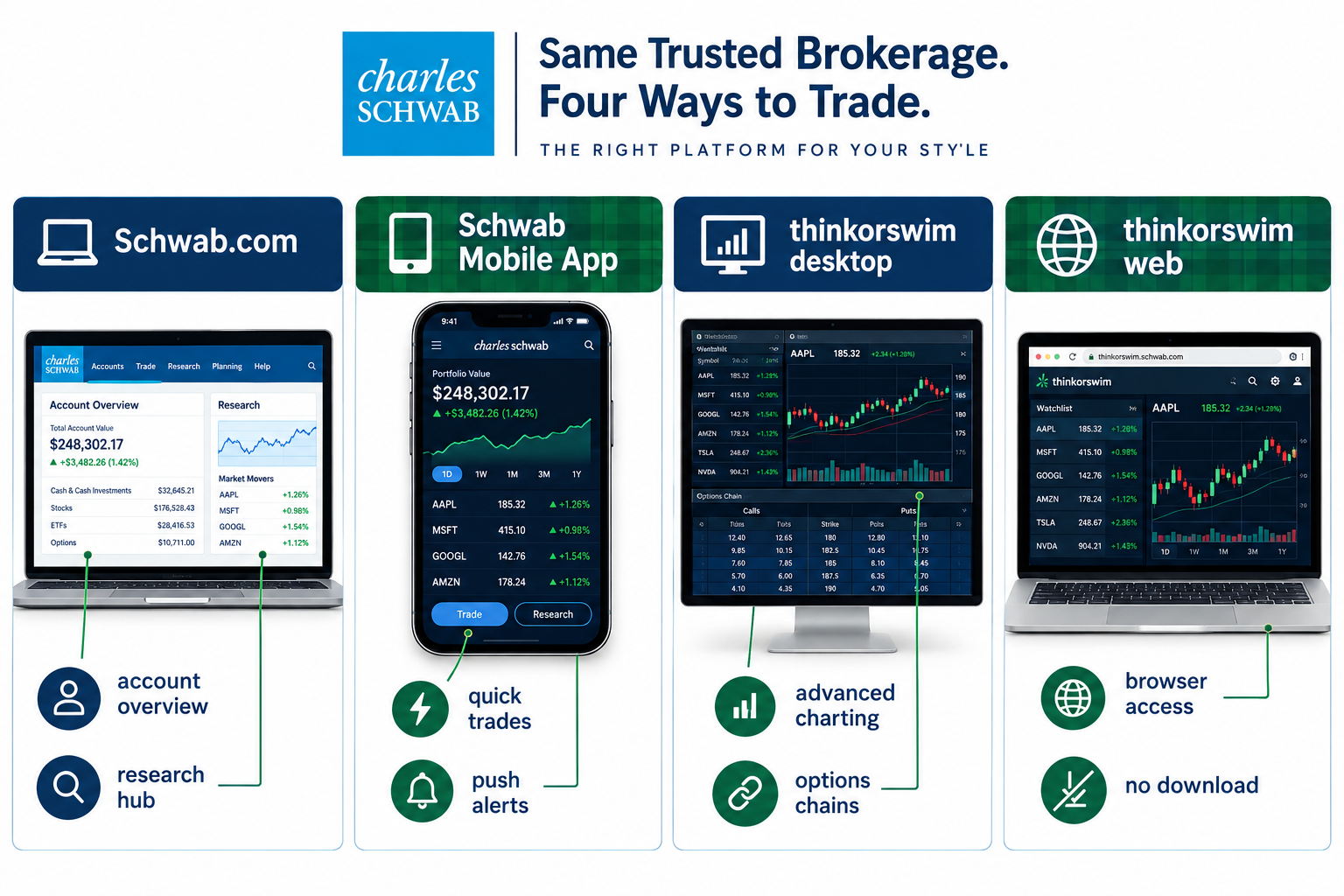
The Charles Schwab trading platform isn't one app. It's a set of four tools that share the same account, the same balance, and the same trade history, so a position opened on your phone shows up instantly on thinkorswim desktop.
That matters because most brokers make you choose one interface and live with it. Schwab lets you match the tool to the task.
The four pieces:
- Schwab.com handles the browser experience: account overview, research reports, and basic stock and ETF orders. This is the version built for someone checking a 401k rollover, not someone scalping the open.
- Schwab Mobile app is the phone version of the same account, built for checking balances, setting alerts, and placing a quick trade between meetings.
- thinkorswim desktop is the deep end: advanced charting, options chains, futures, and a paperMoney simulator for practice trades.
- thinkorswim web runs the same engine in a browser tab, no download required.
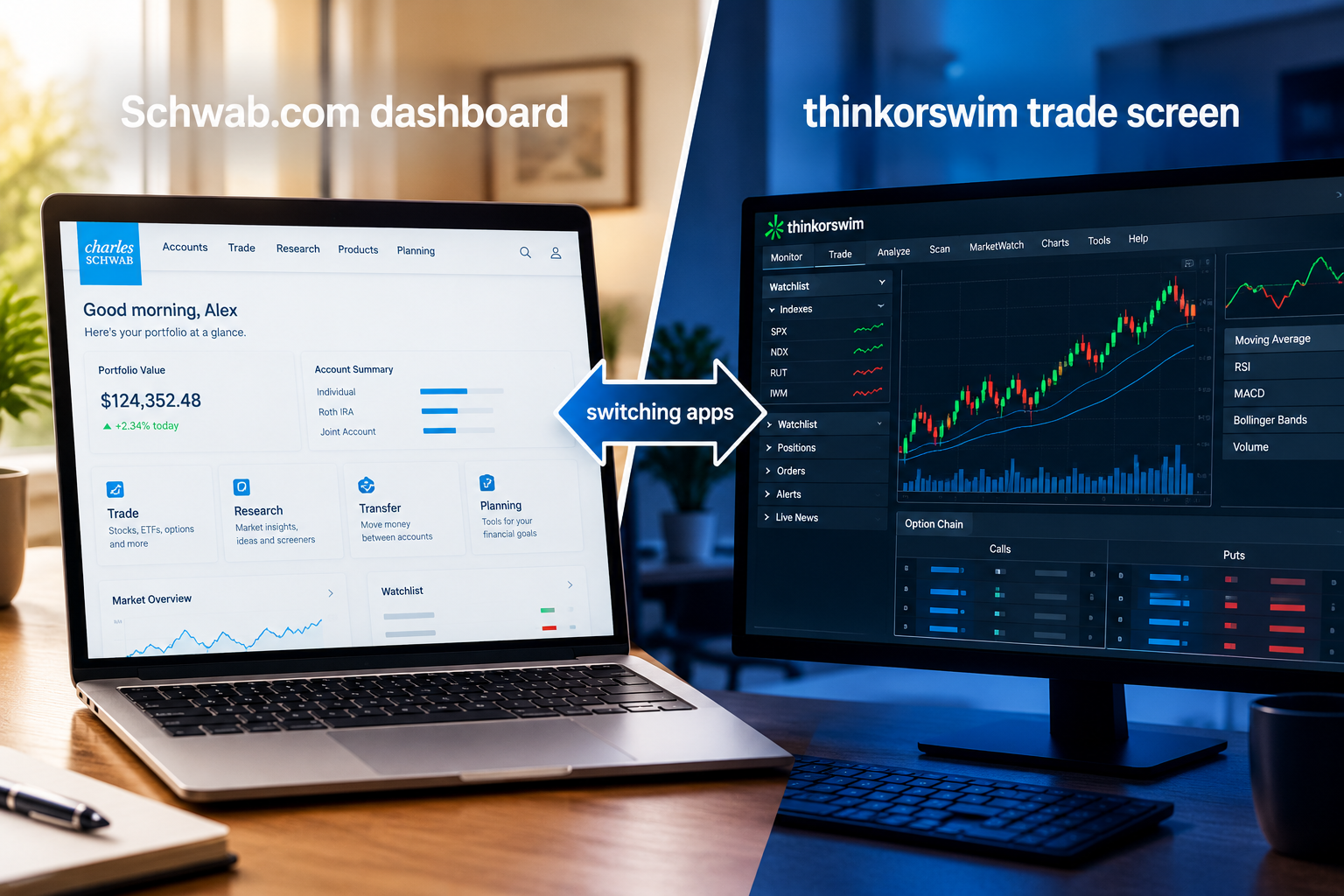
All four connect to a single Schwab brokerage account. There's no upgrade fee to open up thinkorswim and no downgrade in research quality if you stay on Schwab.com. That's the structural reason Schwab keeps showing up near the top of "best trading platform" lists: it doesn't force a trade-off between beginner friendly and pro grade.
Which Schwab Platform Fits Which Type of Trader?
A retirement investor belongs on Schwab.com or the Schwab mobile app. An active options or futures trader belongs on thinkorswim desktop. The split isn't about skill, it's about what the account is actually doing on a given day.
If you're dollar cost averaging into an ETF twice a month, thinkorswim's options chain and Level II data are noise you'll never use. If you're reading the tape on a breakout setup during power hour, Schwab.com's simplified order ticket will slow you down.
A simple filter:
- Buy and hold, retirement account, occasional trade: Schwab.com or the Schwab mobile app.
- Swing trader, holds days to weeks, wants clean charts without a steep learning curve: thinkorswim web.
- Day trader, options seller, futures trader: thinkorswim desktop, full stop.
Schwab Mobile App vs Desktop Platform Features
The Schwab mobile app covers the basics well: balances, watchlists, alerts, and single leg option orders. What it doesn't do is multi leg option strategies, custom thinkScript studies, or Level II depth, all of which live on thinkorswim desktop.
Treat the mobile app as your monitoring tool and thinkorswim desktop as your execution tool once a position gets complicated. That's not a knock on the app. It's a design choice, and it's the right one for a screen that size.
Is Charles Schwab Good for Beginners or Experienced Traders?
Both, and that's the honest answer, not a dodge. A beginner gets a $0 minimum account, fractional shares starting at $1, and a clean Schwab.com dashboard that doesn't overwhelm on day one. An experienced trader gets thinkorswim desktop, futures, forex, and now single stock futures on more than 50 names as of August 2026.
The trade-off: a beginner who jumps straight into thinkorswim desktop without a plan is going to feel like they walked onto a trading floor with no headset. Start on Schwab.com or the app, graduate to thinkorswim once you have an actual system, not before. If you're still building that system, our breakdown of AI tools for swing trading is a reasonable next stop before you touch a multi leg option order.
Charles Schwab vs Fidelity vs Interactive Brokers: Which Is Best?
There's no single winner here, only a best fit. Forbes Advisor named Schwab its best overall brokerage for 2026, citing broad investment selection and platform quality. Kiplinger's September 2026 ranking put Interactive Brokers first, ahead of Fidelity. StockBrokers.com's 2026 review called Schwab strong on active trading and ease of use, Fidelity strong on research and education, and Interactive Brokers strongest for global markets and complex derivatives.
Schwab vs Fidelity comes down to platform preference more than price, since both charge $0 for online stock and ETF trades. Fidelity's research tools lean academic. Schwab's thinkorswim leans active trader. If you've used both, the Schwab trading platform generally feels faster to actually place a trade, while Fidelity's research library runs deeper for buy and hold analysis.
Schwab vs Interactive Brokers is a different question entirely. Interactive Brokers wins on raw global market access and tiered pricing for high volume traders. Schwab wins on usability and the fact that thinkorswim doesn't require a finance degree to open.
Choose Schwab if: you want one account for investing, options, and futures, with the option to add crypto, and you value a shorter learning curve.
Choose Interactive Brokers if: you trade internationally, need the cheapest per share pricing at high volume, or want direct market access routing.
Charles Schwab vs Robinhood for Casual Investors
For a casual investor placing a handful of trades a month, Schwab and Robinhood both charge $0 for online stock and ETF trades, so the decision comes down to depth, not cost.
Robinhood built its app around simplicity: buy, sell, done. Schwab built the Charles Schwab trading platform around optionality: start on the simple app, then grow into thinkorswim without opening a new account. Robinhood doesn't give you that second gear.
The trade-off: Robinhood's interface can feel friendlier for a first trade ever. Schwab's research library, bond desk, and banking integration make it the better long term home once that first trade turns into an actual portfolio. Play stupid games with an account that can't grow with you, and you'll be migrating brokers in a year anyway.
What Does Trading Cost on the Charles Schwab Trading Platform?
Schwab charges $0 for online U.S. exchange listed stock and ETF trades, $0.65 per options contract, and requires no account minimum to open. Broker assisted trades run $25, a fee most active traders never touch since the platform handles order entry directly.
Charles Schwab fees stay competitive with the rest of the industry precisely because Schwab, Fidelity, and most majors settled on $0 commissions years ago. Where Schwab trading fees actually differentiate is in the extras:
| Item | Cost |
|---|---|
| Online stock/ETF trades | $0 |
| Options contracts | $0.65 each |
| Broker assisted trades | $25 |
| Account minimum | $0 |
| Fractional shares | $1 minimum |
| Crypto trades (Schwab Crypto) | 0.75% of dollar value traded |
Crypto pricing sits apart from the rest because Schwab Crypto runs through Charles Schwab Premier Bank rather than the brokerage itself. Crypto holdings there aren't FDIC insured or SIPC protected the way brokerage assets are, which is worth knowing before you fund that account.
Charles Schwab Margin Requirements and Account Minimums
Schwab requires no minimum deposit to open a standard brokerage account, though margin trading and certain options strategies carry their own equity requirements set by FINRA and Schwab's own house rules. Pattern day trading rules still apply the same way they do industry wide: four or more day trades in five business days on a margin account under $25,000 in equity can trigger a flag.
A common mistake: funding an account with $2,000 and expecting full day trading flexibility. Margin accounts need real equity behind them before Schwab lets you run size. Check the current margin disclosure on your account before you position size a trade you can't actually support.
Schwab.com vs Schwab Mobile vs Thinkorswim: Platform Comparison
Here's the lineup side by side, because the fastest way to pick a Schwab platform is to see what each one is actually built for.
| Platform | Best audience | Depth | Learning curve |
|---|---|---|---|
| Schwab.com | Long term investors, retirement accounts | Moderate: research, basic orders | Low |
| Schwab Mobile app | Anyone checking or trading on the go | Moderate: alerts, single leg options | Low |
| thinkorswim web | Swing traders wanting charts without install | High: charting, options chains | Medium |
| thinkorswim desktop | Active day traders, options sellers, futures traders | Highest: 400+ studies, thinkScript, paperMoney | High |
Notice none of these cost extra. That's the actual edge of the Charles Schwab trading platform over brokers that gate advanced tools behind a subscription: you grow into thinkorswim, you don't pay to open up it.
How to Set Up a Charles Schwab Trading Account
Opening a Charles Schwab trading platform account takes about 10 minutes online, and funding can post the same day with an electronic transfer. The process runs through Schwab.com regardless of which platform you plan to trade on afterward.
- Go to Schwab.com and choose the account type: brokerage, IRA, or a joint account.
- Complete identity verification with your Social Security number and employment details.
- Fund the account through an ACH transfer, wire, or account transfer from another broker.
- Download the Schwab mobile app or install thinkorswim desktop once funds post.
- Enable options and margin trading separately, if you plan to use them, since those need their own approval step.
Common mistake: applying for options approval before you've read Schwab's own risk disclosures. Approval tiers exist for a reason. Skipping past them to trade spreads you don't understand is how small accounts blow up fast.
How Good Is Thinkorswim Inside the Charles Schwab Trading Platform?
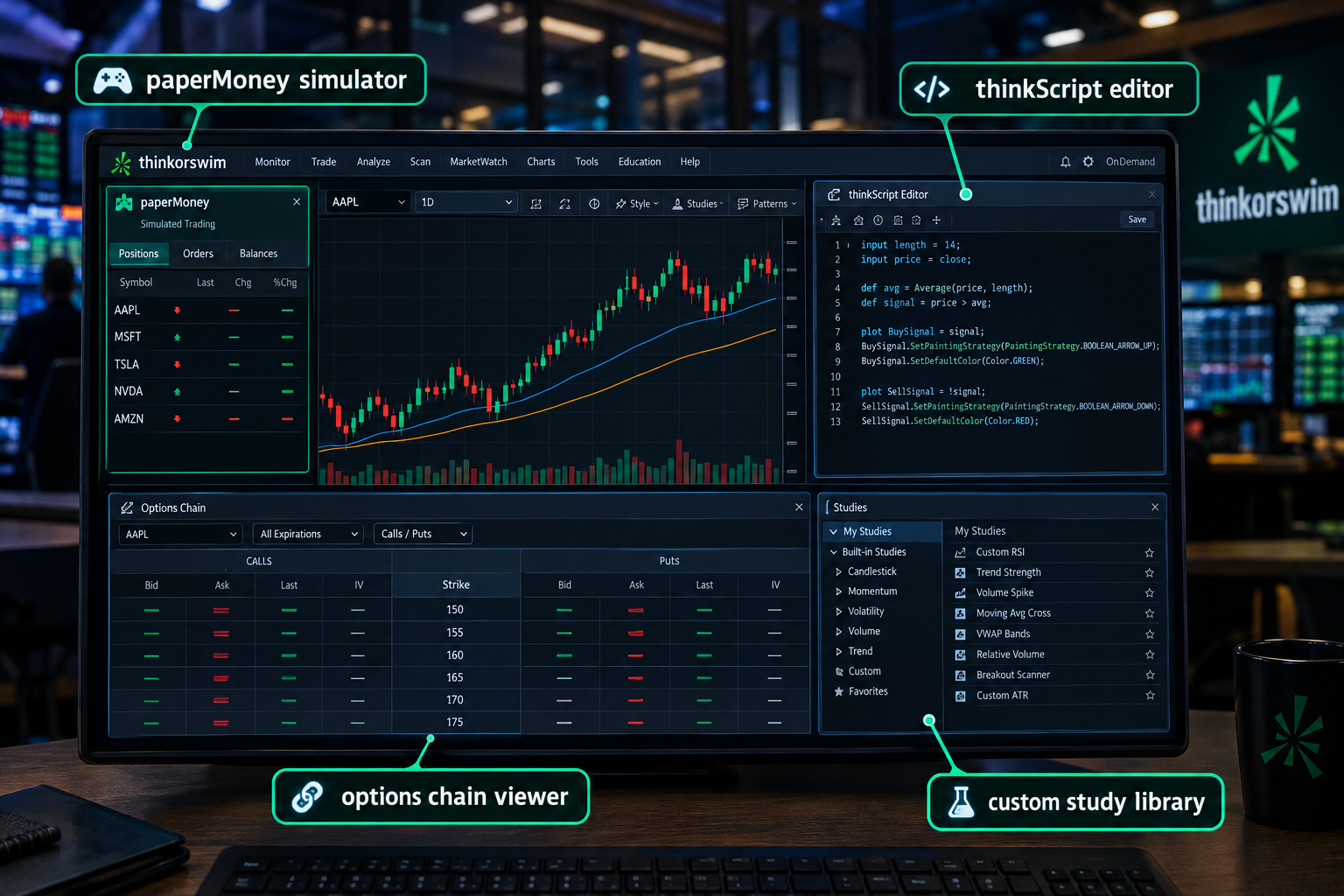
Thinkorswim is the strongest single reason to open a Charles Schwab trading platform account if you trade actively. It carries more than 400 built in technical studies, a full options chain with Greeks displayed live, and thinkScript, a coding language for writing your own indicators and scans.
Schwab thinkorswim also runs paperMoney, a virtual trading simulator loaded with real market data. That matters more than it sounds like it should. If you've got a clean setup you want to test before risking real capital, paper trade it first on paperMoney and see if it actually holds up across a week of real price action instead of one lucky chart.
Trading hours extend further than most retail platforms too: thinkorswim supports trading 24 hours a day, five days a week, across more than 1,300 stocks and ETFs including the S&P 500, Nasdaq-100, and Dow 30 names. That's a real edge for anyone reacting to overnight news instead of waiting for the opening bell.
Can You Trade Options on the Charles Schwab Trading Platform?
Yes. Options trade on all four Schwab platforms, with the deepest tools, spread builders, and Greeks analysis living on thinkorswim desktop. Contracts cost $0.65 each with no base commission.
Approval happens in tiers based on experience and account size, from covered calls up through naked spreads. Walk Limit orders, a Schwab feature that automatically adjusts a limit price toward the market over a set time window, are available on options orders specifically to help with fills on less liquid contracts.
Our Top 5 Favorite Charles Schwab Trading Platform Features
Five features earn their spot for genuinely changing how you trade, not just padding a features list.
- paperMoney simulator. Real market data, zero real money at risk. The single best onboarding tool on the Charles Schwab trading platform for anyone who wants to test a system before funding it.
- thinkScript. Build your own indicators and scans instead of settling for whatever ships default. This is the closest thing retail gets to a hedge fund style research desk.
- Level II Nasdaq TotalView data. Real order book depth for reading the tape, not just the last print. Serious for anyone trading a low float name in a choppy tape.
- 24 hour, 5 day trading on 1,300+ names. Reacting to overnight news without waiting for the open is a structural edge most brokers don't offer at all.
- Fractional shares at a $1 minimum. Position sizing on high priced stocks used to mean skipping them entirely. Now $1 buys a slice of anything.
Charles Schwab Alpha Score Breakdown: 83/100
The Charles Schwab trading platform earns an Alpha Score of 83 out of 100, built from five pillars scored 20 points each. No single pillar drags the average down, which is rare for a broker this size.
| Execution Quality | 17 / 20 |
| Cost Transparency | 17 / 20 |
| Price-to-Value | 16 / 20 |
| Usability | 16 / 20 |
| Community Verdict | 17 / 20 |
Execution quality (17/20): fills are fast and reliable across thinkorswim and Schwab.com, and outage reports stay rare. A third party monitor logged a roughly 24 minute login access issue on September 11, 2026, but Schwab didn't officially acknowledge it, and service showed operational again days later.
Cost transparency (17/20): $0 stock and ETF trades, $0.65 options contracts, and a published crypto rate of 0.75% per trade are all stated plainly, no hidden tiers.
Price-to-value (16/20): full service depth at zero added platform cost is hard to beat. The caveat: cash sweep yields on uninvested balances run lower than some high yield savings alternatives, a real cost if you park cash there long term.
Usability (16/20): Schwab.com and the mobile app are genuinely easy. thinkorswim's learning curve is real, and switching between two ecosystems inside one account creates occasional friction, especially the first month.
Community verdict (17/20): trader forums and review sites consistently rate thinkorswim's depth highly, with the most common complaint being the adjustment period moving from a simpler app.
The pattern across all five pillars: strength with a named trade-off, never a free pass. That's what an honest 83 looks like.
Where Does the Charles Schwab Trading Platform Fall Short?
The biggest trade-off with the Charles Schwab trading platform is that you're really learning two ecosystems, not one, and a few smaller costs hide in places new users don't check first.
- Two interfaces to learn. Schwab.com and thinkorswim don't share a design language. Muscle memory built on one doesn't transfer cleanly to the other.
- Cash sweep yields. Uninvested cash defaults to a sweep account with a lower yield than some competing money market options. Worth checking before you let cash sit idle for months.
- Some data fees. Certain premium data feeds and Level II access carry activity requirements or small fees if you don't trade enough volume to qualify for free access.
Common Mistakes People Make With Charles Schwab Trading
The most common one: opening thinkorswim on day one, staring at 400 studies, and freezing. That's analysis paralysis, not a platform problem. Pick three indicators you actually understand, mute the rest, and build from there.
The second most common: skipping paperMoney entirely and funding a live account before testing a system. Revenge trading a real account because you never validated the setup first is an expensive way to learn a lesson paperMoney would've taught you for free.
Charles Schwab Platform Not Working: Troubleshooting Steps
If Schwab.com or thinkorswim won't load, check three things before assuming an outage: your internet connection, your browser cache, and Schwab's own status page, since third party outage trackers sometimes flag brief login issues that Schwab itself doesn't confirm.
For thinkorswim desktop specifically, a full reinstall fixes more login failures than any other single step, since the app occasionally needs a fresh authentication token after a Schwab side update.
Charles Schwab Platform Slow or Lagging: How to Fix It
Lag on thinkorswim desktop is usually a local resource problem, not a Schwab problem. Too many open charts, too many studies running live, and an underpowered machine will choke any charting platform, not just this one.
Close unused tabs and charts, limit live studies to what you're actually watching, and restart the app during low volume hours rather than power hour, when order flow and data load peak together.
Best Alternatives to Charles Schwab for Day Trading
If raw speed and the cheapest per contract pricing matter more than an all in one ecosystem, Interactive Brokers and a dedicated futures platform are the two real alternatives worth a look.
- Interactive Brokers: tiered pricing rewards high volume, plus the deepest global market access of any major retail broker.
- Tastytrade: built specifically around options traders, with a fee structure that caps per leg costs on multi leg trades.
- Webull: commission free with a mobile first design that appeals to a younger, phone native trader.
None of these replace the breadth of the Charles Schwab trading platform outright. They compete on one specific dimension each. If you're stacking tools on top of whichever broker you land with, our tested breakdown of AI tools for day trading covers what actually earns its subscription versus what's a public API with a paywall bolted on.
What Tools and Research Does Charles Schwab Offer Traders?
Schwab bundles in house market commentary, third party research, and charting tools across every platform, at no added subscription cost. That's a meaningful advantage over brokers that charge separately for research access.
thinkorswim adds Level II data, options analytics, and futures and forex access on top of the standard research library. Schwab's own market commentary desk publishes daily notes covering earnings season moves, Fed commentary, and sector rotation, which pairs well with a system you're already running rather than replacing it.
For traders who want charting depth beyond what any single broker platform offers, it's worth comparing dedicated charting tools separately. Our full review of TradingView and our head to head on TradingView vs Finviz both cover where a broker's built in charts stop and a dedicated charting subscription starts to earn its keep. If you're exploring whether automated scripts on thinkScript actually replace disciplined manual review, our breakdown of whether AI trading bots actually work is the honest version of that question. And if position sizing on a growing account is the actual gap, the free position sizing and risk calculators are a faster fix than another indicator.
Final Verdict: Who the Charles Schwab Trading Platform Fits Best
The Charles Schwab trading platform fits two kinds of traders well: someone who wants one account that grows from a first ETF purchase into full options and futures trading, and someone who's already active and wants thinkorswim's depth without paying a separate platform fee for it.
It fits less well if your only priority is the absolute cheapest per share pricing at high volume, where Interactive Brokers still wins, or if you want a single, simple interface with zero learning curve at all, where Robinhood's narrower app has an edge.
Next step: if you're opening a new account, start on Schwab.com, fund it, and spend a week in paperMoney before you touch a live options order. Systems over hacks. A tested process beats a lucky first trade every time, and the Charles Schwab trading platform gives you the room to build that process without switching brokers as you grow.
FullStack Alpha tests the AI tools and systems that run on top of whichever broker you land with. See the scanners, screeners, and honest rankings at aistockpickerapps.com.
This review covers the Charles Schwab trading platform on its own merits. FullStack Alpha may earn a commission from some partner links on this site, at no added cost to you.
References
Trading - https://www.schwab.com/learn/trading
Trading And Investment Management - https://advisorservices.schwab.com/whats-new/trading-and-investment-management
Whats New - https://advisorservices.schwab.com/whats-new
Thinkorswim - https://www.schwab.com/trading/thinkorswim
Desktop - https://www.schwab.com/trading/thinkorswim/desktop
Set Up Thinkorswim Desktop Options Trading - https://www.schwab.com/learn/story/set-up-thinkorswim-desktop-options-trading
schwab - https://www.schwab.com/trading/thinkorswim/web
Introduction To Thinkorswim Desktop Platform - https://www.schwab.com/learn/story/introduction-to-thinkorswim-desktop-platform
Market Commentary - https://www.schwab.com/learn/market-commentary
We test the tools. You get the verdict.
One email a week. What we tested, what scored, and what we'd skip. Written for traders, not for clicks.
Frequently asked
Topics in this teardown
Our verdict on Charles Schwab
Charles Schwab scores 83, and thinkorswim is most of the reason.