

Barchart Premier: Every Feature Ranked Before You Pay
Short on time? The Barchart Alpha Score scorecard covers pricing, the verdict and what traders actually say, in about 90 seconds.
See the score
Barchart Premier turns the free site's teaser data into full options history, unlimited screener automation, and Excel-ready exports, for less than the price of two coffees a week.
Quick Answer
Barchart Premier is the paid tier of Barchart.com that opens up the options screener, years of historical options data, unusual options activity scans, and CSV exports the free site blocks behind a paywall. It runs $29.95 a month, or roughly $19.95 a month if you pay $239.95 annually. It earns a 77 out of 100 Alpha Score from FullStack Alpha testing: strong on data depth and honesty about what its signals actually are, weaker on raw predictive power and interface polish.
Key Takeaways
- Price: $29.95 per month, $239.95 billed annually (about $19.95 a month), or $419.95 for two years (about $17.49 a month).
- Free trial: 30 days before your card is charged, on qualifying subscriptions.
- Data exports: 250 CSV downloads per day, up to 20,000 records per historical download.
- Options history: Daily data back to January 3, 2017; minute-level data starts March 2023.
- Options screener: More than 150 data points and hundreds of filter combinations covering volume, open interest, implied volatility, and Greeks.
- Automated screeners: Saved screens run up to four times a day and can email up to 1,000 results as a CSV file.
- Alpha Score: 77/100, with Transparency the standout pillar at 18/20 and Signal Quality the weak spot at 13/20.
What is Barchart Premier and what does it include?
Barchart Premier is the paid subscription layer sitting on top of the free Barchart.com site, and its whole job is removing the walls the free version puts around data, screens, and exports. Free Barchart shows you a stock's chart and a taste of the numbers. Barchart Premier shows you the entire filing cabinet.
The subscription bundles several things that would otherwise be separate tools: a full options screener, a stock screener, real-time and historical price data, unusual options activity scanning, technical signal tracking through something called Barchart Opinion, and export tools built for Excel and CSV work. It covers equities, ETFs, futures, forex, and cryptocurrencies in one login, which is unusual. Most competitors specialize. TradingView leans charting. Unusual Whales leans options flow. Barchart Premier tries to be the one subscription that touches all of it.
That breadth is the pitch and, depending on your process, the trade-off. If you trade one asset class and want the deepest possible tool for it, a specialist wins on depth. If you swing trade stocks, watch options flow, and check futures before the open, Barchart Premier keeps that in one tab instead of five.
Barchart Premier charting features explained
Barchart Premier's charting is functional, not flashy. You get technical indicators, drawing tools, multiple timeframes, and the ability to overlay Barchart Opinion signals directly on the chart. It is not built to compete with TrendSpider's automated pattern recognition or TradingView's social layer. It is built to sit next to your options screener results and confirm what you are already looking at.
Decision rule: choose Barchart Premier for charting if you want it bundled with data and screening in one place. Choose a dedicated charting platform if charting is the whole job.
Barchart Premier system requirements and can you use it on mobile
Barchart Premier runs in a web browser, so there is no heavy install and no minimum hardware spec beyond a modern browser and a stable connection. It also has a mobile app for iOS and Android that mirrors watchlists, quotes, and core screener results.
The mobile experience is fine for checking a Barchart watchlist or a quick quote between meetings. It is not where you want to build a 40-filter options screen from scratch. That work belongs on a desktop screen, full stop.
How good are the Barchart Premier screeners and unusual options activity data?
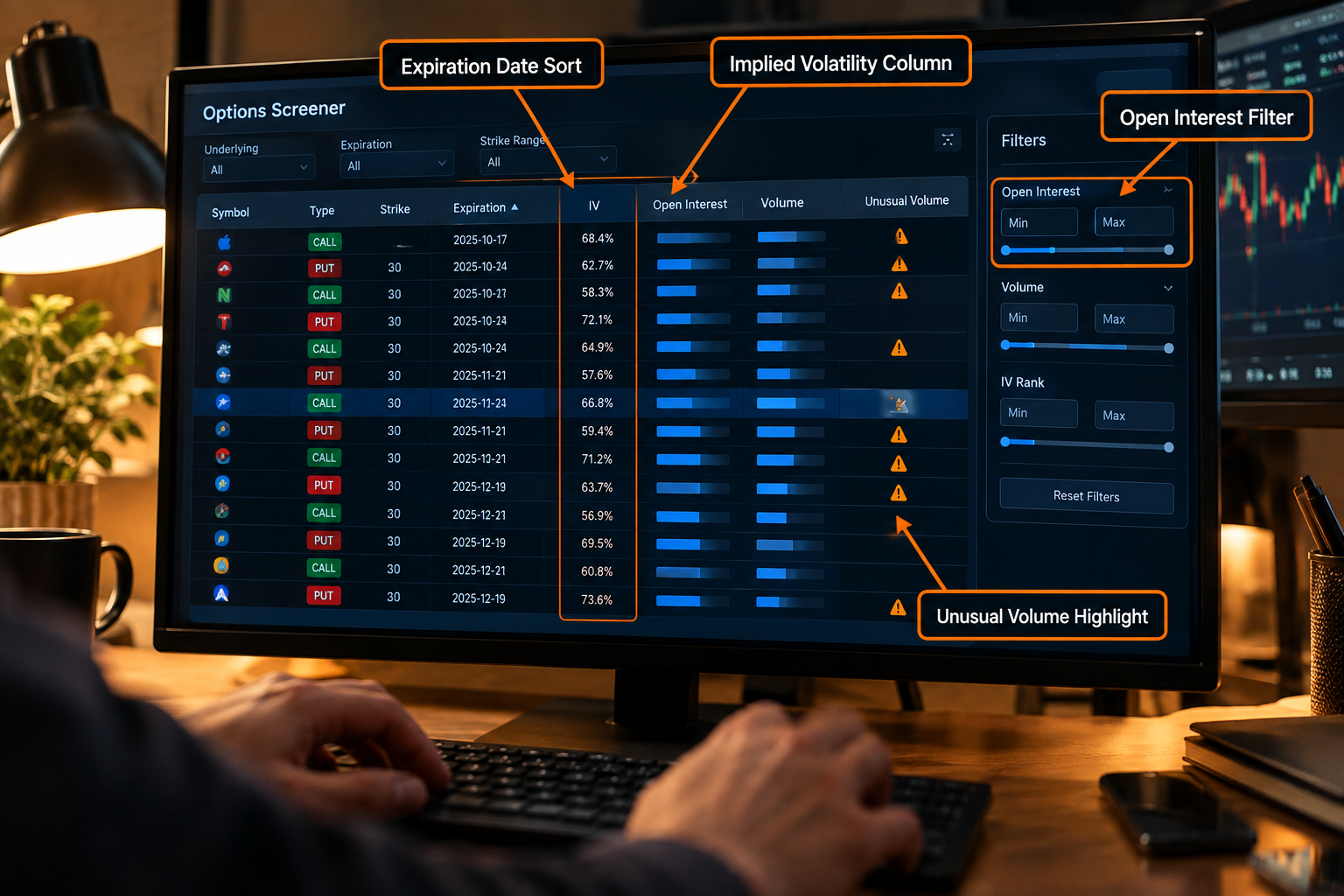
The Barchart Premier screener is genuinely deep, and the unusual options activity data is one of the strongest reasons to pay for the upgrade at all. The free version shows you a locked preview. Premier hands you the full filter list.
The options screener alone supports more than 150 data points across hundreds of filter combinations: volume, open interest, implied volatility, moneyness, expiration windows, the Greeks, and specific strategy setups like covered calls or bull spreads. That is a genuine stock screener and options screener rolled into one subscription, and it is the feature that shows up most often in trader discussion of the platform.
Unusual options activity is Barchart's flag for trades that stand out from a contract's normal volume pattern, the kind of activity that sometimes precedes a catalyst. It will not tell you why a trade happened. It will tell you it happened, with the volume and open interest to back it up. Investopedia's explainer on unusual options activity is worth a read if the concept is new to you.
Common mistake: treating every unusual options activity flag as a signal to trade. It is a starting point for research, not an entry trigger. Pair it with your own price action reading, not instead of it.
For a side by side on how Barchart's screener stacks up against a pure flow tool, the Barchart Review breaking down 150+ screener filters goes deeper on the filter list, and the best options flow scanners guide compares it against dedicated flow platforms.
Does Barchart Premier work for options trading?
Yes, and it is likely the strongest use case for the subscription. Barchart Premier gives you an options screener, options history back to January 3, 2017 daily and March 2023 for minute bars, and strategy tools for covered calls, naked puts, and vertical spreads. What it does not do is model complex multi-leg strategies with the same precision as a dedicated options analytics tool.
Choose Barchart Premier for options if you want screening and history in one subscription alongside your equity research. Choose a specialist tool if your process is built entirely around options flow or complex spread modeling, where a platform like Unusual Whales focuses harder on one job.
What can you export with Barchart Premier?
Barchart Premier's export tools are built for anyone who wants to run their own numbers in Excel instead of trusting a single dashboard. You get 250 CSV downloads per day, capped at 20,000 records per historical download, plus separate export allowances for options data.
Here is what that actually covers:
- Barchart Excel export for historical price data, symbol by symbol, up to 20,000 records per file.
- Barchart watchlist exports so your tracked symbols and their current fields move straight into a spreadsheet.
- Screener export, including automated screens that email a CSV of up to 1,000 matching results, up to four times a day.
- Options history downloads, separate from the general CSV allowance, covering the multi-year window mentioned above.
Practical takeaway: if your process includes any backtesting or spreadsheet modeling, the export limits on Barchart Premier are generous enough that you will hit your own time constraints before you hit the platform's caps.
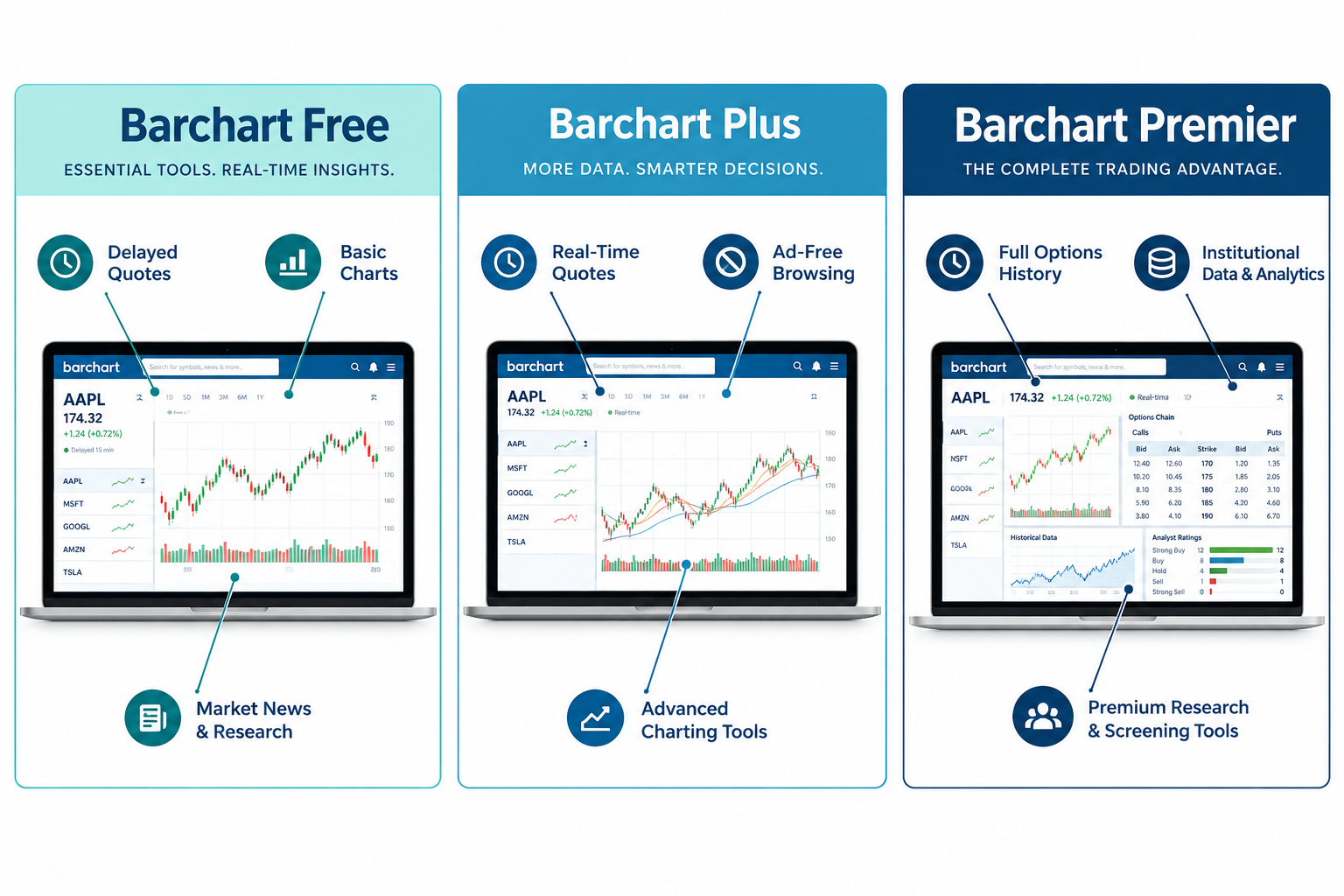
Barchart Free vs Barchart Plus vs Barchart Premier
| Feature | Barchart Free | Barchart Plus (Premier Lite) | Barchart Premier |
|---|---|---|---|
| Monthly price | $0 | Ad-free viewing tier, priced below full Premier | $29.95/mo, or about $19.95/mo billed annually |
| Ads on site | Yes | Removed | Removed |
| CSV downloads per day | Very limited preview | Limited | 250 per day, up to 20,000 records each |
| Options screener | Preview only | Preview only | Full access, 150+ data points |
| Historical options data | None | None | Daily back to Jan 3, 2017; minute data from March 2023 |
| Automated screener runs | No | No | Up to 4 per day with email/CSV output |
| Barchart Opinion signals | Basic view | Basic view | Full technical signal history |
How much does Barchart Premier cost and is it worth it?
Barchart Premier costs $29.95 a month if you pay monthly, $239.95 a year if you commit annually (about $19.95 a month), or $419.95 for two years (about $17.49 a month). Barchart's own promotional page rounds the annual figure to roughly $19.99 a month, a small display inconsistency rather than a pricing change, so budget closer to $20 a month on the annual plan to be safe.
Is it worth it? For a trader who actually uses the options screener, pulls historical data, or runs automated screens weekly, yes. You are replacing what could be three separate subscriptions, a screener, a data export tool, and a basic charting package, with one line item. For someone who just wants live quotes and a chart, no. The free tier and a basic charting app already cover that, and paying $29.95 a month for features you will not touch is exactly the kind of subscription creep this brand warns against.
Barchart Premier price only earns its keep if the screener and export tools are load-bearing parts of your actual weekly process, not a nice-to-have you check once a month.
Barchart Premier free trial: what's included
New subscribers get 30 days free before billing starts, and the trial includes full Premier access, not a stripped down preview. That means you can run the options screener, pull real historical data, and test the export limits before committing a dollar.
Practical takeaway: use the full 30 days to run your actual weekly process end to end, not a five minute click-around. Build one screener, export one watchlist, and see if the workflow sticks before the card gets charged.
How to cancel a Barchart Premier subscription
Barchart Premier subscriptions can be canceled through the account settings on Barchart's own site, and support documentation walks through the exact steps for stopping renewal. Monthly plans stop at the next billing cycle; annual and two-year plans are prepaid, so canceling stops future renewal but does not refund the current term in most cases.
Common mistake: canceling on the day you meant to renew instead of a week before. Set a calendar reminder tied to your trial end date, not the day it lands in your inbox.
Our Top 5 Favorite Barchart Premier Features
- The options screener. 150+ data points, real filter depth, and it is genuinely faster to build a usable screen here than in most competing tools.
- Full options history. Daily data to January 2017 and minute data to March 2023 is a serious research window most free tools do not touch.
- Unusual options activity flags. A clean, fast way to see where volume is breaking from a contract's normal pattern.
- Automated screener delivery. Four scheduled runs a day, emailed with a CSV attachment, means your watchlist works while you are asleep.
- Barchart Excel export. 250 downloads a day and 20,000 records per file is enough runway for real backtesting, not a token gesture.
Barchart Premier Alpha Score breakdown: 77/100
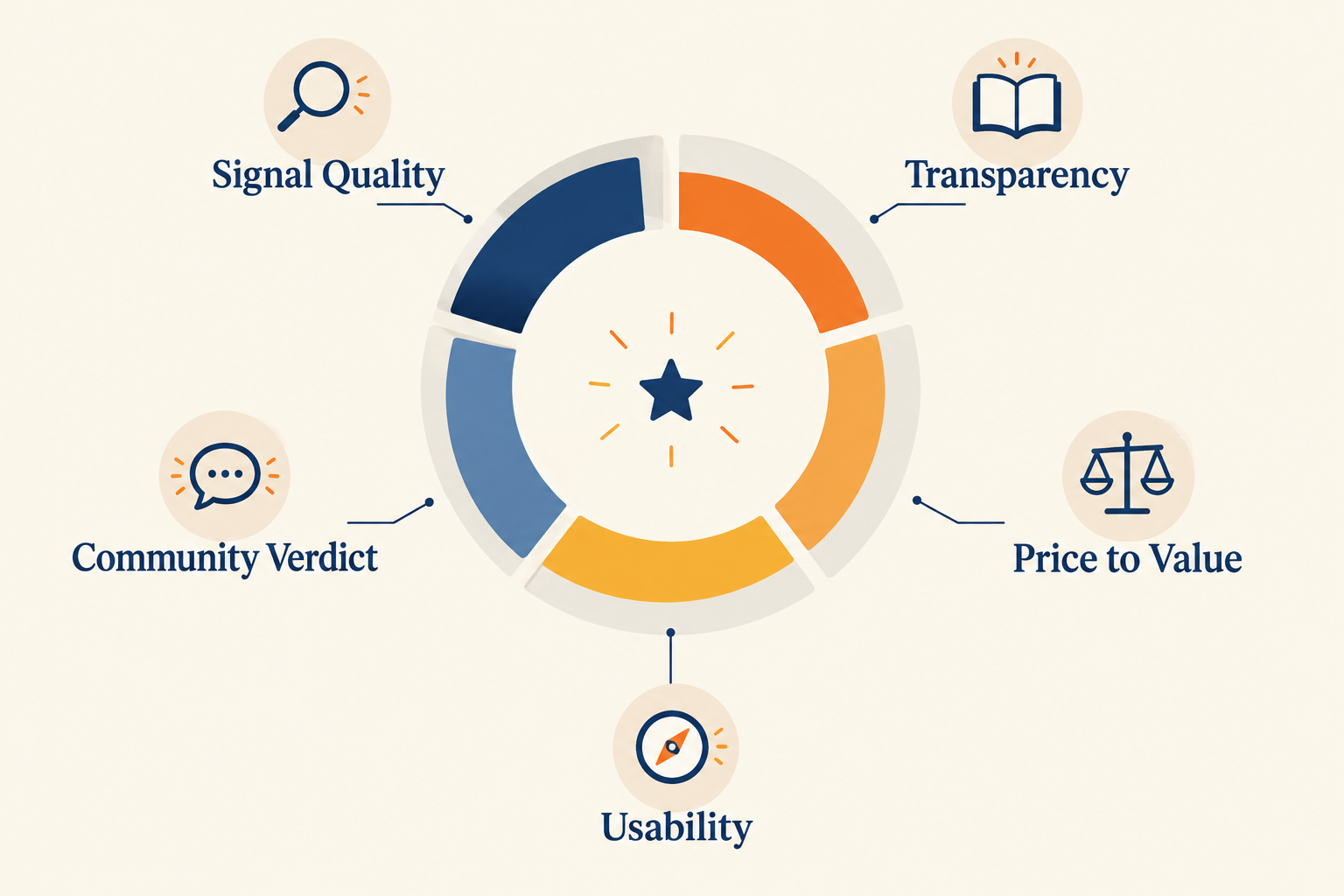
FullStack Alpha scores every tool it reviews across five pillars worth 20 points each, based on desk research rather than a spec sheet. Barchart Premier lands at 77 out of 100, a solid mid-pack score built on strong data honesty and dragged down by a signal layer that is simpler than its name suggests.
| Pillar | Score | What it means |
|---|---|---|
| Signal Quality | 13/20 | Barchart Opinion is a moving-average crossover signal dressed up as an "opinion," not a predictive model. |
| Transparency | 18/20 | Barchart is upfront about what its signals are, including labeling the Futures Trading Guide explicitly hypothetical. |
| Price-to-Value | 16/20 | Strong breadth per dollar on the annual plan, less compelling paid month to month. |
| Usability | 14/20 | Functional but dated in places; the options screener alone takes real time to learn. |
| Community Verdict | 16/20 | Generally positive on data depth in trader discussion, with recurring notes on interface friction. |
Signal Quality at 13/20 is the honest weak point. Barchart Opinion runs on technical crossovers like a 9-day versus 18-day MACD, and Barchart says as much: the Futures Trading Guide is described as a hypothetical system based on that exact crossover, not a guarantee of anything. That is not a knock on the data, which is excellent. It is a reminder that "Barchart Opinion" is a label for a rules-based technical signal, not an AI model reading the tape for you.
Transparency at 18/20 is the best pillar on the board. Barchart names its methodology, discloses the moving-average basis for its signals, and flags hypothetical performance as hypothetical instead of burying it. That kind of honesty is rare in this category, and it should be rewarded.
Price-to-Value at 16/20 reflects real breadth: stocks, options, futures, forex, and crypto data in one subscription at roughly $20 a month on the annual plan. The caveat is the full $29.95 monthly rate, which is a weaker deal if you never commit past month to month.
Usability at 14/20 is solid with named caveats. Basic quotes and watchlists are fast to use. The options screener and automated screen builder take real time to configure well, and the interface shows its age in spots.
Community Verdict at 16/20 reflects generally positive sentiment around data depth in trading forums and comparison sites, alongside recurring complaints about interface density and support response time. That gap between "the data is great" and "the interface is a lot" is the honest story here, not a uniform five-star chorus.
For more on how these five pillars get built for every tool on the site, see how FullStack Alpha tests AI stock tools.
Where does Barchart Premier fall short?
Barchart Premier's biggest trade-off is that its signal layer is simpler than its data suggests, and its interface can feel dense next to newer, cleaner competitors. Neither is a dealbreaker. Both change what you should expect going in.
- Barchart Opinion is a technical indicator, not an AI verdict. It is built on moving-average crossovers with a published five-year performance history behind each signal type. Treat it as one input, not a final call.
- Interface density. Full Premier opens up a lot of screens, and a lot of screens means a lot of tabs, filters, and columns. New users need a real onboarding period before the platform stops feeling cluttered.
- Lower tiers still carry delayed data. Free and Plus users see delayed quotes in places; Premier removes most of that friction but check the specific data feed for your instrument class before assuming real-time everywhere.
Barchart Premier data delays on lower tiers
Free Barchart and the Plus tier carry delayed quotes on several data feeds, which is standard for a freemium research site. Barchart Premier reduces most of that delay across core equity and options data, but exchange-specific real-time add-ons can still apply depending on the instrument.
Decision rule: if your process depends on true real-time fills for fast intraday setups, confirm the specific feed delay for your asset class before trading off it, don't assume Premier means zero delay everywhere.
Barchart Premier not loading charts: quick fixes
Chart loading issues on Barchart Premier are usually browser-side, not platform-side. Try these in order:
- Clear your browser cache and reload, since a stale session token is the most common cause.
- Disable ad blockers or script blockers temporarily, they can interfere with chart rendering.
- Switch browsers once to isolate whether it's a local extension conflict.
- Check Barchart's status page or support documentation for a known outage before assuming it's your setup.
Is Barchart Premier good for day trading?
Barchart Premier can support a day trading process, but it is not purpose-built for split-second execution the way a dedicated scanner is. Its strength for a day trader is pre-market screening and unusual options activity checks, not the live tape-reading speed of a specialized scanner.
Choose Barchart Premier for day trading if you want your pre-market screen and options check in the same tool you already use for research. Choose a faster, purpose-built scanner if execution speed during the open is the whole job, that's a different tool for a different minute of the day.
Barchart Premier vs thinkorswim comparison
Barchart Premier and thinkorswim solve different problems, so the real question is whether you want a research and screening platform or a full brokerage trading terminal. Thinkorswim is built around order execution tied to a funded brokerage account; Barchart Premier is a research and data layer that sits on top of whatever broker you already use.
- Choose Barchart Premier if: you want a deep options and stock screener, historical data exports, and unusual options activity flags, independent of which broker executes your trades.
- Choose thinkorswim if: you want charting and order execution in one terminal and you are already a client of the brokerage that runs it.
Many traders run both: Barchart Premier for screening and research, a broker's own platform for the fill. See more head-to-head breakdowns on the AI stock tool comparisons page.
Barchart Premier alternatives worth a look
Barchart Premier is not the only way to get deep options and screening data, and naming a couple of alternatives keeps your process honest instead of loyal to one login.
- Unusual Whales for a tool built specifically around options flow, at the cost of the multi-asset breadth Barchart offers, see the Unusual Whales options flow review.
- Finviz Elite for a cleaner, faster stock screener interface if equities are your main focus, covered in the Finviz Elite upgrade review.
- TradingView if charting quality and community indicators matter more to your process than raw options history depth.
Decision rule: if you need one subscription across stocks, options, futures, and forex, Barchart Premier still wins on breadth per dollar. If you need best-in-class depth in one category, a specialist usually beats it there.
Who should use Barchart Premier?
Barchart Premier fits an intermediate to advanced self-directed trader who wants one subscription covering stock screening, options screening, and historical data exports, rather than a beginner who just wants a clean, guided first experience. It fits less well for someone who wants pure execution speed or a beginner-friendly onboarding.
- A strong fit: swing traders and options traders who already understand support and resistance, want to build their own screens, and plan to actually use the Excel export.
- A weaker fit: brand new traders who need a guided, simplified first experience, or day traders whose entire edge depends on the fastest possible scanner speed.
If your process leans on the watchlist, the options screener, and a habit of exporting data to check your own math, Barchart Premier earns its subscription. If you are still building that process, paper trade it first on the free tier before paying for the full toolkit.
Verdict: Who Should Subscribe, and the Next Step
Barchart Premier earns its 77/100 Alpha Score on the strength of two things: genuinely deep options and stock screening, and unusual honesty about what its signals actually are. Barchart Opinion won't predict the market for you, and Barchart says so in its own documentation. That kind of straight talk is rare, and it's worth crediting.
If your weekly process already includes screening, watchlist building, and a habit of pulling data into a spreadsheet, run the 30 day free trial and see if the workflow sticks before you pay a dollar. If your process is still a pile of open tabs with no system behind it, fix that first. A better tool won't fix a missing process. It just gives a missing process better data to ignore.
Systems over hacks. Pick the tool that fits the process you already have, not the one that promises to build the process for you.
FullStack Alpha tested Barchart's full screener lineup, not just Premier, in the complete Barchart review covering 150+ filters. For a broader look at how stock screeners and scanners differ before you commit to either, read Stock Screener vs Scanner: What's the Difference?
One tool, scored five ways. There are 200+ more in the FullStack Alpha directory, filterable by category, price, and what they actually do.
Browse the directory: aistockpickerapps.com
This article may contain affiliate links. See our affiliate disclosure for details.
References
Get Barchart Premier - https://www.barchart.com/get-barchart-premier
Barchart Premier - https://www.barchart.com/my/barchart-premier
242902 How Can I Cancel My Premier Subscription - https://help.barchart.com/support/solutions/articles/242902-how-can-i-cancel-my-premier-subscription-
Download - https://www.barchart.com/my/price-history/download
247954 What Is The Difference Between A Premier Lite No Ads Vs Premier Subscription - https://help.barchart.com/support/solutions/articles/247954-what-is-the-difference-between-a-premier-lite-no-ads-vs-premier-subscription-
242752 What Are The Benefits And Cost Of A Premier Subscription - https://help.barchart.com/support/solutions/articles/242752-what-are-the-benefits-and-cost-of-a-premier-subscription-
247719 Can I Take A Trial To Barchart Premier - https://help.barchart.com/support/solutions/articles/247719-can-i-take-a-trial-to-barchart-premier-
barchart - https://www.barchart.com/
We test the tools. You get the verdict.
One email a week. What we tested, what scored, and what we'd skip. Written for traders, not for clicks.